🏡 Lab: Predicting House Prices with Linear Regression
In this lab, we’ll apply what we’ve learned about linear regression to a real dataset:
the Ames Housing dataset, which contains information about nearly 3,000 homes sold in Ames, Iowa.
🎯 Goals
By the end of this lab, you will: - Explore the distribution of house prices and motivate the use of log-transformed prices. - Learn how to prepare real-world data for modeling: - Handle missing values (imputation). - Convert categorical variables into numbers (one-hot encoding). - Scale features so they are comparable (Min–Max scaling). - Build and train a Linear Regression model to predict home prices. - Evaluate the model using different error metrics (\(R^2\), RMSE, MAE, RMSLE). - Visualize predictions vs. actual prices to see where the model works well and where it struggles. - Put everything together into a scikit-learn Pipeline, which combines preprocessing and modeling into a clean workflow.
🧠 Why this lab?
Machine learning is not just about fitting a model — most of the work is in data preparation.
This lab mirrors the workflow used in practice: 1. Explore the data.
2. Clean and preprocess features.
3. Train a model.
4. Evaluate and visualize performance.
5. Wrap it up in a reusable pipeline.
👉 By the end, you’ll see how a simple linear model, combined with careful preprocessing, can already achieve strong performance on a challenging real-world dataset.
These are the python packages you will need in this lab.
Code
# Coreimport numpy as npimport pandas as pd# Vizimport matplotlib.pyplot as pltimport seaborn as sns# Utilitiesfrom pathlib import Pathimport joblib # optional; keep if you plan to save models/pipelinesimport gdown # optional; keep if you download from Google Drive# Scikit-learn: data prep & modelingfrom sklearn.model_selection import train_test_split, KFoldfrom sklearn.preprocessing import OneHotEncoder, MinMaxScaler # OneHotEncoder used in demo; MinMax for scalingfrom sklearn.impute import SimpleImputerfrom sklearn.linear_model import LinearRegression, Ridge, Lassofrom sklearn.metrics import r2_score, mean_squared_error, mean_absolute_error# Display / stylepd.set_option("display.max_columns", 200)sns.set_context("talk")
Regression Metrics Overview
When we evaluate regression models, we often look at several metrics together since each emphasizes different aspects of model quality.
Below are the four metrics we’ll report in this lab. Each metric compares predicted target values \(\hat{y}\) to ‘ground-truth’ actual/measured values \(y\) (the ‘labels’ in our supervised learning models).
Interpretation: Measures relative error on a log scale. Predicting 2× too high is penalized about the same as predicting 2× too low.
Range:\([0, \infty)\).
Units: Unitless (because of the log transform).
Typical scale:
< 0.2 = excellent (errors ~20% or less on a relative scale)
0.2–0.5 = moderate
0.5 = large relative errors
Constraint: Only defined for non-negative predictions and targets.
➡️ Best practice: Report all four metrics.
- Use \(R^2\) for easy interpretability.
- Use RMSE/MAE for error magnitudes in original units.
- Use RMSLE when relative error matters (e.g., house prices, where \$50k off is minor for a \$1M home but huge for a \$100k home).
I’ll give you a function that computes all these different error/accuracy metrics and outputs them in a clear way using a pandas dataframe:
In this lab, we’ll have another look at the Ames housing data, which is a good dataset to practice ML pre-processing pipelines, because there are a lot of different types of features. The dataset contains 79 explanatory variables describing residential homes in Ames, Iowa (USA), along with the target variable SalePrice.
Below is a guide to the column names. This is a long text cell, but remember you can collapse this section to hide it when convenient.
Identification
Id: Observation identifier (not a predictive feature).
Sale Information
SalePrice: The property’s sale price in dollars (target variable).
General Property Characteristics
MSSubClass: Building class (coded); e.g. 20 = 1-story 1946+, 60 = 2-story 1946+, 120 = 1-story PUD, etc.
MSZoning: General zoning classification (Residential, Commercial, etc.).
LotFrontage: Linear feet of street connected to property.
LotArea: Lot size in square feet.
Street: Type of road access (Grvl = gravel, Pave = paved).
Alley: Type of alley access (Grvl, Pave, NA = none).
LotShape: General shape of property (Reg = regular, IR1/IR2/IR3 = increasingly irregular).
LandContour: Flatness of the property (Lvl, Bnk, HLS, Low).
Utilities: Type of utilities available (AllPub = all public, NoSeWa = no sewage/water, etc.).
LotConfig: Lot configuration (Inside, Corner, CulDSac, FR2, FR3).
LandSlope: Slope of property (Gtl = gentle, Mod = moderate, Sev = severe).
Neighborhood: Physical location within Ames (e.g., CollgCr, OldTown, Edwards).
Condition1: Proximity to main road or railroad (Artery, Feedr, Norm, etc.).
Condition2: Proximity to a second main road or railroad (if applicable).
BldgType: Type of dwelling (1Fam, 2FmCon, Duplx, TwnhsE, TwnhsI).
HouseStyle: Style of dwelling (1Story, 2Story, 1.5Fin, 1.5Unf, etc.).
House Construction & Age
OverallQual: Overall material and finish quality (1 = very poor, 10 = very excellent).
OverallCond: Overall condition rating (1 = very poor, 10 = very excellent).
YearBuilt: Original construction date.
YearRemodAdd: Remodel date (same as YearBuilt if never remodeled).
RoofStyle: Type of roof (Gable, Hip, Gambrel, Mansard, Flat, Shed).
RoofMatl: Roof material (CompShg = composition shingles, Tar&Grv, WdShngl, etc.).
Exterior1st: Exterior covering on house (brick, siding, stucco, etc.).
Exterior2nd: Exterior covering on house (if more than one material).
MasVnrType: Masonry veneer type (BrkFace, Stone, None).
MasVnrArea: Masonry veneer area in square feet.
ExterQual: Exterior quality (Ex = excellent, Gd, TA = typical, Fa, Po).
ExterCond: Exterior condition (same scale).
Foundation & Basement
Foundation: Type of foundation (BrkTil, CBlock, PConc, Slab, Stone, Wood).
BsmtQual: Basement height (Ex, Gd, TA, Fa, Po, NA).
BsmtCond: Basement condition (same scale).
BsmtExposure: Walkout or garden level walls (Gd, Av, Mn, No).
MiscFeature: Miscellaneous feature not covered in other categories (Elev, Gar2, Othr, Shed, TenC, NA).
MiscVal: $Value of miscellaneous feature.
Sale Conditions
MoSold: Month Sold (1–12).
YrSold: Year Sold.
SaleType: Type of sale (WD = Warranty Deed, CWD, VWD, New, COD, ConLD, ConLI, ConLw, Con, Oth).
SaleCondition: Condition of sale (Normal, Abnorml, AdjLand, Alloca, Family, Partial).
Load the Ames Housing data
I put the dataset in my own Google Drive and made a share link for anyone. The code below allows you to download the file straight into your Colab / Google Drive environment.
Code
# View/download file directly from: https://drive.google.com/file/d/1St06441v0dv4dGyImDLsF5vyJQbCqRBM/view?usp=share_link# if you want to inspect in Excel or something. Otherwise, download into your Google Drive / Colab like this:gdown.download(id="1St06441v0dv4dGyImDLsF5vyJQbCqRBM", output="AmesHousing.csv", quiet=False)# The AmesHousing.csv is the same data that we used before with:# file_url = 'http://jse.amstat.org/v19n3/decock/AmesHousing.txt'# r = requests.get(file_url);# open('AmesHousing.txt', 'wb').write(r.content);# but formatted a bit differently
Downloading...
From: https://drive.google.com/uc?id=1St06441v0dv4dGyImDLsF5vyJQbCqRBM
To: /content/AmesHousing.csv
100%|██████████| 964k/964k [00:00<00:00, 114MB/s]
'AmesHousing.csv'
Load into pandas dataframe:
Code
# Load Kaggle version of Ames Housing datasetdf = pd.read_csv("AmesHousing.csv")# Drop Id column if presentif"Id"in df.columns: df = df.drop(columns=["Id"])
Can you print out the first 15 column names of the dataset and show the first few lines of the dataframe?
💡 Hint
Use .columns to access column names, and slice to the first 15.
Use .head() to show the top rows of the dataframe.
Code
# Print column names# print first few lines of dataframe# maybe also print shape of entire dataframe
Exploratory Data Analysis (EDA)
Exploratory Data Analysis (EDA) is the process of getting to know your dataset before jumping into modeling.
It helps us understand the structure, quality, and main patterns in the data.
Goals of EDA
Understand the dataset
What features (columns) do we have?
What does the target variable (here: SalePrice) look like?
Summarize
Basic statistics: min, max, mean, median, standard deviation.
Frequency counts for categorical features.
Visualize
Histograms and boxplots to see distributions.
Scatterplots to check relationships between variables.
Correlation heatmaps to spot strongly related features.
Detect issues
Missing values (NaN).
Outliers or extreme values.
Features that may need transformation (e.g., skewed data).
Form hypotheses
Which features might be good predictors?
Do we expect linear or nonlinear relationships?
Are some features redundant or overlapping?
In this lab (Ames Housing example)
We’ll start by looking at the target (SalePrice).
Then check numerical features (e.g., living area, lot size, year built).
Explore categorical features (e.g., neighborhood, building type).
Identify missing data that we’ll need to handle later.
Finally, we’ll combine all preprocessing into a single scikit-learn Pipeline.
🧭 Think of EDA as map-making before the journey:
we don’t build a model yet, but we draw the map of the data landscape so we know where to go.
Explore distribution of target values: sale prices
We already did this in the previous lab, but let’s visualize the distribution of sale prices again. First, we define our usual target variable \(y\). I’m giving you the code y = df['SalePrice'].copy() to remind you of something important. If you just use y = df['SalePrice'], then \(y\) is just a reference, or ‘view’ is the technical term, of df['SalePrice']. What that means is that when you add some value of \(y\), rescale all of \(y\), etc, then it also changes the same values in df['SalePrice'], which is generally not what you want (not entire safe). So instead we make a .copy() such that the elements of \(y\) are now independent of df['SalePrice'].
Code
# Define our target variable y from the SalePrice column in the Ames dataframe:y = df['SalePrice'].copy()
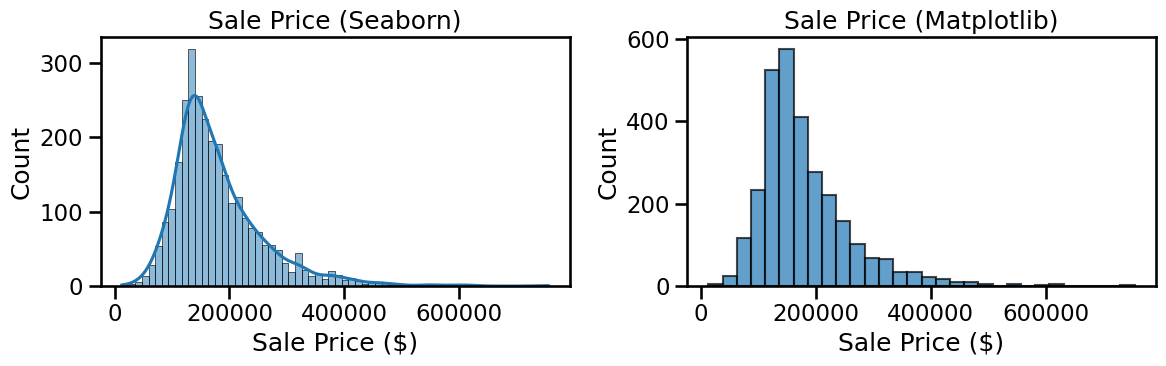
Next, let’s plot the distribution of sales prices as a histogram. I’m showing here how to use the python seaborn library (loaded in the top as sns, similar to plt for matplotlib), which sometimes makes nicer plots than matplotlib. Actually, let’s plot both side-by-side so you can decide which you like better.
Code
fig, axes = plt.subplots(1, 2, figsize=(12,4))# --- Seaborn version (left) ---sns.histplot(y, kde=True, ax=axes[0])axes[0].set_title("Sale Price (Seaborn)")axes[0].set_xlabel("Sale Price ($)")axes[0].set_ylabel("Count")# --- Pure Matplotlib version (right) ---axes[1].hist(y, bins=30, edgecolor="black", alpha=0.7)axes[1].set_title("Sale Price (Matplotlib)")axes[1].set_xlabel("Sale Price ($)")axes[1].set_ylabel("Count")plt.tight_layout()plt.show()
Exploring the Target Variable
❓ Question for you:
Take a look at the histogram of Sale Price.
What does the distribution look like? Is it symmetric, or skewed?
✅ Click here to reveal the answer
The distribution is right-skewed, with a long tail of very expensive houses.
Why does this matter?
Many regression models (especially linear regression) assume that the residuals (errors) are normally distributed and have constant variance (homoscedasticity).
- If the target variable itself is strongly skewed, these assumptions are often violated.
- The model may fit poorly, and errors will be larger for houses at the high end of the price range.
A common solution
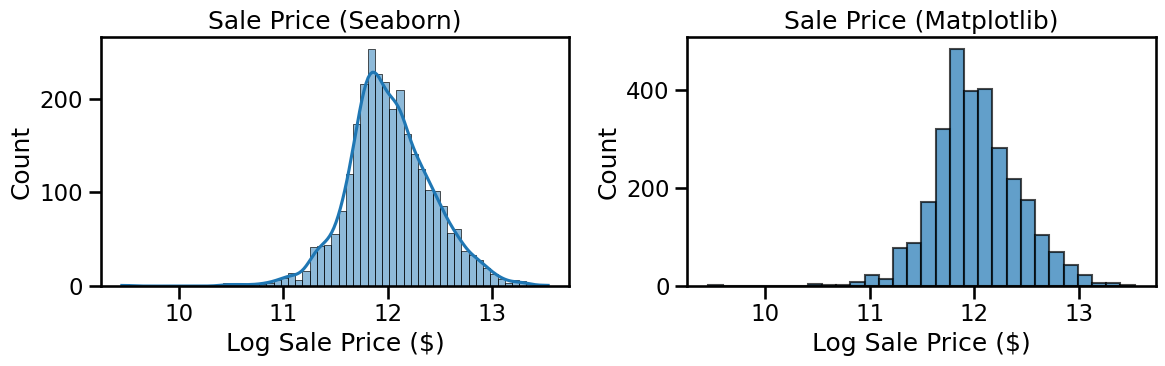
Instead of predicting Sale Price directly, we often predict its logarithm:
\[
y' = \log(1 + y)
\] if there is a risk of \(y\) being zero (avoiding \(\log(0)\). In this case, the lowest house price is \\(35k so we can just use\)$ y’ = (y) $$ - This compresses the long tail.
- The distribution of $ () $ becomes closer to symmetric and bell-shaped.
- Errors are interpreted on a relative scale (percentage differences), which makes more sense for house prices (e.g., being \$50k off on a \$100k house is a big deal, but not on a \$1M house).
Note that after we make any house price predictions, of course we can just take the exponent of \(\log(y)\) to get actual house prices and plot those.
➡️ Next, we will define a new target variable as log(SalePrice) and compare the histograms before and after transformation.
Code
# Define a more robust target variable.# new_y = np.someoperation(y)
❓ Visualize again what this new target variable looks like:
Code
# add plots similar to above
Dropping the target from the feature DataFrame
Now that we’ve defined our target variable (y), it is useful/important to drop it from our DataFrame.
This way, df will only contain the feature columns.
Later, once we have ensured that all features are numeric, we can convert df into a NumPy array for use in scikit-learn models.
💡 Hint
You can drop the target column with: df = df.drop(columns=["SalePrice"]) This removes the SalePrice column from the DataFrame while keeping all the other features.
Code
# remove target column from feature array (still pandas datadframe)
One-Hot-Encoding of Categorical (String) Feature Values
How many categorical features are there?
❓ Question for you:
In the Ames dataset, some features are numerical (e.g. square footage, year built) and some are categorical (e.g. neighborhood, roof type).
Can you figure out how many categorical features there are?
Which ones are they?
Hint: In pandas, categorical features usually have the data type object or category.
❓ Lab Question
Can you figure out how many categorical features there are in the dataset,
and also print their names for reference?
💡 Hint
You can use Python’s len() function to count the items in categorical_cols,
and then just print(categorical_cols) to see the full list.
Code
# Identify categorical features# Print number of categorical features# categorical_cols = df.select_dtypes(include=["object", "category"]).columns.tolist(
Real-world datasets almost always have missing values (empty cells, NaN).
In the Ames dataset, some examples include: - LotFrontage (many houses don’t list the frontage length), - Alley (most houses don’t have an alley → marked as missing), - GarageYrBlt (missing when there is no garage).
Why are missing values a problem?
Most machine learning algorithms cannot handle NaN values directly.
We need to decide how to deal with them before modeling.
Options for handling missing data
Drop rows or columns
Simple, but risky: we may throw away valuable data.
Only makes sense if very few rows/columns are affected.
Imputation (filling in values)
Numerical features: replace missing values with the mean, median, or a constant.
Categorical features: replace with the most frequent category, "Missing", or a special label.
This keeps all the data but introduces some approximation.
Advanced methods
Use predictive models (e.g. KNN imputer, regression imputer) to estimate missing values.
Useful when missingness depends on other features.
In this lab
We will start with simple imputation: - Median for numerical features (robust against outliers). - Most frequent category for categorical features.
Later, we’ll integrate this into a scikit-learn Pipeline so that missing values are automatically handled during training and prediction.
Note: we need to do the impute before the one-hot-encoding in the next step, because we want to impute missing values of categorical values like neighborhood before we turn them into numbers. Remember that: in a pre-processing pipeline, we need to fix missing values before any next steps.
Impute step 1
Check how many measurement points / samples we would lose
if we simply removed rows for houses where one or more feature values are missing. Print the number of rows (measurements/houses) where some feature value is missing, print the total number of measurements \(m\) that we started with, and print the difference to see how many measurements/rows we would be left with.
💡 Hint
You can count rows with at least one missing value using:
df.isna().any(axis=1).sum() This works by: * df.isna() → True/False mask of missing values, * .any(axis=1) → True if any value is missing in that row, * .sum() → counts how many rows satisfy that condition.
Code
# Count how many rows have at least one missing value# Print total number of rows/measurements that we started with# Print how many rows would remain if we removed all rows with missing values
Number of rows with at least one missing value: 2930
Total rows: 2930
Percentage of rows that would be dropped: 100.0%

Shape after dropping missing rows: (np.int64(0), 81)
What would happen if we dropped all rows with missing values?
❓ We found that dropna() would remove all 2930 rows. Does that make sense?
Yes — in the Ames dataset, every single house has at least one missing value.
Why?
Many features are only applicable to some houses, so they are left as NaN when not relevant:
Alley: missing if the house has no alley.
PoolQC: missing if the house has no pool (most do not).
GarageYrBlt: missing if the house has no garage.
FireplaceQu: missing if the house has no fireplace.
Fence, MiscFeature: often missing as well.
So, almost every row has at least one NaN somewhere.
Are some columns entirely empty?
No — but some have very high percentages of missing values (80–95%).
Examples: PoolQC, MiscFeature, Alley, Fence, FireplaceQu.
Takeaway
Dropping rows with any missing values → disastrous (you lose all data).
Dropping columns with extreme missingness → sometimes reasonable, but be careful:
Missingness can itself be informative (e.g., “no pool” says something about house price).
The better approach is imputation — filling missing values in a systematic way.
Impute Step 2: Which features have the most missing values?
❓ Task for you
Compute the percentage of missing values for each feature,
then sort the results to find the features with the highest missingness.
Hint: Start with df.isna().mean() — this gives you the fraction of missing values per column. Define this into a separate dataframe. Multiply by 100 to turn it into percentages. Show the .head(10) to see the 10 features with the most missing values.
Code
# Compute % missing values per column# Show the top 10 columns
0
Pool QC
99.556314
Misc Feature
96.382253
Alley
93.242321
Fence
80.477816
Mas Vnr Type
60.580205
Fireplace Qu
48.532423
Lot Frontage
16.723549
Garage Yr Blt
5.426621
Garage Finish
5.426621
Garage Cond
5.426621
✅ Click here to reveal the expected result
When checking the percentage of missing values per column, you should find something like this (values may vary slightly depending on the dataset version):
Pool QC 99.556314
Misc Feature 96.382253
Alley 93.242321
Fence 80.477816
Mas Vnr Type 60.580205
Fireplace Qu 48.532423
Lot Frontage 16.723549
Garage Qual 5.426621
Garage Yr Blt 5.426621
Garage Cond 5.426621
Takeaway
The top four features are missing in 80–99% of houses (e.g., most houses have no pool, no miscellaneous feature, no alley, no fence).
Some features (like Mas Vnr Type, Fireplace Qu, Lot Frontage) have moderate missingness.
A few garage-related features are missing in about 5% of houses.
This is why dropping rows with missing values is not an option — instead we need thoughtful imputation or recoding.
We have to pay attention to our data throughout developing this pipeline. If we have a feature where that value is missing in, say, >80% of measurements, a simple impute with, say, the mean of the available values may be quite misleading. For example, you should see in your last result that >99% of houses have no information on “Pool QC”. If you look in the top of the notebook at all the available features, you’ll see that this is a categorical variable for “pool quality”, which of course is only available if a house indeed has a pool; otherwise, it has no value. Similarly, ’Fireplace Qu” is the quality of the fireplace, which only exists if there is a fireplace to begin with.
Some features in Ames are only present for a subset of houses: - Not every house has a garage, basement, fireplace, pool, alley, or fence.
- In the dataset, these are recorded as NaN when the feature does not exist.
💡 Hint
Inspect these columns first to see which categories exist and how NaN appears.
Here’s some code where you can see the unique values of some of these structural features.
Code
structural_features = ["Garage Yr Blt", "Garage Finish", "Garage Qual", "Garage Cond","Bsmt Qual", "Bsmt Cond", "Bsmt Exposure", "BsmtFin Type 1", "BsmtFin Type 2","Fireplace Qu", "Pool QC", "Alley", "Fence", "Misc Feature"]for col in structural_features:if col in df.columns:print(f"{col}: {df[col].unique()[:10]}")else:print(f"{col} not found in df")
👉 Notice how NaN appears whenever the feature does not exist (e.g., no garage, no pool).
If we impute these with the most frequent category (e.g., "TA" for “Typical Garage”), that would misrepresent the data.
Instead, it would be smarter to create explicit categories like "NoGarage", "NoBasement", "NoFireplace", etc.
✅ Suggested fill values
Garage: "NoGarage"
Basement: "NoBasement"
Fireplace: "NoFireplace"
Pool: "NoPool"
Alley: "NoAlley"
Fence: "NoFence"
Misc Feature: "None"
For the numeric Garage Yr Blt: use 0 (or possibly copy Year Built)
This is not super interesting, so let me suggest some code to show you how to do this:
Code
# Fill structural missingness with explicit categoriesdf["Garage Finish"] = df["Garage Finish"].fillna("NoGarage")df["Garage Qual"] = df["Garage Qual"].fillna("NoGarage")df["Garage Cond"] = df["Garage Cond"].fillna("NoGarage")df["Bsmt Qual"] = df["Bsmt Qual"].fillna("NoBasement")df["Bsmt Cond"] = df["Bsmt Cond"].fillna("NoBasement")df["Bsmt Exposure"] = df["Bsmt Exposure"].fillna("NoBasement")df["BsmtFin Type 1"] = df["BsmtFin Type 1"].fillna("NoBasement")df["BsmtFin Type 2"] = df["BsmtFin Type 2"].fillna("NoBasement")df["Fireplace Qu"] = df["Fireplace Qu"].fillna("NoFireplace")df["Pool QC"] = df["Pool QC"].fillna("NoPool")df["Alley"] = df["Alley"].fillna("NoAlley")df["Fence"] = df["Fence"].fillna("NoFence")df["Misc Feature"] = df["Misc Feature"].fillna("None")# Clever trick: Fill Garage Yr Blt with Year Built when missing# if a house has no garage, that is already encoded in a separate featuredf["Garage Yr Blt"] = df["Garage Yr Blt"].fillna(df["Year Built"])
Now that we’ve made these ‘smarter’ impute changes, copy your earlier code and check again what percentage of values is still missing for each feature.
Code
# Compute % missing values per column# Show the top 10 columns
0
Mas Vnr Type
60.580205
Lot Frontage
16.723549
Garage Type
5.358362
Mas Vnr Area
0.784983
Bsmt Full Bath
0.068259
Bsmt Half Bath
0.068259
BsmtFin SF 2
0.034130
Bsmt Unf SF
0.034130
Total Bsmt SF
0.034130
Electrical
0.034130
Impute Step 3: Remove features with too much missing data
You should see that we don’t have too many features left with tons of missing data, but for illustrative purposes we will remove any features with too many missing data points. We could have done this from the start as an easier (but maybe less predictive) approach when we still had many features with lots of missing data.
👉 Go ahead and remove all features that have missing values for more than 10% of houses.
(You can adjust the threshold as you like — but always check which features you are removing, and ask yourself whether they might actually be useful for predicting house prices.)
💡 Hint
Define some threshold variable to your liking (e.g., 0.1) and then you could obtain a list of column names with something like df.columns[df.isna().mean() > threshold].
You can use the pandas syntax:
df.drop(columns=cols_to_drop, inplace=True) where cols_to_drop is a list of column names that exceed your missing-value threshold.
Code
# Set threshold (here: drop features missing in >5% of houses)# Find features exceeding the threshold# Print how many features you're dropping and the names of those features# Print the shape of your feature array before and after dropping those features
Features to drop (2):
['Lot Frontage', 'Mas Vnr Type']

Original shape: (2930, 81)
Reduced shape: (2930, 79)
Impute Step 4: Basic imputation for remaining missing values
After handling structural missingness (like NoGarage, NoPool, etc.), we still have a few features with true missing values.
👉 To keep things simple, we’ll split features into two groups and impute them differently:
Numerical features
Fill missing values with the median (robust against outliers).
Example: Lot Frontage → use the median value (or even better, the median by neighborhood).
Categorical features
Fill missing values with the most frequent category (the mode).
Example: if most houses have electrical type "SBrkr", fill missing Electrical with "SBrkr".
Why not use the mean for numeric features?
The mean is sensitive to outliers (e.g., one unusually huge lot).
The median gives a more stable central value.
➡️ Later, when we build pipelines, we’ll use scikit-learn’s SimpleImputer to do this automatically.
For now, let’s do a one-off imputation to clean the dataset.
Impute numerical features and double check that no missing values remain. I’ll show you how to do this for the numerical features, and then you can generalize it below for the categorical features.
Code
# Identify numeric columnsnum_cols = df.select_dtypes(include=[np.number]).columns# Imputer for numerical data: use mediannum_imputer = SimpleImputer(strategy="median")# Apply to numeric columnsdf[num_cols] = num_imputer.fit_transform(df[num_cols])print("Numeric imputation done. Any NaNs left in numeric features?")print(df[num_cols].isna().sum().sum())
Numeric imputation done. Any NaNs left in numeric features?
0
Impute categorical features and double check that no missing values remain:
Code
# Identify categorical columnscat_cols = df.select_dtypes(exclude=[np.number]).columns# Imputer for categorical data: use most frequent (mode)cat_imputer = SimpleImputer(strategy="most_frequent")# Apply to categorical columns# generalize what you did for numerical columns above but now for the categorical featuresprint("Categorical imputation done. Any NaNs left in categorical features?")# again, generalize from the code above# Final check: are there any missing values left at all?# again, copy from above with correct variable names for the categorical variables
Categorical imputation done. Any NaNs left in categorical features?
0
Total missing values remaining in df: 0
One-Hot Encoding of Categorical Features
Most machine learning algorithms (like linear regression) require numerical input.
But many of our features are categorical (e.g. Neighborhood, RoofStyle, SaleCondition).
👉 One-Hot Encoding (OHE) is the standard way to handle this: - Each category value becomes its own binary column (0 or 1). - Example: Neighborhood = [CollgCr, OldTown, Edwards]
becomes three columns: Neighborhood_CollgCr, Neighborhood_OldTown, Neighborhood_Edwards.
This way, the model can use categorical information without assuming any numeric ordering.
Pandas has its own way to do one-hot-encoding, as in the demo example below:
Code
# Example: look at the "Neighborhood" columnprint("Unique neighborhoods:", df["Neighborhood"].nunique())# One-hot encode just this columndemo_ohe = pd.get_dummies(df["Neighborhood"], prefix="Neighborhood", dtype=int)print(demo_ohe.dtypes.head())demo_ohe.head()
When you are not sure what a function does (like pd.get_dummies), there are a few quick ways to get help:
Hover your mouse over the function name in Colab →
A tooltip will appear with the function signature and a short description.
Use a question mark in code (Jupyter/Colab magic):
```python pd.get_dummies?
scikit-learn has its own way to do one-hot-encoding, which uses similar syntax as when fitting regressions etc.
Code
# from sklearn.preprocessing import OneHotEncoder #loaded in the top# Initialize the encoderohe = OneHotEncoder(sparse_output=False, handle_unknown="ignore")encoded = ohe.fit_transform(df[["Neighborhood"]])print("Encoded shape:", encoded.shape)print(ohe.get_feature_names_out(["Neighborhood"]))
The pandas approach is perhaps a bit easier, but the scikit-learn option is prefered when we want to combine all the data preprocessing steps into a single pipeline. First, we’ll do the steps one at a time, though, and keep everything in a pandas dataframe (OneHotEncoder outputs a numpy array, which would be more tedious to put back into the pandas dataframe).
One-Hot Encoding All Categorical Features
❓ Can you do the one-hot-encoding for all categorical columns at once using pandas?
Hint: Earlier we defined a variable categorical_cols that holds the names of all categorical features.
💡 Still stuck? Expand for code suggestion
df = pd.get_dummies(df, columns=categorical_cols, drop_first=False, dtype=int)
Code
# One-hot encode all categorical columns directly in dfprint("Original shape:", df.shape)# one-hot-encode all categorical features at once
Original shape: (2930, 81)
Print the shapes of our feature array before and after the one-hot-encoding and pay attention to how many features we’ve added in turning the categorical features into numerical ones with the one-hot-encoding trick.
Code
# print shape of feature array after one-hot-encoding# Show the first few rows to inspect
After one-hot encoding: (2930, 318)
Order
PID
MS SubClass
Lot Frontage
Lot Area
Overall Qual
Overall Cond
Year Built
Year Remod/Add
Mas Vnr Area
BsmtFin SF 1
BsmtFin SF 2
Bsmt Unf SF
Total Bsmt SF
1st Flr SF
2nd Flr SF
Low Qual Fin SF
Gr Liv Area
Bsmt Full Bath
Bsmt Half Bath
Full Bath
Half Bath
Bedroom AbvGr
Kitchen AbvGr
TotRms AbvGrd
Fireplaces
Garage Yr Blt
Garage Cars
Garage Area
Wood Deck SF
Open Porch SF
Enclosed Porch
3Ssn Porch
Screen Porch
Pool Area
Misc Val
Mo Sold
Yr Sold
MS Zoning_A (agr)
MS Zoning_C (all)
MS Zoning_FV
MS Zoning_I (all)
MS Zoning_RH
MS Zoning_RL
MS Zoning_RM
Street_Grvl
Street_Pave
Alley_Grvl
Alley_NoAlley
Alley_Pave
Lot Shape_IR1
Lot Shape_IR2
Lot Shape_IR3
Lot Shape_Reg
Land Contour_Bnk
Land Contour_HLS
Land Contour_Low
Land Contour_Lvl
Utilities_AllPub
Utilities_NoSeWa
Utilities_NoSewr
Lot Config_Corner
Lot Config_CulDSac
Lot Config_FR2
Lot Config_FR3
Lot Config_Inside
Land Slope_Gtl
Land Slope_Mod
Land Slope_Sev
Neighborhood_Blmngtn
Neighborhood_Blueste
Neighborhood_BrDale
Neighborhood_BrkSide
Neighborhood_ClearCr
Neighborhood_CollgCr
Neighborhood_Crawfor
Neighborhood_Edwards
Neighborhood_Gilbert
Neighborhood_Greens
Neighborhood_GrnHill
Neighborhood_IDOTRR
Neighborhood_Landmrk
Neighborhood_MeadowV
Neighborhood_Mitchel
Neighborhood_NAmes
Neighborhood_NPkVill
Neighborhood_NWAmes
Neighborhood_NoRidge
Neighborhood_NridgHt
Neighborhood_OldTown
Neighborhood_SWISU
Neighborhood_Sawyer
Neighborhood_SawyerW
Neighborhood_Somerst
Neighborhood_StoneBr
Neighborhood_Timber
Neighborhood_Veenker
Condition 1_Artery
Condition 1_Feedr
Condition 1_Norm
...
BsmtFin Type 2_BLQ
BsmtFin Type 2_GLQ
BsmtFin Type 2_LwQ
BsmtFin Type 2_NoBasement
BsmtFin Type 2_Rec
BsmtFin Type 2_Unf
Heating_Floor
Heating_GasA
Heating_GasW
Heating_Grav
Heating_OthW
Heating_Wall
Heating QC_Ex
Heating QC_Fa
Heating QC_Gd
Heating QC_Po
Heating QC_TA
Central Air_N
Central Air_Y
Electrical_FuseA
Electrical_FuseF
Electrical_FuseP
Electrical_Mix
Electrical_SBrkr
Kitchen Qual_Ex
Kitchen Qual_Fa
Kitchen Qual_Gd
Kitchen Qual_Po
Kitchen Qual_TA
Functional_Maj1
Functional_Maj2
Functional_Min1
Functional_Min2
Functional_Mod
Functional_Sal
Functional_Sev
Functional_Typ
Fireplace Qu_Ex
Fireplace Qu_Fa
Fireplace Qu_Gd
Fireplace Qu_NoFireplace
Fireplace Qu_Po
Fireplace Qu_TA
Garage Type_2Types
Garage Type_Attchd
Garage Type_Basment
Garage Type_BuiltIn
Garage Type_CarPort
Garage Type_Detchd
Garage Finish_Fin
Garage Finish_NoGarage
Garage Finish_RFn
Garage Finish_Unf
Garage Qual_Ex
Garage Qual_Fa
Garage Qual_Gd
Garage Qual_NoGarage
Garage Qual_Po
Garage Qual_TA
Garage Cond_Ex
Garage Cond_Fa
Garage Cond_Gd
Garage Cond_NoGarage
Garage Cond_Po
Garage Cond_TA
Paved Drive_N
Paved Drive_P
Paved Drive_Y
Pool QC_Ex
Pool QC_Fa
Pool QC_Gd
Pool QC_NoPool
Pool QC_TA
Fence_GdPrv
Fence_GdWo
Fence_MnPrv
Fence_MnWw
Fence_NoFence
Misc Feature_Elev
Misc Feature_Gar2
Misc Feature_None
Misc Feature_Othr
Misc Feature_Shed
Misc Feature_TenC
Sale Type_COD
Sale Type_CWD
Sale Type_Con
Sale Type_ConLD
Sale Type_ConLI
Sale Type_ConLw
Sale Type_New
Sale Type_Oth
Sale Type_VWD
Sale Type_WD
Sale Condition_Abnorml
Sale Condition_AdjLand
Sale Condition_Alloca
Sale Condition_Family
Sale Condition_Normal
Sale Condition_Partial
0
1.0
526301100.0
20.0
141.0
31770.0
6.0
5.0
1960.0
1960.0
112.0
639.0
0.0
441.0
1080.0
1656.0
0.0
0.0
1656.0
1.0
0.0
1.0
0.0
3.0
1.0
7.0
2.0
1960.0
2.0
528.0
210.0
62.0
0.0
0.0
0.0
0.0
0.0
5.0
2010.0
0
0
0
0
0
1
0
0
1
0
1
0
1
0
0
0
0
0
0
1
1
0
0
1
0
0
0
0
1
0
0
0
0
0
0
0
0
0
0
0
0
0
0
0
0
0
1
0
0
0
0
0
0
0
0
0
0
0
0
0
0
1
...
0
0
0
0
0
1
0
1
0
0
0
0
0
1
0
0
0
0
1
0
0
0
0
1
0
0
0
0
1
0
0
0
0
0
0
0
1
0
0
1
0
0
0
0
1
0
0
0
0
1
0
0
0
0
0
0
0
0
1
0
0
0
0
0
1
0
1
0
0
0
0
1
0
0
0
0
0
1
0
0
1
0
0
0
0
0
0
0
0
0
0
0
0
1
0
0
0
0
1
0
1
2.0
526350040.0
20.0
80.0
11622.0
5.0
6.0
1961.0
1961.0
0.0
468.0
144.0
270.0
882.0
896.0
0.0
0.0
896.0
0.0
0.0
1.0
0.0
2.0
1.0
5.0
0.0
1961.0
1.0
730.0
140.0
0.0
0.0
0.0
120.0
0.0
0.0
6.0
2010.0
0
0
0
0
1
0
0
0
1
0
1
0
0
0
0
1
0
0
0
1
1
0
0
0
0
0
0
1
1
0
0
0
0
0
0
0
0
0
0
0
0
0
0
0
0
0
1
0
0
0
0
0
0
0
0
0
0
0
0
0
1
0
...
0
0
1
0
0
0
0
1
0
0
0
0
0
0
0
0
1
0
1
0
0
0
0
1
0
0
0
0
1
0
0
0
0
0
0
0
1
0
0
0
1
0
0
0
1
0
0
0
0
0
0
0
1
0
0
0
0
0
1
0
0
0
0
0
1
0
0
1
0
0
0
1
0
0
0
1
0
0
0
0
1
0
0
0
0
0
0
0
0
0
0
0
0
1
0
0
0
0
1
0
2
3.0
526351010.0
20.0
81.0
14267.0
6.0
6.0
1958.0
1958.0
108.0
923.0
0.0
406.0
1329.0
1329.0
0.0
0.0
1329.0
0.0
0.0
1.0
1.0
3.0
1.0
6.0
0.0
1958.0
1.0
312.0
393.0
36.0
0.0
0.0
0.0
0.0
12500.0
6.0
2010.0
0
0
0
0
0
1
0
0
1
0
1
0
1
0
0
0
0
0
0
1
1
0
0
1
0
0
0
0
1
0
0
0
0
0
0
0
0
0
0
0
0
0
0
0
0
0
1
0
0
0
0
0
0
0
0
0
0
0
0
0
0
1
...
0
0
0
0
0
1
0
1
0
0
0
0
0
0
0
0
1
0
1
0
0
0
0
1
0
0
1
0
0
0
0
0
0
0
0
0
1
0
0
0
1
0
0
0
1
0
0
0
0
0
0
0
1
0
0
0
0
0
1
0
0
0
0
0
1
0
0
1
0
0
0
1
0
0
0
0
0
1
0
1
0
0
0
0
0
0
0
0
0
0
0
0
0
1
0
0
0
0
1
0
3
4.0
526353030.0
20.0
93.0
11160.0
7.0
5.0
1968.0
1968.0
0.0
1065.0
0.0
1045.0
2110.0
2110.0
0.0
0.0
2110.0
1.0
0.0
2.0
1.0
3.0
1.0
8.0
2.0
1968.0
2.0
522.0
0.0
0.0
0.0
0.0
0.0
0.0
0.0
4.0
2010.0
0
0
0
0
0
1
0
0
1
0
1
0
0
0
0
1
0
0
0
1
1
0
0
1
0
0
0
0
1
0
0
0
0
0
0
0
0
0
0
0
0
0
0
0
0
0
1
0
0
0
0
0
0
0
0
0
0
0
0
0
0
1
...
0
0
0
0
0
1
0
1
0
0
0
0
1
0
0
0
0
0
1
0
0
0
0
1
1
0
0
0
0
0
0
0
0
0
0
0
1
0
0
0
0
0
1
0
1
0
0
0
0
1
0
0
0
0
0
0
0
0
1
0
0
0
0
0
1
0
0
1
0
0
0
1
0
0
0
0
0
1
0
0
1
0
0
0
0
0
0
0
0
0
0
0
0
1
0
0
0
0
1
0
4
5.0
527105010.0
60.0
74.0
13830.0
5.0
5.0
1997.0
1998.0
0.0
791.0
0.0
137.0
928.0
928.0
701.0
0.0
1629.0
0.0
0.0
2.0
1.0
3.0
1.0
6.0
1.0
1997.0
2.0
482.0
212.0
34.0
0.0
0.0
0.0
0.0
0.0
3.0
2010.0
0
0
0
0
0
1
0
0
1
0
1
0
1
0
0
0
0
0
0
1
1
0
0
0
0
0
0
1
1
0
0
0
0
0
0
0
0
0
0
1
0
0
0
0
0
0
0
0
0
0
0
0
0
0
0
0
0
0
0
0
0
1
...
0
0
0
0
0
1
0
1
0
0
0
0
0
0
1
0
0
0
1
0
0
0
0
1
0
0
0
0
1
0
0
0
0
0
0
0
1
0
0
0
0
0
1
0
1
0
0
0
0
1
0
0
0
0
0
0
0
0
1
0
0
0
0
0
1
0
0
1
0
0
0
1
0
0
0
1
0
0
0
0
1
0
0
0
0
0
0
0
0
0
0
0
0
1
0
0
0
0
1
0
5 rows × 318 columns
One-hot encoding increases the dimensionality of your dataset. With more features, models can capture more nuanced patterns — but they can also become more complex, need more data, and may overfit.
Feature Engineering: Creating New Features
❓ What new features could you create from this dataset to better predict house prices?
Here are some ideas inspired by top Kaggle approaches:
1. Age-related features
HouseAge = Year Sold – Year Built
(Older houses may sell for less, unless well maintained)
YearsSinceRemodel = Year Sold – Year Remod/Add
(Recent remodels often increase value)
GarageAge = Year Sold – Garage Yr Blt
(Newer garages can add appeal/value)
2. Total square footage
Combine basement and floors:
- TotalSF = TotalBsmtSF + 1stFlrSF + 2ndFlrSF
(This is one of the strongest predictors of Sale Price)
3. Total number of bathrooms
Combine full and half baths, above and below grade:
- TotalBath = FullBath + 0.5*HalfBath + BsmtFullBath + 0.5*BsmtHalfBath
(Having more bathrooms generally raises house value)
➡️ Feature engineering is about adding new meaningful, interpretable features that help the model capture important relationships not directly visible in the raw dataset.
Code
# --- 1. Age-related features ---df["HouseAge"] = df["Yr Sold"] - df["Year Built"]df["YearsSinceRemodel"] = df["Yr Sold"] - df["Year Remod/Add"]df["GarageAge"] = df["Yr Sold"] - df["Garage Yr Blt"]# --- 2. Total square footage ---df["TotalSF"] = df["Total Bsmt SF"] + df["1st Flr SF"] + df["2nd Flr SF"]# --- 3. Total number of bathrooms ---df["TotalBath"] = ( df["Full Bath"]+0.5* df["Half Bath"]+ df["Bsmt Full Bath"]+0.5* df["Bsmt Half Bath"])print("New engineered features added:")print(["HouseAge", "YearsSinceRemodel", "GarageAge", "TotalSF", "TotalBath"])df[["HouseAge", "YearsSinceRemodel", "GarageAge", "TotalSF", "TotalBath"]].head()
New engineered features added:
['HouseAge', 'YearsSinceRemodel', 'GarageAge', 'TotalSF', 'TotalBath']
HouseAge
YearsSinceRemodel
GarageAge
TotalSF
TotalBath
0
50.0
50.0
50.0
2736.0
2.0
1
49.0
49.0
49.0
1778.0
1.0
2
52.0
52.0
52.0
2658.0
1.5
3
42.0
42.0
42.0
4220.0
3.5
4
13.0
12.0
13.0
2557.0
2.5
Correlation and House Prices
Before deciding which features to use in our regression model, we should ask:
Which features are actually related to Sale Price?
If a feature has little or no correlation with the target, it may not be useful.
Which features are highly correlated with each other?
If two features carry almost the same information, we may only want to keep one.
What is correlation?
Correlation measures how two variables move together.
A correlation of +1 means they move exactly together (perfect positive linear relationship).
A correlation of –1 means they move in exactly opposite directions (perfect negative linear relationship).
A correlation of 0 means there is no linear relationship.
For example:
- If larger houses always sell for higher prices, then GrLivArea and SalePrice will have a high positive correlation.
- If a feature has almost no relationship with price, its correlation will be near 0.
Tools we’ll use
Pandas .corr() → computes correlation values between numeric features.
Seaborn heatmap → visualizes correlation matrices as a color-coded grid.
Bar charts → useful for showing which features are most correlated with the target.
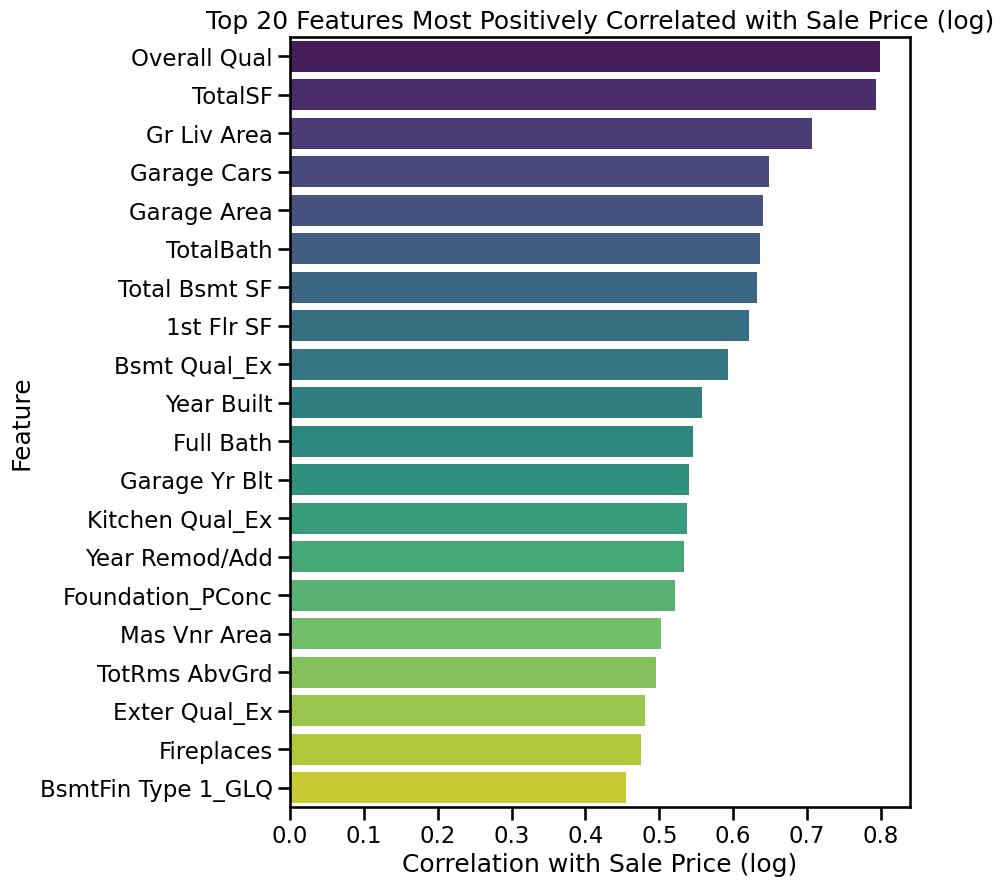
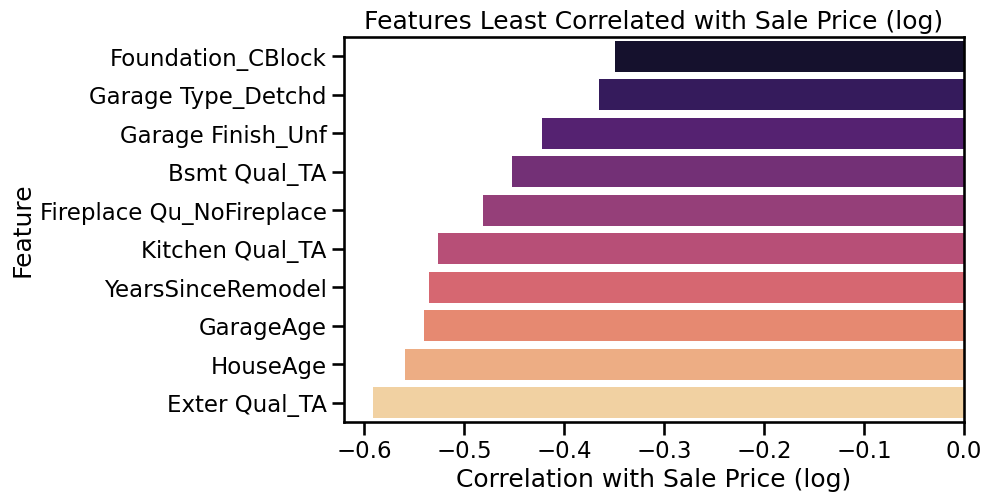
👉 Step 1: Let’s check which features are most correlated with our target SalePrice (we’ll actually use log(SalePrice) since that’s our target).
I’ll give you some code do to this:
Code
# Compute correlations with target (log SalePrice)corr_with_target = df.corrwith(y).sort_values(ascending=False)# Top 20 positively correlated featuresplt.figure(figsize=(8, 10))sns.barplot( x=corr_with_target.head(20).values, y=corr_with_target.head(20).index, hue=corr_with_target.head(20).index, # assign hue explicitly dodge=False, legend=False, palette="viridis")plt.title("Top 20 Features Most Positively Correlated with Sale Price (log)")plt.xlabel("Correlation with Sale Price (log)")plt.ylabel("Feature")plt.show()
❓ Lab Question
We saw the top 20 features most positively correlated with Sale Price.
Can you now make a similar plot that shows the least correlated features with Sale Price?
💡 Hint
Instead of using .head(20) on the sorted correlations,
you can use .tail(20) to grab the bottom ones.
Everything else in the plotting code stays almost the same.
Code
# Visualize the 20 features that are least correlated with the known house sales prices, similar to the plots above
Interpreting Correlation
❓ Does correlation assume the relationship between features and Sale Price is linear?
Yes. By default, pandas computes the Pearson correlation, which measures linear relationships:
+1 → perfect positive linear relationship
–1 → perfect negative linear relationship
0 → no linear relationship
What this means:
If a feature has a high correlation with Sale Price, it suggests a strong linear relationship → linear regression can likely use it effectively.
If a feature has low correlation, it might still have a non-linear relationship with Sale Price that Pearson correlation won’t capture.
👉 Correlation is a great first filter for feature selection, but it doesn’t tell the full story.
That’s why we later look at more flexible models (like decision trees or random forests) that can capture non-linear patterns as well.
Feature Selection by Correlation
❓ How can we decide which features to keep based on correlation with Sale Price?
👉 One simple approach is to set a threshold for the absolute correlation:
If |correlation| ≥ 0.1 → keep the feature
If |correlation| < 0.1 → drop the feature
Why?
Features with almost no correlation to the target are unlikely to improve predictions.
Keeping too many noisy or irrelevant features can slow training and sometimes cause overfitting.
This isn’t perfect (correlation only measures linear relationships), but it’s a good first filter.
❓ Lab Question
We don’t need to keep every single feature — some are very weakly correlated with Sale Price.
Let’s filter out features whose correlation with the target is too low.
Can you write code to: 1. Define a correlation threshold (e.g., 0.1).
2. Select only those features where the absolute correlation is above this threshold.
3. Print how many features you kept, and compare it to the original count.
4. Reduce the dataframe df to only these selected features.
(Remember: corr_with_target is already defined, so no need to recompute it!)
💡 Hint
Use abs(corr_with_target) >= threshold to build a mask.
# Set threshold for absolute correlation# Select features above threshold# Create reduced DataFrame with only selected features# Print feature counts before and after dropping features that don't correlate strongly with our target
❓ We already dropped weakly correlated features — what should we check for now?
We’ve removed features that had little or no correlation with the target.
That’s a good first filter — we no longer carry around lots of noisy features that don’t help predictions.
👉 But we still have to check whether some of the remaining features are highly correlated with each other.
Example: 1st Flr SF, 2nd Flr SF, and TotalSF are all strongly related.
If we keep them all, linear regression may suffer from multicollinearity (unstable coefficients, redundant information).
In such cases, it’s often best to keep only one representative feature.
How to check?
We’ll look at the correlation matrix of all the remaining features and use a heatmap to visualize which ones are strongly correlated with each other.
❓ Lab Question
Now that we’ve filtered down to our most correlated features,
let’s check how strongly they are correlated with each other.
Can you: 1. Compute the correlation matrix of the filtered features, and
2. Plot a heatmap of this matrix?
(Note: you might have called your reduced dataframe df, df_filtered, or something else — use the one you created in the previous step.)
💡 Hint
Use .corr() on your filtered dataframe to compute the correlation matrix.
Then pass this matrix into sns.heatmap() to visualize it.
Don’t forget to set a color map (cmap="coolwarm") and center=0 to highlight positive vs negative correlations.
💡 Still stuck? Expand for full code
# Compute correlation matrix of the filtered features
corr_matrix = df.corr()   # or df_filtered.corr() depending on your variable name

# Plot heatmap
plt.figure(figsize=(14, 12))
sns.heatmap(
    corr_matrix,
    cmap="coolwarm",
    center=0,
    square=True,
    cbar_kws={"shrink": 0.7}
)
plt.title("Correlation Heatmap of Selected Features", fontsize=14)
plt.show()
Code
# Compute correlation matrix of the filtered features# Plot heatmap ( no grid lines)
Heatmaps with Many Features
With our filtered dataset we still have around 152 features (depending on your choices earlier).
A full correlation heatmap of all these features is very hard to read — the grid looks messy and it’s difficult to spot meaningful patterns.
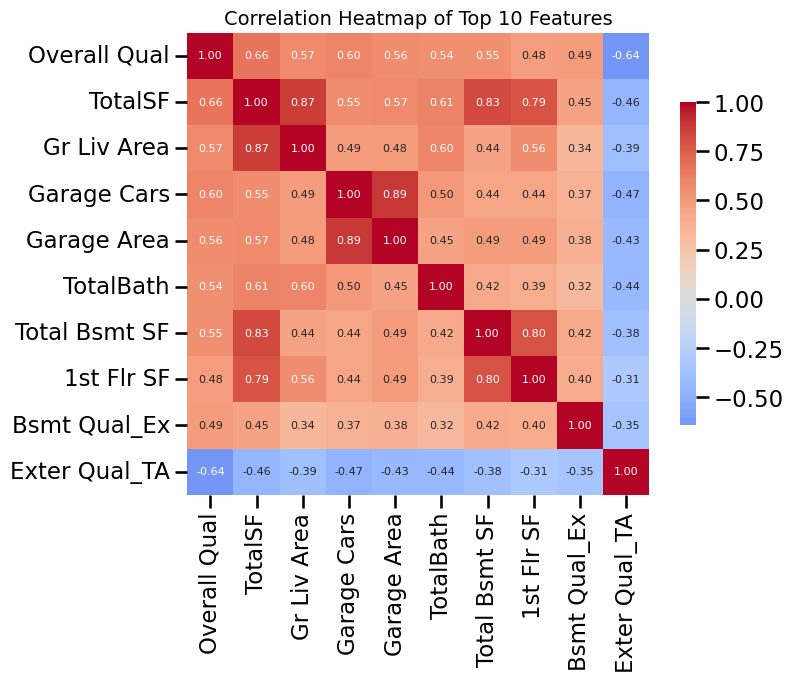
👉 Instead, we will focus on just the 10 most correlated features with Sale Price.
This will make the heatmap much clearer and serve as an illustrative example of how to check for multicollinearity.
I’ll just give you the code to do this (modify dataframe variable name from df if you changed it earlier):
Code
# Find top 10 features most correlated with targettop10_features = df.corrwith(y).abs().sort_values(ascending=False).head(10).index.tolist()print("Top 10 features most correlated with Sale Price (log):")print(top10_features)# Compute correlation matrix for just these featurescorr_top10 = df[top10_features].corr()# Plot heatmap with smaller annotation fontplt.figure(figsize=(8, 6))sns.heatmap( corr_top10, annot=True, fmt=".2f", cmap="coolwarm", center=0, square=True, cbar_kws={"shrink": 0.7}, annot_kws={"size": 8} # smaller font size for numbers)plt.title("Correlation Heatmap of Top 10 Features", fontsize=14)plt.show()
Top 10 features most correlated with Sale Price (log):
['Overall Qual', 'TotalSF', 'Gr Liv Area', 'Garage Cars', 'Garage Area', 'TotalBath', 'Total Bsmt SF', '1st Flr SF', 'Bsmt Qual_Ex', 'Exter Qual_TA']
Removing Redundant Features (Multicollinearity)
❓ Some features are strongly correlated with each other — which should we drop?
👉 The common approach is:
Set a correlation threshold (e.g. |r| ≥ 0.8).
For each pair of features that exceed this threshold, keep the one more correlated with the target (SalePrice).
Drop the weaker one.
This reduces multicollinearity and ensures we don’t throw away information that’s predictive of the target.
Note that the correlation matrix, which you should have defined above (for example as corr_matrix) is symmetric, so we only need only the top or bottom triangle. We can do that as follows:
Code
# Select upper triangle of the correlation matrix (ignore self-corr and duplicates)upper = corr_matrix.where(np.triu(np.ones(corr_matrix.shape), k=1).astype(bool))
Now define some threshold for what features are too correlated to each other can can probably be dropped (maybe 0.8 or so?).
Code
# Set redundancy threshold# redundancy_threshold =# Correlation of each feature with the target (log SalePrice)# use earlier definition of corr_with_target or compute again:# target_corr = df.corrwith(y).abs()
Number of redundant features to drop: 34
Dropping: ['Exterior 2nd_MetalSd', 'Exterior 2nd_AsbShng', 'Central Air_N', 'Garage Qual_NoGarage', 'Gr Liv Area', 'Electrical_FuseA', 'Kitchen Qual_Gd', 'Exterior 2nd_VinylSd', 'Bsmt Qual_NoBasement', 'Roof Style_Gable', 'Lot Shape_IR1', '1st Flr SF', 'Exterior 2nd_CmentBd', 'Bsmt Cond_NoBasement', 'BsmtFin Type 2_NoBasement'] ...

Remaining feature count: 118
The next step is probably more complicated that I should suggest in this lab, but I can’t help suggest what looks like the best approach: if we have 2 features that are highly correlated, we can drop one of them. But which one? For that, we compare each to how well they correlate to our target variable. In other words, both have similar predictive powers, but we only want to keep the feature with the most predictive power (even if close). Either way, we have to pick one or the other.
So this is what we can do:
🔎 Understanding the Redundancy Removal Code
Here’s the code we used:
to_drop = set()
for col in upper.columns:
    high_corr = upper[col][upper[col] > redundancy_threshold].index.tolist()
    for row in high_corr:
        # Compare target correlations: drop the weaker one
        if target_corr[col] >= target_corr[row]:
            to_drop.add(row)
        else:
            to_drop.add(col)
Step by step
upper is the correlation matrix of all features, but only the upper triangle is kept.
This way we only compare each feature pair once (no duplicates).
Outer loop (for col in upper.columns:)
Go through each feature (column) one at a time.
Inner loop (for row in high_corr:)
For this feature (col), find all other features (row) that are highly correlated with it (above our redundancy threshold).
Compare their importance
Look at how strongly each feature (col and row) correlates with the target (logy).
If col is more correlated with the target, then we keep col and drop row.
If row is stronger, then we drop col instead.
Build a drop list
to_drop is a set of all the weaker features.
At the end, we drop them all at once from the dataframe.
🔑 Takeaway
Think of it like a pairwise survival game: - Every time two features are “too similar” (highly correlated with each other),
- We only keep the stronger one (the one more correlated with the target).
- The weaker one gets eliminated and added to to_drop.
I’ll just give you the code for this:
Code
# Features to drop (based on lower target correlation in each redundant pair)to_drop =set()for col in upper.columns: high_corr = upper[col][upper[col] > redundancy_threshold].index.tolist()for row in high_corr:# Compare target correlations: drop the weaker oneif target_corr[col] >= target_corr[row]: to_drop.add(row)else: to_drop.add(col)print(f"Number of redundant features to drop: {len(to_drop)}")print("Dropping:", list(to_drop)[:15], "...") # show first 15 for sanity check# Drop them in placedf = df.drop(columns=list(to_drop))print("\nRemaining feature count:", df.shape[1])
---------------------------------------------------------------------------NameError Traceback (most recent call last)
/tmp/ipython-input-3607008411.py in <cell line: 0>() 1# Features to drop (based on lower target correlation in each redundant pair) 2 to_drop = set()----> 3for col in upper.columns: 4 high_corr = upper[col][upper[col]> redundancy_threshold].index.tolist() 5for row in high_corr:NameError: name 'upper' is not defined
Train–Validation Split and Scaling
Before we scale features, we need to split our dataset into training and validation sets.
👉 Why?
- Scaling requires computing the min and max (or mean and std) of each feature.
- If we compute these using the entire dataset, we are “peeking” at the validation data.
- That leaks information from validation into training and gives us overly optimistic results. - I should emphasis that this actually also applies to how we do the imputing, but lets not worry about that for now.
✅ Correct approach:
1. Split into training and validation sets.
2. Fit the scaler on the training set only.
3. Apply the trained scaler to both training and validation sets.
First, convert pandas dataframes to numpy arrays
Code
# Convert features and target to NumPy arrays# Use whatever variable names you have chosen so far# X = df.to_numpy()# logy = logy.to_numpy()
❓ Lab Question
Now it’s time to split our data into two parts: - A training set (used by the model to learn patterns),
- A validation set (used to check how well the model generalizes).
Can you use train_test_split to create: - X_train, X_val (features), and
- y_train, y_val (target values)?
ℹ️ Explanation
test_size=0.2 means that 20% of the data will go into the validation set, and 80% will be used for training.
random_state=42 fixes the random shuffle so you and your classmates all get the same split.
(Any number could be used — 42 is just a convention!)
💡 Hint
from sklearn.model_selection import train_test_split
where: - $ _j $ = minimum of feature \(j\) in the training set
- $ _j $ = maximum of feature \(j\) in the training set
- The scaled values \(x'_{ij}\) always lie in \([0,1]\).
Why do we care about this?
Linear regression will learn coefficients $ ’_j $ in the scaled feature space.
But those coefficients are hard to interpret, because they apply to normalized units.
To interpret results in the original feature units (square feet, years, number of bathrooms, etc.), we need to “undo” the scaling.
Transforming coefficients back
If we fit a regression in the scaled space:
\[
y = \beta'_0 + \sum_j \beta'_j \, x'_j
\]
then the equivalent model in the original feature space is:
Transform coefficients back → for human interpretation in original units.
To transform fitting parameters \(\beta^\prime\) back into fitting parameters for the original unscaled features \(\beta\), we can define a function (though we may not actually use it in this lab):
Code
def unscale_coefficients(beta_scaled, intercept_scaled, scaler):""" Transform regression coefficients and intercept from scaled space back to the original feature space. Parameters ---------- beta_scaled : array-like, shape (n_features,) Coefficients from regression fit on scaled features. intercept_scaled : float Intercept from regression fit on scaled features. scaler : fitted MinMaxScaler Scaler used to transform the features. Returns ------- beta_orig : np.ndarray, shape (n_features,) Coefficients in the original feature space. intercept_orig : float Intercept in the original feature space. """ scale = scaler.data_max_ - scaler.data_min_ beta_orig = beta_scaled / scale intercept_orig = intercept_scaled - np.sum(beta_scaled * scaler.data_min_ / scale)return beta_orig, intercept_orig
Now perform the feature scaling. To emphasize once more: the scaling is based on the min and max of the training data only, and based on those min and max values we also rescale the validation data. So we should not 1) rescale all features based on the min max of the entire dataset (because the validation data are mimicking future measurements) and therefore also not 2) rescale validation data by their own min and max values (because we want this to work for any number of future unseen new measurements).
❓ Lab Question
Next we need to scale our features so they’re all on comparable ranges.
We’ll use Min–Max scaling, which transforms each feature into the range [0, 1].
What to do:
Initialize a MinMaxScaler().
Fit the scaler only on the training data (X_train), and transform it into X_train_scaled. (We already give you this step in code so you can see the pattern.)
Now, apply the same scaler to the validation data and call the result X_val_scaled. (Important: never fit on validation data — we only transform it!)
Add some print() statements to check the shapes and display an example of the scaled values.
💡 Hint
Use scaler.transform(X_val) to scale the validation features.
If you’re curious, you can also inspect the scaling factors with:
…but this is not strictly needed for the rest of the lab.
👉 Finally, add two print() statements on your own to check:
- The shapes of the scaled training and validation sets,
- A small sample of scaling values (e.g. the first 5 features).
Code
# Initialize the scalerscaler = MinMaxScaler()# Fit only on training dataX_train_scaled = scaler.fit_transform(X_train)# Apply the same scaling to validation data# fill this in!# Print size of scaled training and validation data# Optionally, add some print statements to check scales and scale factors as you please.
We’ve now completed all of our data preprocessing step by step.
The moment has come to actually train a machine learning model and see how well it can predict house prices!
❓ Lab Question
Use a linear regression model to fit the training data and then make predictions on both the training and validation sets.
What to do:
Initialize a regression model.
The easiest option is LinearRegression from scikit-learn.
But you are also welcome (and encouraged!) to try your own hand-coded versions of:
Gradient Descent
Stochastic Gradient Descent
Mini-batch Gradient Descent
Fit the model using the scaled training data (X_train_scaled, y_train).
Predict house prices for both the training set and the validation set.
# Initialize and fit linear regression on scaled training data# Predictions# make predictions both for the training data and then for the validation data# save each as something like y_train_pred and y_val_pred# so we can then compare those predictions to the true values and compute# accuracy metrics next (below).
Next, we want to compute the accuracy/errors of our predictions versus the ground-truth label values. If you want to see metrics like RMSE or MAE in actual dollar units, though, you have to pay attention to whether or not we modified our target variable early on (e.g. by taking the log of house price instead of just dollar house price). If you did, it makes sense to convert the predicted target values back to just dollars and do the same for the ground truth labels (or just use a separate variable name for those if you still have that defined and didn’t overwrite it with something else).
Code
# Evaluate using our earlier functionprint("Training set performance:")# use the function I provided: evaluate_regression# to compute various accuracy metrics between fitted training data and the true valuesprint("\nValidation set performance:")# do the same for the validation data
Training set performance:
Metric   Value
    R²     87%
  RMSE $27,868
   MAE $14,321
 RMSLE   0.125

Validation set performance:
Metric   Value
    R²     88%
  RMSE $31,092
   MAE $16,441
 RMSLE   0.124
Metric
Value
0
R²
88%
1
RMSE
$31,092
2
MAE
$16,441
3
RMSLE
0.124
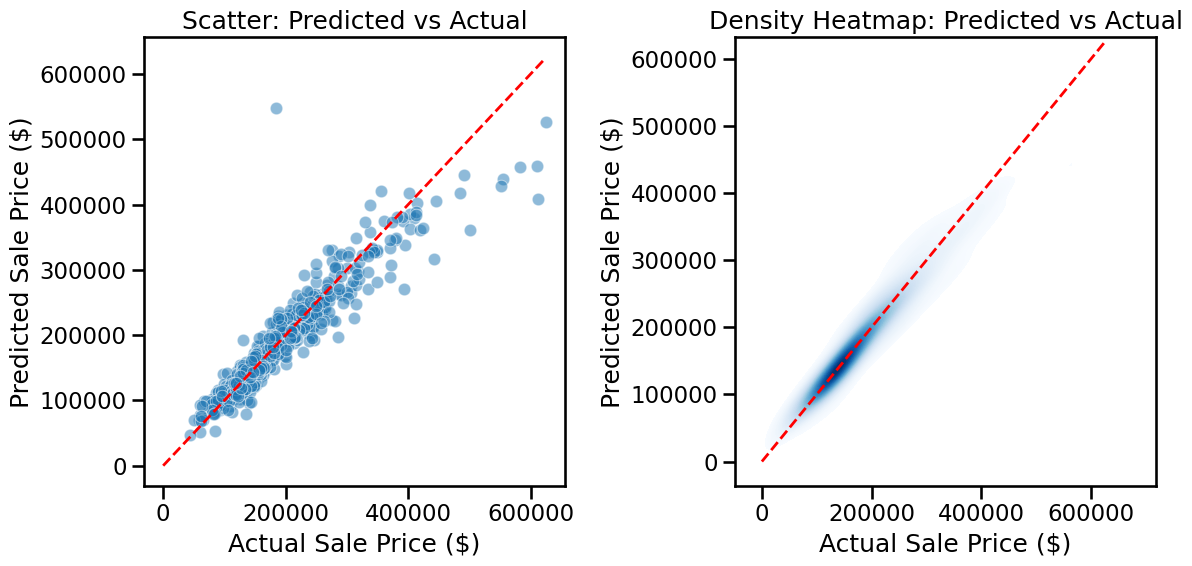
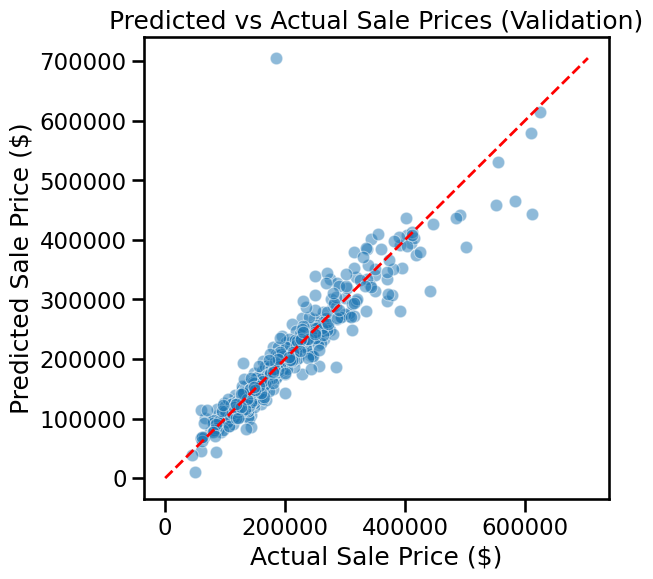
As we did in an earlier lab, it can also be illustrative to plot predicted house prices versus the true sales prices. Doing so as a heat map can give you a sense of the distribution of true/false predictions. In other words, in what price ranges the model is performing better/worse.
Modify the code below as needed for your variable names.
Code
fig, axes = plt.subplots(1, 2, figsize=(12, 6))# Left: scatter plotsns.scatterplot( x=np.exp(y_val), y=np.exp(y_val_pred), alpha=0.5, ax=axes[0])axes[0].plot( [0, np.exp(y_val).max()], [0, np.exp(y_val).max()],'r--', lw=2)axes[0].set_xlabel("Actual Sale Price ($)")axes[0].set_ylabel("Predicted Sale Price ($)")axes[0].set_title("Scatter: Predicted vs Actual")# Right: density heatmapsns.kdeplot( x=np.exp(y_val), y=np.exp(y_val_pred), fill=True, cmap="Blues", thresh=0.05, levels=100, ax=axes[1])axes[1].plot( [0, np.exp(y_val).max()], [0, np.exp(y_val).max()],'r--', lw=2)axes[1].set_xlabel("Actual Sale Price ($)")axes[1].set_ylabel("Predicted Sale Price ($)")axes[1].set_title("Density Heatmap: Predicted vs Actual")plt.tight_layout()plt.show()
Model performance at high prices
❓ Why does the model perform worse for houses above ~$500,000?
Few training examples: Most homes in Ames cost $100k–$250k. Luxury homes are rare, so the model has little data to learn from.
Different drivers of value: Expensive homes often depend on factors not well captured in our dataset (prestige, architecture, location desirability).
Model limitations: A simple linear regression struggles when the relationships between features and prices are not strictly linear.
👉 This means our model tends to underpredict expensive homes because it hasn’t seen enough examples and can’t capture their unique patterns.
⭐ Optional Exercise
Very expensive homes can sometimes distort model performance.
For practice, try removing homes with Sale Prices above $500,000 from both the training and validation sets.
Then:
1. Fit a new Linear Regression model on the filtered data.
2. Evaluate its accuracy again on both training and validation sets.
3. Compare the results to the original model — what changes?
💡 Hint (expand for code)
# Exclude houses above $500,000
mask_train = np.exp(y_train) <= 500000
mask_val   = np.exp(y_val) <= 500000

X_train_sub = X_train_scaled[mask_train]
y_train_sub = y_train[mask_train]
X_val_sub   = X_val_scaled[mask_val]
y_val_sub   = y_val[mask_val]

print("Filtered training set shape:", X_train_sub.shape, y_train_sub.shape)
print("Filtered validation set shape:", X_val_sub.shape, y_val_sub.shape)

# Fit a new linear regression
linreg_sub = LinearRegression()
linreg_sub.fit(X_train_sub, y_train_sub)

# Predictions
y_train_sub_pred = linreg_sub.predict(X_train_sub)
y_val_sub_pred   = linreg_sub.predict(X_val_sub)

# Evaluate performance in $ again
print("Training set performance (prices <= $500k):")
evaluate_regression(np.exp(y_train_sub), np.exp(y_train_sub_pred))

print("\nValidation set performance (prices <= $500k):")
evaluate_regression(np.exp(y_val_sub), np.exp(y_val_sub_pred))```

</details>

::: {#_ro1VJ8IyWzU .cell execution_count=3}
``` {.python .cell-code}

# optional. you could try if your model performs better when excluding the most expensive houses.
:::
Reading:
This concludes the part where you are expected to write your own code. Spend the rest of your time reading through the next sections in which:
I give you a primer on Cross-Validation, which we’ll discuss more next week.
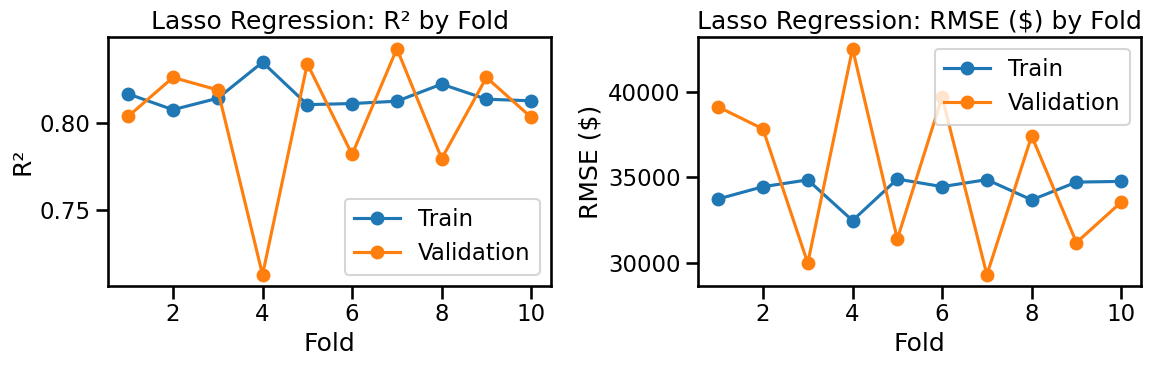
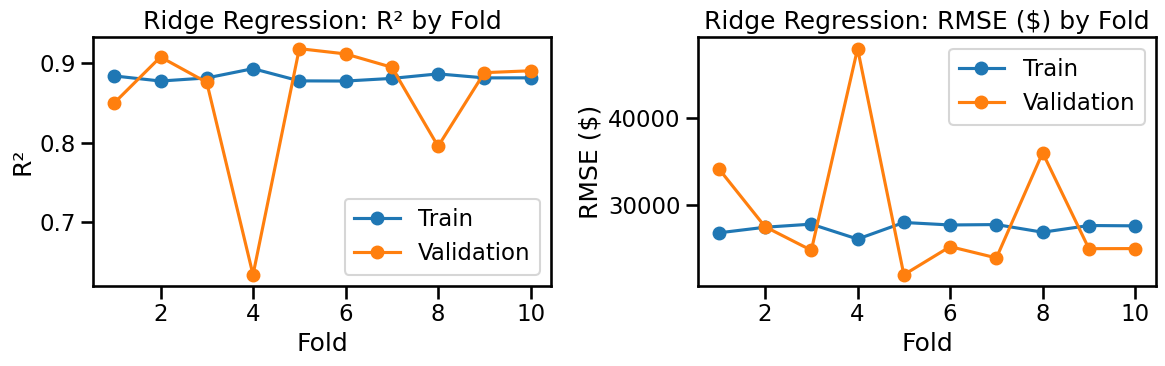
You’ll see some examples of Lasso and Ridge Regularization, which can automatically reduce overfitting (also discussed properly next week).
Importantly in the context of this week’s materials and your work so far in the lab above, you’ll see how we can combine all the pre-processing steps into an elegant and reusable data pre-processing pipeline for machine learning.
Next Steps
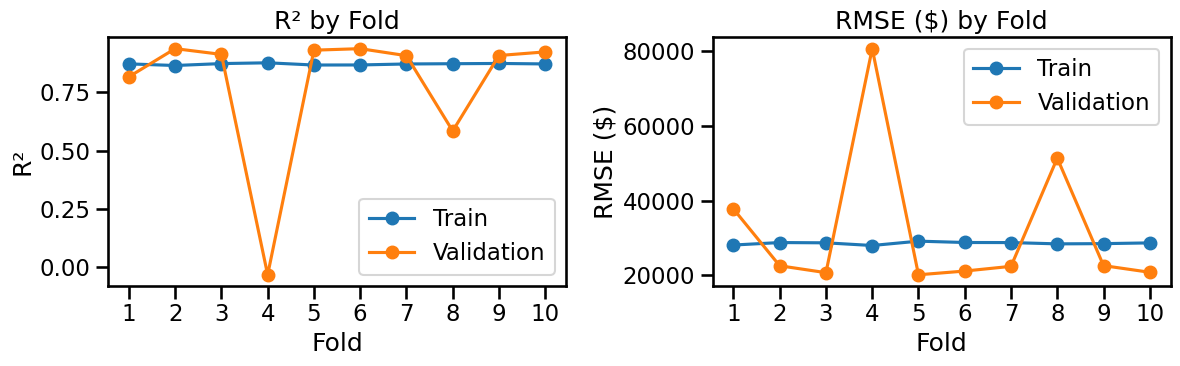
In several labs so far, we’ve done a single split of our datasets into training and validation data. Especially for relatively modest sizes of data, which we generally have in this course to make models run fast, the ‘luck of the draw’ is quite a significant factor. In other words, which measurements you pick for training versus validation can have quite a big impact. For example, your training data may not cover the full range of possible values and you should know by know that extrapolating models is often problematic, so if your validation data fall outside the range of your training data you’re often in trouble.
Even when you have more data, though, the best practice is to do so-called cross-validation. This simply means doing a randomized split of your data into training and validation data multiple times. For each split, you fit on the training data and evaluate performance on the validation data. If your model is good (complex enough but not too complex) and you have enough training data, the performance (accuracy) of predictions on un-seen validation data should be the same or similar to the performance on validation data. Also, the performance on both training and validation data should ideally be the same/similar regardless of how you sample the data, i.e. regardless of your random training-validation splits
We’ll discuss this in the next lecture (through this is most of what you need to know), but below I give you some examples of this. There are very easy-to-use built-in functions in scikit-learn, but below I choose to do the cross-validation a bit more explicitly in a loop and use the same pre-processing steps as before.
One critical take-away point that you should burn into your memory is that for each training-validation split, any pre-processing steps can only rely on information from the training data and can never ‘look at’ the validation data, because the validation data are supposed to mimick future measurements that we have not yet taken. So we are not supposed to know what, e.g., the maximum and minimum values of future measurements might me. This is a extremely common mistake by beginner ML users. I’ll keep mentioning this. Never do min-max scaling, imputing, etc on all your data and do a training-validation split afterwards, because by doing so you will have poluted your validation data.
A First Look at Cross-Validation (manual 10-fold)
We’ll do a simple manual 10-fold cross-validation with the exact steps we used before:
Split indices into 10 folds (each fold gets a turn as validation).
For each fold:
FitMinMaxScaler on the training split only (no leakage).
Train a LinearRegression on the scaled training split (target = log price).
Predict on both training & validation splits (in log space).
Convert predictions back to dollars with np.exp(...).
Compute our usual metrics (R², RMSE, MAE, RMSLE) in dollars.
Aggregate the metrics across folds and plot training vs validation to see under/overfitting patterns.
Code
# --- Inputs expected to already exist from your notebook:# X -> full numeric feature matrix (np.array), shape (n_samples, n_features)# logy -> log-transformed target (np.array), shape (n_samples,)k =10kf = KFold(n_splits=k, shuffle=True, random_state=42)records = []for fold, (tr_idx, va_idx) inenumerate(kf.split(X), start=1): X_tr, X_va = X[tr_idx], X[va_idx] y_tr_log, y_va_log = logy[tr_idx], logy[va_idx]# Fit scaler on training split only scaler = MinMaxScaler() X_tr_s = scaler.fit_transform(X_tr) X_va_s = scaler.transform(X_va)# Fit linear regression model = LinearRegression() model.fit(X_tr_s, y_tr_log)# Predictions in log space y_tr_pred_log = model.predict(X_tr_s) y_va_pred_log = model.predict(X_va_s)# Convert to dollars for human-friendly metrics y_tr = np.exp(y_tr_log) y_va = np.exp(y_va_log) y_tr_pred = np.exp(y_tr_pred_log) y_va_pred = np.exp(y_va_pred_log)# Metrics (same formulas as evaluate_regression, but numeric for aggregation)def metrics(y_true, y_hat): r2 = r2_score(y_true, y_hat) rmse = np.sqrt(mean_squared_error(y_true, y_hat)) mae = mean_absolute_error(y_true, y_hat) rmsle = np.sqrt(mean_squared_error(np.log1p(y_true), np.log1p(y_hat)))return r2, rmse, mae, rmsle r2_tr, rmse_tr, mae_tr, rmsle_tr = metrics(y_tr, y_tr_pred) r2_va, rmse_va, mae_va, rmsle_va = metrics(y_va, y_va_pred) records.append({"fold": fold,"R2_train": r2_tr, "RMSE_train": rmse_tr, "MAE_train": mae_tr, "RMSLE_train": rmsle_tr,"R2_val": r2_va, "RMSE_val": rmse_va, "MAE_val": mae_va, "RMSLE_val": rmsle_va })cv_df = pd.DataFrame(records).set_index("fold")display(cv_df.style.format({"R2_train": "{:.3f}", "R2_val": "{:.3f}","RMSE_train": "{:,.0f}", "RMSE_val": "{:,.0f}","MAE_train": "{:,.0f}", "MAE_val": "{:,.0f}","RMSLE_train": "{:.3f}", "RMSLE_val": "{:.3f}",}))# Print mean ± std summarysummary = pd.DataFrame({"Metric": ["R²", "RMSE ($)", "MAE ($)", "RMSLE"],"Train (mean ± std)": [f"{cv_df['R2_train'].mean():.3f} ± {cv_df['R2_train'].std():.3f}",f"{cv_df['RMSE_train'].mean():,.0f} ± {cv_df['RMSE_train'].std():,.0f}",f"{cv_df['MAE_train'].mean():,.0f} ± {cv_df['MAE_train'].std():,.0f}",f"{cv_df['RMSLE_train'].mean():.3f} ± {cv_df['RMSLE_train'].std():.3f}", ],"Val (mean ± std)": [f"{cv_df['R2_val'].mean():.3f} ± {cv_df['R2_val'].std():.3f}",f"{cv_df['RMSE_val'].mean():,.0f} ± {cv_df['RMSE_val'].std():,.0f}",f"{cv_df['MAE_val'].mean():,.0f} ± {cv_df['MAE_val'].std():,.0f}",f"{cv_df['RMSLE_val'].mean():.3f} ± {cv_df['RMSLE_val'].std():.3f}", ]})print("\nCross-Validation Summary (mean ± std across folds):")print(summary.to_string(index=False))# --- Plots: Training vs Validation across foldsfig, axes = plt.subplots(1, 2, figsize=(12, 4))# R²axes[0].plot(cv_df.index, cv_df["R2_train"], marker="o", label="Train")axes[0].plot(cv_df.index, cv_df["R2_val"], marker="o", label="Validation")axes[0].set_title("R² by Fold")axes[0].set_xlabel("Fold")axes[0].set_ylabel("R²")axes[0].set_xticks(cv_df.index)axes[0].legend()# RMSE ($)axes[1].plot(cv_df.index, cv_df["RMSE_train"], marker="o", label="Train")axes[1].plot(cv_df.index, cv_df["RMSE_val"], marker="o", label="Validation")axes[1].set_title("RMSE ($) by Fold")axes[1].set_xlabel("Fold")axes[1].set_ylabel("RMSE ($)")axes[1].set_xticks(cv_df.index)axes[1].legend()plt.tight_layout()plt.show()
Why is validation performance more variable than training?
❓ Why do we see much more spread in validation performance than in training performance?
Training scores are stable: Each fold’s training set is ~80% of the data (≈2300 houses). With that much data, the model fits consistently, so training metrics don’t change much.
Validation scores vary more: Each validation set is only ~20% (≈580 houses). Some folds may include more unusual or expensive homes, which are harder to predict. This makes validation performance fluctuate a lot more.
Smaller sample effect: With fewer samples, outliers matter more. One validation fold with a few luxury $500k+ homes can drag performance down, while another fold without them looks much better.
How can we reduce this variation?
Use cross-validation averages: By combining results from multiple folds, we get a more reliable estimate of the model’s true generalization performance.
Collect more data: Larger validation sets reduce sensitivity to outliers.
Apply regularization (Ridge, Lasso): This can reduce overfitting to small quirks in each training set, which should make validation performance more stable.
👉 Next week, when we introduce regularization, we’ll test this idea and see if Ridge/Lasso help reduce variability in validation scores.
Without explaining how Lasso regularization works yet (next week), let me give you a teaser of how it can improve our regression results. We run the exact same code as above, but using the scikit-learnLasso regression model instead of LinearRegression.
When looking at the result, make sure to pay attention to the vertical axes. The accuracy on validation data should be quite a bit closer to those on the training data as compared to our basic LinearRegression. Both Lasso and Ridge regression as powerful tricks to reduce overfitting, as you’ll learn next week. Importantly, the accuracy on training data may reduce but the accuracy on validation data should increase, which is the most crucial if we want to make accurate predictions for future measurements.
Let’s now see what this looks like for regression with Ridge regularization:
Again, you should see that the predictive power on unseen houses (validation data) is excellent. Expressed in raw dollar sales prices, the range is probably comparable to something similar to what one would lose in terms or realtor and notary fees etc (few percentage points).
Modern Data-Preprocessing Pipeline
In the following, we won’t try to recreate every single step of the data preprocessing that we did above, which involved some rather specific ‘domain expert’ insights into the data. Rather, the idea is to show you how we can, in general, combine multiple pre-processing steps into a single automated pipeline that can be easily repurposed for future use by yourself or others.
In order to do so, we will assume that someone already did some of the data inspections and figured out what features are the most predictive (correlated with our target feature) and not overly correlated with other features.
Other than that, we’ll make the code below independent from anything above to show a start-to-end data preprocessing pipeline.
To be specific, the steps below are:
Start from the raw Ames dataset and only keep the most useful features, based on our earlier correlation work.
The pipeline will: 1. Impute missing values (median for numeric, most-frequent for categorical)
2. One-hot encode categoricals
3. Min–Max scale everything
4. Fit a LinearRegression on log(SalePrice)
5. Evaluate predictions back in real dollars
Code
# --- Load raw dataraw = pd.read_csv("AmesHousing.csv")# --- Define targety_dollars = raw["SalePrice"].copy()y_log = np.log(y_dollars.values) # model trains in log spaceX = raw[selected_features_raw].copy()# --- Identify numeric vs categoricalnum_cols = X.select_dtypes(include=[np.number]).columns.tolist()cat_cols = X.select_dtypes(exclude=[np.number]).columns.tolist()print(f"Using {len(selected_features_raw)} raw features "f"({len(num_cols)} numeric, {len(cat_cols)} categorical).")# --- Preprocessorsnum_pre = Pipeline(steps=[ ("impute", SimpleImputer(strategy="median")), ("scale", MinMaxScaler())])cat_pre = Pipeline(steps=[ ("impute", SimpleImputer(strategy="most_frequent")), ("onehot", OneHotEncoder(handle_unknown="ignore", sparse_output=False))])preprocess = ColumnTransformer( transformers=[ ("num", num_pre, num_cols), ("cat", cat_pre, cat_cols), ])# --- Pipelinelinreg_pipe = Pipeline(steps=[ ("preprocess", preprocess), ("model", LinearRegression())])# --- Train/validation splitX_train, X_val, y_train_log, y_val_log = train_test_split( X, y_log, test_size=0.2, random_state=42)# --- Fit modellinreg_pipe.fit(X_train, y_train_log)# --- Predictionsy_train_pred_log = linreg_pipe.predict(X_train)y_val_pred_log = linreg_pipe.predict(X_val)y_train_pred = np.exp(y_train_pred_log)y_val_pred = np.exp(y_val_pred_log)y_train_dollars = np.exp(y_train_log)y_val_dollars = np.exp(y_val_log)# --- Evaluateprint("Training set performance:")evaluate_regression(y_train_dollars, y_train_pred)print("\nValidation set performance:")evaluate_regression(y_val_dollars, y_val_pred)# --- Visualizationplt.figure(figsize=(6,6))sns.scatterplot(x=y_val_dollars, y=y_val_pred, alpha=0.5)mx =max(y_val_dollars.max(), y_val_pred.max())plt.plot([0, mx], [0, mx], 'r--', lw=2)plt.xlabel("Actual Sale Price ($)")plt.ylabel("Predicted Sale Price ($)")plt.title("Predicted vs Actual Sale Prices (Validation)")plt.show()
Using 56 raw features (19 numeric, 37 categorical).
Training set performance:
Metric   Value
    R²     91%
  RMSE $23,418
   MAE $13,962
 RMSLE   0.116

Validation set performance:
Metric   Value
    R²     87%
  RMSE $32,675
   MAE $17,287
 RMSLE   0.150
Hopefully, you agree that the above is quite an elegant and concise code cell to define a whole range of somewhat non-trivial data-preprocessing steps and then do all the model regression fitting, accuracy evaluations, and plotting of performance on validation data in just a few lines of codes. This is what a real-world Machine Learning workflow looks like!
🏡 Lab Summary: Predicting House Prices with Linear Regression
In this lab, we worked step by step through a real machine learning workflow using the Ames housing dataset.
Here’s what we accomplished:
🔍 Exploratory Data Analysis (EDA)
Looked at the distribution of Sale Prices, noticed skew, and motivated using log-transformed prices.
Explored categorical vs. numerical features and learned how to handle each.
Checked missing values and thought about whether they were due to structural reasons (e.g., no garage, no basement).
🛠 Data Preprocessing
Imputation: Filled in missing values (median for numeric, most-frequent for categorical).
One-hot encoding: Converted categorical variables into numerical form.
Scaling: Applied Min–Max scaling so features are on comparable scales.
Practiced selecting a subset of features by looking at their correlation with the target and with each other.
📈 Modeling
Fit a Linear Regression model on log-transformed prices to stabilize variance and reduce skew.
Converted predictions back into dollars for interpretation.
Computed multiple evaluation metrics:
\(R^2\) (explained variance, as %)
RMSE (root mean squared error, in $)
MAE (mean absolute error, in $)
RMSLE (root mean squared log error, unitless)
Visualized predicted vs. actual prices to spot where the model performs well (typical homes) and less well (very expensive homes).
🧩 Pipelines
Wrapped the preprocessing steps (impute → one-hot encode → scale) together with the regression model in a scikit-learn Pipeline.
Learned that pipelines help:
Keep the workflow organized and reproducible.
Avoid data leakage (e.g., fitting scalers only on training data).
Make it easy to swap models later (e.g., Ridge, Lasso).
💡 Key Takeaways
Log-transforming skewed targets can greatly improve regression performance.
Multiple error metrics give different insights; always look at more than just \(R^2\).
Validation performance varies more than training — this is why we use cross-validation.
Pipelines are the standard practice in applied ML: they bundle preprocessing + modeling into a single, elegant workflow.
Even a simple linear regression can achieve strong performance (~85–90% \(R^2\)) when data is carefully prepared.
👉 Next time: we’ll see how regularization (Ridge, Lasso) can help further improve stability and prevent overfitting.