View on GitHub Open in Colab Launch Binder Open in Kaggle Open in GitHub Codespaces

Which platform should I choose?

✏️ After this lecture, try the Practice exercise

Code
import time
import numpy as np
import pandas as pd
import matplotlib.pyplot as plt
from scipy import optimize
from scipy.linalg import solve_banded
import scipy.sparse as sp
import scipy.sparse.linalg
from sklearn.model_selection import train_test_split, cross_val_score, KFold
from sklearn.utils import resample, shuffle
from sklearn.preprocessing import PolynomialFeatures, LabelEncoder, StandardScaler
from sklearn.impute import SimpleImputer
from sklearn.pipeline import make_pipeline, Pipeline
from sklearn.metrics import mean_absolute_error, mean_squared_error
from sklearn.linear_model import LinearRegression, LogisticRegression, Ridge, Lasso
from sklearn.tree import DecisionTreeRegressor, export_graphviz
from sklearn.ensemble import RandomForestRegressor
from xgboost import XGBRegressor
from mpl_toolkits.mplot3d import Axes3D
from IPython import display
from IPython.core.debugger import set_trace
from google.colab import files
from google.colab import files as gfiles
import requests
from sklearn.preprocessing import PolynomialFeatures
from sklearn.linear_model import LinearRegression
from sklearn.pipeline import make_pipeline
from sklearn.utils import resample
from sklearn.model_selection import train_test_split

Part 2: Cross-Validation and Regularization

In this section of the lecture we build on bias–variance tradeoffs and introduce: - Cross-validation (CV) for model assessment. - Ridge and Lasso regularization for controlling model complexity.

We will experiment with polynomial regression to visualize how CV selects model complexity and how regularization stabilizes solutions.

Define cost function, cost function gradients, and gradient descent for numerical regression

The following few functions are identical to previous notebooks (I could load them together with other libraries, but I like to include all code explicitly in each notebook for maximum transparancy).

Code
def cost(theta, X, y):
    """Half mean squared error cost function."""
    return np.mean((X.dot(theta) - y)**2) / 2

def gradient(theta, X, y):
    """Gradient of cost wrt theta."""
    return (X.dot(theta) - y).dot(X) / len(y)

def gradient_descent(theta, X, y, alpha, tolerance, nrsteps=100000, verbose=False):
    m = len(y)
    i = 0
    converged = False
    diverged = False
    cost_sv = cost(theta, X, y)

    while i < nrsteps-1 and not converged and not diverged:
        costi = cost(theta, X, y)
        theta = theta - alpha * gradient(theta, X, y)

        if i > 0:
            if cost_sv > 1e-12:
                improvement = abs(1 - costi/cost_sv)
            else:
                improvement = np.inf

            if improvement < tolerance:
                converged = True
                if verbose:
                    print(f"Converged in {i} iterations "
                          f"with error {costi:.4f}, "
                          f"thetas {np.round(theta,4)}")
            elif improvement > 1:
                print(i, improvement, "Errors are diverging:", costi, ">", cost_sv)
                diverged = True

        i += 1
        cost_sv = costi

    if i == nrsteps-1 and not converged:
        print(f"Did not converge in {nrsteps} steps. Last cost: {costi:.4f}")

    return theta

General purpose fitting function [optional]

You can skip this section for now.

To keep the notebook and codes tidy below, I define a single function in the cell below that will find the best fitting parameters \(\theta\) but allows easy switching between different solvers: solver=1 means our own implementation of gradient descent, solver=2 is the accelerated Newton solver that we used several times before, and the other solvers will be explained further below.

You can already see in the next code block, though, that Ridge and Lasso are external functions that were loaded above in the first code cell. They work the same as the pre-built LinearRegression function that we also used before. All three functions have a fit and a predict stage, but here we only use the former. The function below cleans things up a little where our single function solve_theta will take features \(x\) and targets \(y\) as input and spit out the best fit \(\theta\), using any solver we like (we could add more options).

Code
def solve_theta(x, y, alpha, tolerance, solver, param):
    n_features = x.shape[1]
    theta0 = np.zeros(n_features)   # starting guess

    if solver == 1:
        theta_fit = gradient_descent(theta0, x, y, alpha, tolerance)

    elif solver == 2:
        result = optimize.minimize(cost, theta0, args=(x, y),
                                   method='TNC', jac=gradient,
                                   options={'disp': True}, tol=tolerance)
        if result.success:
            theta_fit = result.x
            print("Converged after", result.nit, "iterations")
        else:
            print("Accelerated method did not work, falling back to gradient descent.")
            theta_fit = gradient_descent(theta0, x, y, alpha, tolerance)

    elif solver == 3:
        model = Ridge(alpha=param, fit_intercept=False).fit(x, y)
        theta_fit = model.coef_

    elif solver == 4:
        model = Lasso(alpha=param, fit_intercept=False).fit(x, y)
        theta_fit = model.coef_

    elif solver == 5:
        model = LinearRegression(fit_intercept=False).fit(x, y)
        theta_fit = model.coef_

    elif solver == 6:
        theta_fit = optimize.fmin_cg(cost, theta0, fprime=gradient,
                                     args=(x, y), gtol=tolerance, maxiter=10000)

    elif solver == 7:
        theta_fit = gradient_descent_ridge(theta0, x, y, alpha, tolerance, param)

    else:
        raise ValueError("Invalid solver option. Choose 1–7.")

    print("Problem solved with fitting parameters:\n")
    # Name parameters theta_0, theta_1, ...
    # turn into dataframe for pretty printing:
    names = [f"θ_{i}" for i in range(len(theta_fit))]
    df = pd.DataFrame({"Parameter": names, "Value": theta_fit})
    print(df.to_string(index=False))
    return theta_fit

Synthetic data for numerical regression

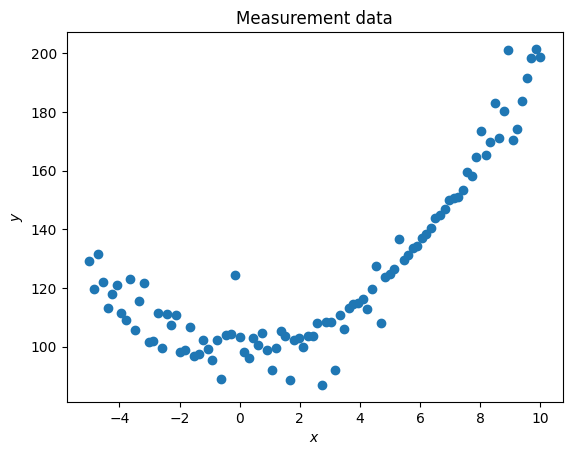
Let’s look again first at numerical regression and generate some synthetic data that are essentially quadratic but with some non-trivial measurement noise.

Code
nr_measurements=100

x = np.linspace(-5,10,nr_measurements)
y_theoretical = 100 + x**2

y = y_theoretical + (x-5)*np.random.uniform(-1,1,x.shape)
p = np.random.permutation(len(y))
y[p[:25]] = y[p[:25]] + np.random.uniform(-20,20,25)

plt.figure()
plt.title('Measurement data')
plt.scatter(x,y)
plt.xlabel(r'$x$')
plt.ylabel(r'$y$')

measurement_error = mean_squared_error(y_theoretical, y)/2
print("Measurement error is", round(measurement_error,2))

x_save = x
y_save = y
Measurement error is 21.16

Without further explanation after many similar steps in earlier lectures and labs, let’s define 15th order polynomial features:

Code
poly_order = 15
x_poly = np.ones([nr_measurements,poly_order+1])

for i in range(poly_order+1):
  x_poly[:,i] = x**i

m,n = np.shape(x_poly)

Cross-Validation

Hopefully you remember that the main problem with overfitting your data is that an over-fitted model will perform poorly in predicting new and independent data. In developing any machine learning algorithm (whether simple regressions or deep neural network), the model is therefore always fitted first to a training set and then predictions of the model are made for an independent validation set of measurements.

To do this, we don’t use all data we have and then wait for someone to go collect some more data later. Instead, just like we created synthethic measurement data in every module so far, we can also easily synthesize training and validation data. We simply split our data set in two, and use only one subset x_train, y_train to fit a model. Then we apply the same model, which really means fitted \(\theta\), to the other subset of validation data to see how well those \(\theta\) applied to x_val predict the actual y_val.

In making these splits between training and validation data, one has to be very thoughtful and careful to not ‘polute’ the final test data (validation set in this case) with any information regarding the training data. For example, we should not do feature scaling (normalization) on the entire dataset before splitting it into training and validation subsets because this would use information from the validation data (e.g. its range) in training the model (look carefully at the examples below of how to do this properly).

Let’s look at an example.

We start from the same polynomial feature set as above, but now we’ll use the first 80 measurements (rows in the ‘spreadsheet’) to train our regression model and find the theta_fit parameters that give the lowest least-squared-error between the measured y_train versus fitted y_train_fit = x_train.dot(theta_fit) . Then, we use the same model, which really just means the same theta_fit, to predict y_val_fit = x_val.dot(theta_fit) and compare to the actual y_val.

Code
x_train = x_poly[:80,:]
y_train = y[:80]

norms_train = x_train[-1,:]
x_train_norm = x_train/norms_train

x_val = x_poly[80:,:]
y_val = y[80:]

theta_fit = solve_theta(x_train_norm, y_train,1,1e-3,6,0)
theta_fit = theta_fit/norms_train

y_train_fit = x_train.dot(theta_fit)

training_error = mean_squared_error(y_train_fit, y_train)/2
print("Training error is", round(training_error,2))
Optimization terminated successfully.
         Current function value: 18.027573
         Iterations: 111
         Function evaluations: 262
         Gradient evaluations: 262
Problem solved with fitting parameters:

Parameter      Value
      θ_0 100.602164
      θ_1  -4.667305
      θ_2  11.813181
      θ_3  -4.208042
      θ_4 112.439023
      θ_5  32.003908
      θ_6 -40.635748
      θ_7 -14.143793
      θ_8 -56.428547
      θ_9 -18.773228
     θ_10 -29.254086
     θ_11  -1.815529
     θ_12  -0.026659
     θ_13  16.434778
     θ_14  19.876338
     θ_15  27.907650
Training error is 18.03

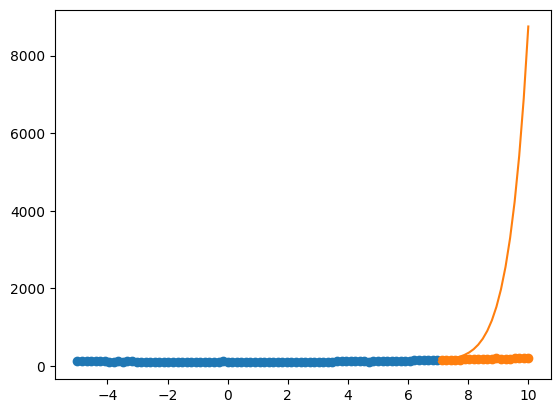
So the fitting error on the training data looks pretty good and comparable to the ‘experimental’ error and all the fits above. But now let’s ‘predict’ the 20 validation points and plot both the predicted y_train_fit and y_val_fit.

Code
y_val_fit = x_val.dot(theta_fit)

validation_error = mean_squared_error(y_val_fit, y_val)/2
print("Validation error is", round(validation_error,2))

# Plotting:
plt.figure()
plt.scatter(x_train[:,1],y_train)
plt.plot(x_train[:,1],y_train_fit)

plt.scatter(x_val[:,1],y_val)
plt.plot(x_val[:,1],y_val_fit);
Validation error is 4596290.74

Clearly, this model is garbage in terms of predicting our validation data. Unfortunately, though, this is somewhat unavoidable for this very particular problem of extrapolating higher-order polynomial fits outside the range of fitting data.

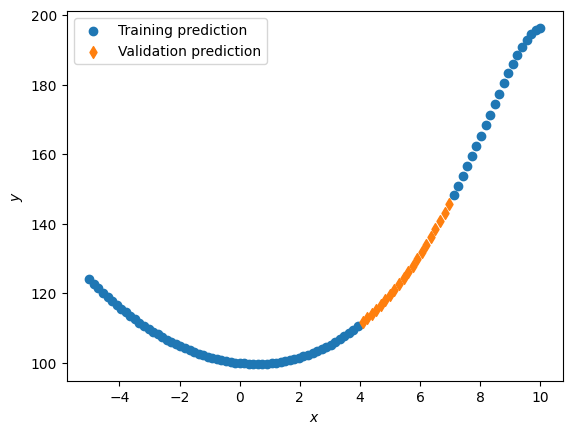
Here is a better illustration: we use the 60th to 80th rows of the data as validation and train on the rest.

Code
x_train = np.delete(x_poly, range(60,80), 0)
y_train = np.delete(y, range(60,80), 0)

norms_train = x_train[-1,:]
x_train_norm = x_train/norms_train

x_val = x_poly[60:80,:]
y_val = y[60:80]

theta_fit = solve_theta(x_train_norm, y_train,1,1e-4,1,0)
theta_fit = theta_fit/norms_train

y_train_fit = x_train.dot(theta_fit)

training_error = mean_squared_error(y_train_fit, y_train)/2
print("Training error is", round(training_error,2))

y_val_fit = x_val.dot(theta_fit)
validation_error = mean_squared_error(y_val_fit, y_val)/2
print("Validation error is", round(validation_error,2))


# Plotting:
plt.figure()
plt.scatter(x_train[:,1],y_train_fit,label='Training prediction')
plt.scatter(x_val[:,1],y_val_fit,label='Validation prediction', marker='d')
# plt.scatter(x,y,label='Measurement data', marker='x')
plt.legend(loc='upper left')
plt.xlabel(r'$x$')
plt.ylabel(r'$y$');
Problem solved with fitting parameters:

Parameter     Value
      θ_0 99.959103
      θ_1 -9.052138
      θ_2 80.106042
      θ_3 15.859689
      θ_4 27.472115
      θ_5  7.456994
      θ_6  6.382413
      θ_7 -0.334040
      θ_8 -1.965176
      θ_9 -4.186138
     θ_10 -4.773509
     θ_11 -5.136122
     θ_12 -4.867281
     θ_13 -4.365205
     θ_14 -3.593856
     θ_15 -2.689541
Training error is 23.33
Validation error is 20.19

In this case, the results seem quite reasonable and the error of the validation set is comparable, or sometimes even lower, than that of the training data. This is because polynomials are particularly good at interpolating data.

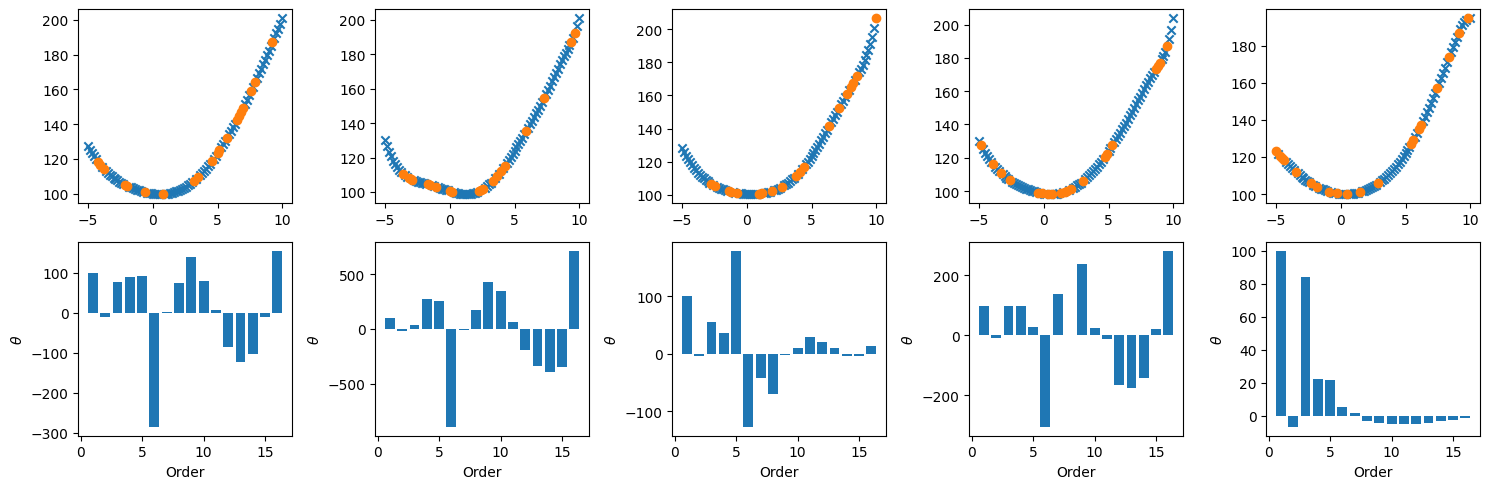
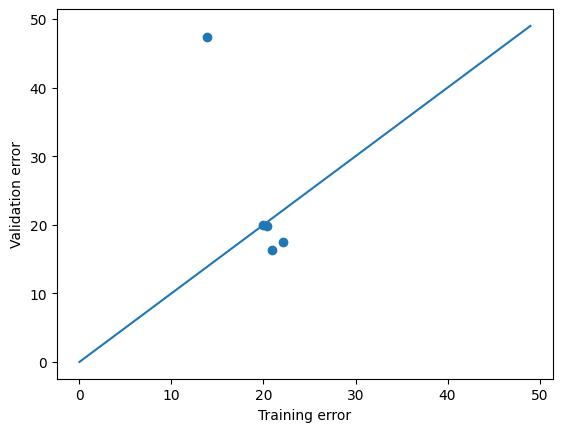
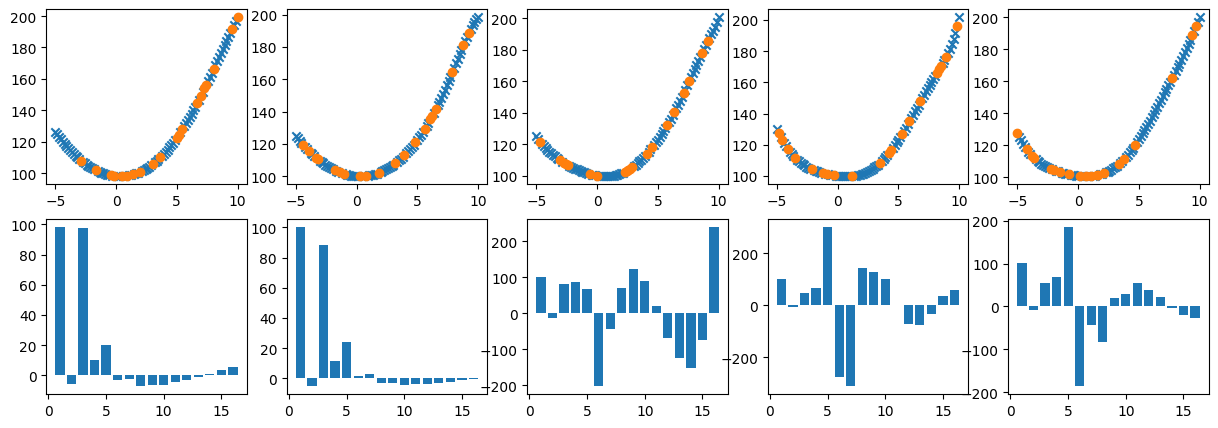
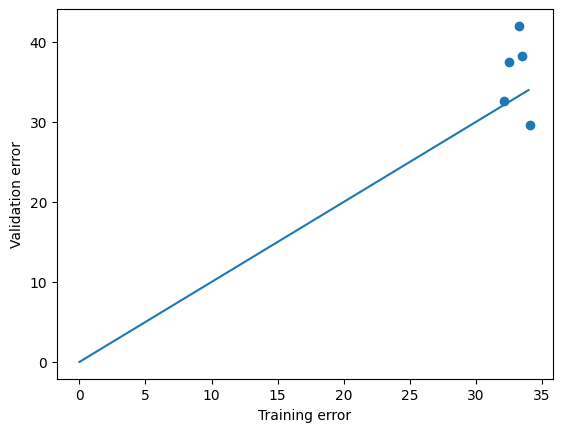
Just for illustrative purposes, let’s take this one step further. Below we shuffle the rows of our input data, which is often a useful way to avoid some ‘unconscious bias’ in your model that is just due to how your ‘spreadsheet’ is organized. Then we do 5 different ‘draws’ of 20 random validation points while we fit on the remaining 80 training measurements. This is what’s called (five-fold in this case) cross-validation. Note that because of the random draw, the difference in performance between training and validation sets is a little different each time. You may well ‘draw lucky’ every now and then and have a validation error that is similar or even lower than the training error, but in general you should see that the validation errors are (sometimes much) larger than the training errors, which is summarized in the last plot of validation versus training errors, where most of the points usually fall above the diagonal line for training=validation error. [You can als have an unlucky draw with some validation points outside the range of training data where the fitting algorithm diverges, as in one of the examples above.]

Code
# Use Accelerated Newton Solver
solver = 2

p = np.random.permutation(len(y))
splitat = 0
xshuf = x_poly[p,:]
yshuf = y[p]
tol = 1.e-4
plt.subplots(2,5,figsize=(15,5))
training_errors = np.zeros(5)
validation_errors = np.zeros(5)

# train, validation set split
for i in range(5):
  istart = i*20
  iend = istart + 20

  x_trn   = np.delete(xshuf, range(istart,iend), 0)
  y_trn = np.delete(yshuf, range(istart,iend), 0)

  x_val = xshuf[istart:iend,:]
  y_val = yshuf[istart:iend]

  norms_trn = np.amax(x_trn, axis=0)
  x_trn_nrm = x_trn/norms_trn

  theta_fit_nrm = solve_theta(x_trn_nrm, y_trn,1,tol,solver,0)

  theta_fit = theta_fit_nrm/norms_trn

  y_train_fit = x_trn.dot(theta_fit)

  training_errors[i] = mean_squared_error(y_train_fit, y_trn)/2
  print("Training error is", round(training_errors[i] ,2))

  y_val_fit = x_val.dot(theta_fit)
  validation_errors[i] = mean_squared_error(y_val_fit, y_val)/2
  print("Validation error is", round(validation_errors[i],2))

  plt.subplot(2,5,i+1)
  plt.scatter(x_trn[:,1],y_train_fit,marker='x')
  plt.scatter(x_val[:,1],y_val_fit)

  plt.subplot(2,5,i+1+5)
  plt.bar(range(1,n+1),theta_fit_nrm)
#  plt.bar(range(1,n+1),theta_fit)

  plt.xlabel('Order')
  plt.ylabel(r'$\theta$')

plt.savefig("/content/crossval1.pdf", format="pdf", bbox_inches="tight")
gfiles.download("/content/crossval1.pdf")

plt.tight_layout()
plt.figure()
plt.plot(range(50),range(50))
plt.scatter(training_errors,validation_errors)
plt.xlabel('Training error')
plt.ylabel('Validation error');


plt.savefig("/content/crossval2.pdf", format="pdf", bbox_inches="tight")
gfiles.download("/content/crossval2.pdf")
Converged after 19 iterations
Problem solved with fitting parameters:

Parameter       Value
      θ_0  100.072225
      θ_1  -10.380898
      θ_2   76.253623
      θ_3   90.759519
      θ_4   92.115613
      θ_5 -284.990105
      θ_6    3.209635
      θ_7   74.210917
      θ_8  139.470172
      θ_9   79.749143
     θ_10    6.440539
     θ_11  -84.745928
     θ_12 -123.931836
     θ_13 -103.256821
     θ_14   -9.512030
     θ_15  155.652806
Training error is 19.93
Validation error is 19.9
Converged after 30 iterations
Problem solved with fitting parameters:

Parameter       Value
      θ_0  100.455846
      θ_1  -23.507911
      θ_2   36.884857
      θ_3  278.382502
      θ_4  255.184164
      θ_5 -897.450323
      θ_6  -14.008096
      θ_7  176.742002
      θ_8  434.100884
      θ_9  349.659505
     θ_10   58.903810
     θ_11 -194.488716
     θ_12 -335.394057
     θ_13 -394.522324
     θ_14 -347.330458
     θ_15  717.642742
Training error is 20.97
Validation error is 16.28
Converged after 13 iterations
Problem solved with fitting parameters:

Parameter       Value
      θ_0  100.555112
      θ_1   -4.790408
      θ_2   54.949234
      θ_3   36.389577
      θ_4  179.137447
      θ_5 -127.118692
      θ_6  -41.846237
      θ_7  -70.333685
      θ_8   -1.965329
      θ_9   10.565726
     θ_10   29.104113
     θ_11   20.092207
     θ_12    9.747920
     θ_13   -3.425002
     θ_14   -4.382430
     θ_15   14.006065
Training error is 20.4
Validation error is 19.77
Converged after 15 iterations
Problem solved with fitting parameters:

Parameter       Value
      θ_0   98.426066
      θ_1  -11.037382
      θ_2   95.535651
      θ_3   95.636094
      θ_4   27.505983
      θ_5 -305.752888
      θ_6  136.583900
      θ_7    0.246488
      θ_8  238.375638
      θ_9   24.885307
     θ_10  -14.053068
     θ_11 -164.574019
     θ_12 -176.162440
     θ_13 -142.414352
     θ_14   19.016733
     θ_15  281.796843
Training error is 13.82
Validation error is 47.43
Accelerated method did not work, falling back to gradient descent.
Problem solved with fitting parameters:

Parameter      Value
      θ_0 100.047065
      θ_1  -6.764312
      θ_2  84.206546
      θ_3  22.461801
      θ_4  21.923104
      θ_5   5.143532
      θ_6   1.520156
      θ_7  -2.981229
      θ_8  -4.317484
      θ_9  -5.203453
     θ_10  -5.162516
     θ_11  -4.804942
     θ_12  -4.128188
     θ_13  -3.300876
     θ_14  -2.359705
     θ_15  -1.363162
Training error is 22.16
Validation error is 17.49

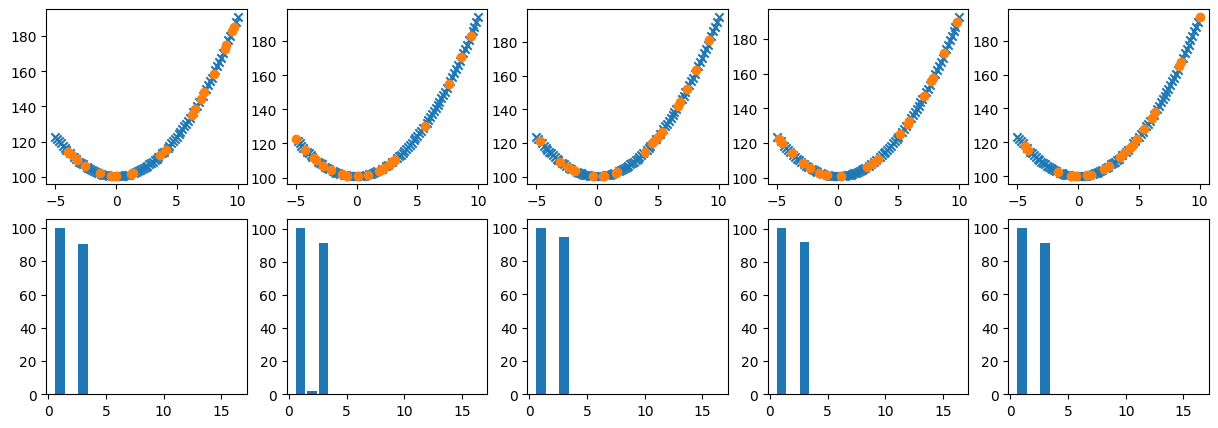
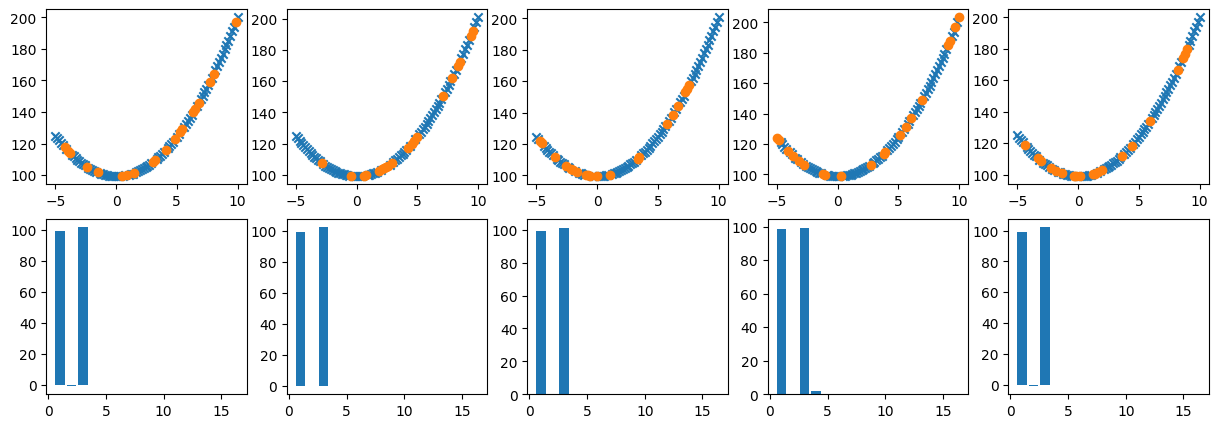
There is another purpose to this example, though, which is illustrated in the middle row of figures. That row shows bar charts of the 15 fitting parameters \(\tilde{\theta}\) for each ‘draw’ of training data (for normalized features, otherwise the \(\theta\) vary by orders of magnitude and are harder to visualize). As you can see, especially if you re-run the code a few times: even though the fitting performance is not bad for most draws, the results vary wildly in terms of which features are important. In some cases, only the first couple of bars are significant; those are close to a lower-order polynomial (such as just the quadratic one that we would like to recover in the end). But in several, if not most, cases all 15 polynomial terms contribute significantly (note that positive and negative \(\theta\) are equally important); just like in the different illustration above where the contribution of each order term was shown (for the entire data set).

This means that even if overfitting does not result in terrible performance in terms of predicting new data (essentially by interpolation), there is also an issue with interpretability. Deep learning algorithms suffer from this even more: with enough complexity those algorithms can predict all kinds of data/problems with amazing accuracy, but even the scientistcs/engineers that developed the algorithms have no idea how the models really make those predictions. In fact, I coded one of those myself, which I will share in the next module.

In those cases, one can only make predictions with exactly that neural network, instead of, e.g., using a 15-order polynomial regression to find in the end that a 3rd order model can perfectly predict a specific phenomenon at which point we no longer need the machine learning / regression model.

So how do we find out effectively what order of complexity is necessary, without overfitting our data by introducing too much complexity? That will be the subject of the last chapter of this notebook.

To keep the discussion/coding clean, I define a function below that does exactly the same as in the last example above in terms of cross-validating a given model. In other words, we will look at different solvers of the fitting problem, which were already included in the solve_theta function in the very top. The function below just combines that with automatically subdividing input data into 5 random combinations of training and validation data, normalizing w.r.t. to the training data, making the predictions of the validation data, and then showing the same plots as discussed above (or not, that is what the boolean input showplot is for). Note that scikit-learn also has built-in functions to split data into training and validation subsets (train_test_split), or even to do the entire cross-validation (sklearn.cross_validation).

Code
def my_crossvalidate(x,y,showplot,solver,learningrate,regularization):
  m,n = np.shape(x)
  batchsize = np.floor(m/5).astype(int)
  p = np.random.permutation(m)
  xshuf = x[p,:]
  yshuf = y[p]
  tol = 1.e-4
  if showplot:
    plt.subplots(2,5,figsize=(15,5))
  training_errors = np.zeros(5)
  validation_errors = np.zeros(5)


  # train, validation set split
  for i in range(5):
    print("Performing cross-validation", i+1)
    istart = i*batchsize
    iend = istart + batchsize

    x_trn = np.delete(xshuf, range(istart,iend), 0)
    y_trn = np.delete(yshuf, range(istart,iend), 0)

    x_val = xshuf[istart:iend,:]
    y_val = yshuf[istart:iend]

    norms_trn = np.amax(x_trn, axis=0)
    x_trn_nrm = x_trn/norms_trn

    theta_fit_nrm = solve_theta(x_trn_nrm, y_trn,learningrate,tol,solver,regularization)

    theta_fit = theta_fit_nrm/norms_trn

    y_train_fit = x_trn.dot(theta_fit)

    training_errors[i] = mean_squared_error(y_train_fit, y_trn)/2
    print("Training error is", round(training_errors[i] ,2))


    y_val_fit = x_val.dot(theta_fit)
    validation_errors[i] = mean_squared_error(y_val_fit, y_val)/2
    print("Validation error is", round(validation_errors[i],2))
    if showplot:
      plt.subplot(2,5,i+1)
      # plt.scatter(x,y)
      plt.scatter(x_trn[:,1],y_train_fit,marker='x')
      plt.scatter(x_val[:,1],y_val_fit)

      plt.subplot(2,5,i+1+5)
      plt.bar(range(1,n+1),theta_fit_nrm)
      # plt.bar(range(1,n+1),theta_fit)

  if showplot:
      plt.figure()
      error_range = np.ceil(np.max(training_errors)).astype(int)
      plt.plot(range(error_range),range(error_range))
      plt.scatter(training_errors,validation_errors)
      plt.xlabel('Training error')
      plt.ylabel('Validation error')
  return training_errors, validation_errors

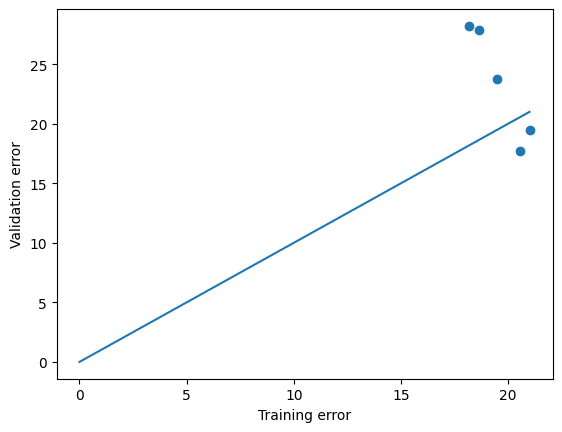
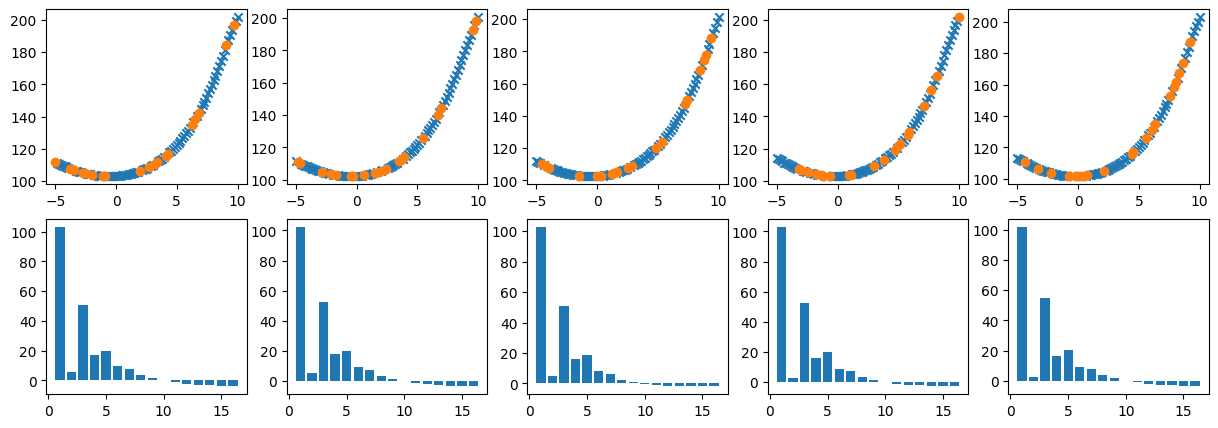
Try it out some of our solvers. Interestingly, for our own Gradient Descent, the results seem quite similar for every draw and the zero (intercept) and quadratic terms are the largest, which is what we want. For the accelerated solver=2 and solver=6, and scikit-learn solver=5 solvers, there is much more variation, and the latter seems to somehow favor higher-order terms over the lower-order ones (remember, though, that the comparison is not exact, every time you call the function, different random subsets of data are used for training and validation).

Code
solver=2
my_crossvalidate(x_poly,y,True,solver,1,0)
Performing cross-validation 1
Accelerated method did not work, falling back to gradient descent.
Problem solved with fitting parameters:

Parameter     Value
      θ_0 98.053609
      θ_1 -5.919394
      θ_2 97.457933
      θ_3 10.205630
      θ_4 20.192677
      θ_5 -2.816305
      θ_6 -2.222049
      θ_7 -7.253043
      θ_8 -6.326578
      θ_9 -6.242373
     θ_10 -4.557793
     θ_11 -2.941813
     θ_12 -0.890981
     θ_13  1.159887
     θ_14  3.302875
     θ_15  5.416085
Training error is 19.48
Validation error is 23.76
Performing cross-validation 2
Accelerated method did not work, falling back to gradient descent.
Problem solved with fitting parameters:

Parameter      Value
      θ_0 100.080102
      θ_1  -5.280030
      θ_2  88.606151
      θ_3  11.397111
      θ_4  23.815788
      θ_5   1.592109
      θ_6   2.626399
      θ_7  -3.155162
      θ_8  -3.102043
      θ_9  -4.230093
     θ_10  -3.820067
     θ_11  -3.541901
     θ_12  -2.833476
     θ_13  -2.112272
     θ_14  -1.274635
     θ_15  -0.433841
Training error is 21.04
Validation error is 19.48
Performing cross-validation 3
Converged after 17 iterations
Problem solved with fitting parameters:

Parameter       Value
      θ_0  100.037557
      θ_1  -12.164779
      θ_2   79.994053
      θ_3   86.040371
      θ_4   66.867648
      θ_5 -202.313485
      θ_6  -44.208255
      θ_7   69.814632
      θ_8  123.498232
      θ_9   90.542690
     θ_10   21.558275
     θ_11  -67.887732
     θ_12 -124.021986
     θ_13 -150.855238
     θ_14  -74.701357
     θ_15  238.557258
Training error is 18.19
Validation error is 28.21
Performing cross-validation 4
Converged after 19 iterations
Problem solved with fitting parameters:

Parameter       Value
      θ_0  100.161172
      θ_1   -8.805624
      θ_2   48.825561
      θ_3   67.340704
      θ_4  300.433920
      θ_5 -278.472777
      θ_6 -312.736659
      θ_7  143.173186
      θ_8  126.540019
      θ_9   99.984464
     θ_10    0.608988
     θ_11  -71.719671
     θ_12  -75.024335
     θ_13  -33.098273
     θ_14   35.974204
     θ_15   58.479461
Training error is 18.66
Validation error is 27.87
Performing cross-validation 5
Converged after 10 iterations
Problem solved with fitting parameters:

Parameter       Value
      θ_0  100.984615
      θ_1   -8.217300
      θ_2   54.770750
      θ_3   68.649202
      θ_4  184.648627
      θ_5 -186.383233
      θ_6  -43.935413
      θ_7  -83.140139
      θ_8   19.090735
      θ_9   29.714692
     θ_10   53.667112
     θ_11   38.354412
     θ_12   21.623355
     θ_13   -2.752475
     θ_14  -19.855675
     θ_15  -27.328437
Training error is 20.57
Validation error is 17.69
(array([19.47743744, 21.03865515, 18.19361273, 18.65795118, 20.56915335]),
 array([23.76148771, 19.48170303, 28.21401128, 27.8685346 , 17.69327419]))

As a final note: this entire notebook focusses on a perhaps insultingly trivial problem of univariate nonlinear regression, but all the above applies equally to multivariate numerical regressions, as well as multivariate nonlinear logistical regressions (classification schemes). To keep this notebook finite in lenght, I will not demonstrate this here explicitly, but (exercise!) I encourage you to revisit the notebook from last session where we considered a polynomial logistic regression two-feature two-category (binary) classification scheme to find a complicated decision boundary between the two categories. There too a high-order order polynomial (in that case of two variables, instead of one here) was overkill. You should go back and 1) split the full data-set into training and validation data, 2) fit the categorization scheme only to the training data, and then 3) see how well the fit is able to separate (decision boundary) the validation data.

Regularization

Finally, the moment you have impatiently been waiting for: how do we solve all these problems of overfitting, ambiguitiy, interprettability, etc.?? The answer is regularization.

Given all the complexity discussed so far, the solution will turn out to be amazingly simple.

Ridge Regression

Let’s clearly phrase the problem one more time: we want to allow for maximum complexity, such that a single model will be able to fit both simple and much more complex data, but we want the final fitted model to be as simple as possible, while still being accurate. In the case of numerical regression, we want to allow for 15 (or even many more) orders of polynomials, but would like our algorithm to figure out itself if we really need 15 terms, or only 14, 13, …, or 2.

Remember that we are still doing linear regression, in the sense that our coefficients \(\theta_0\), \(\theta_1\), \(\ldots\), \(\theta_{15}\) are linear. When all \(|\theta_i|>0\), then all orders of the polynomial contribute, and the larger a given \(|\theta_i|\), the more that order contributes. In order to make our model simpler then, we would like to keep the fitting parameters \(\theta_i\) as small as possible, while still having a decent fit.

The solution then, is simply to penalize the total magnitude of the sum of fitting parameters \(\theta_i\)!

Up to this point, we have used the common least-squared-error function to measure the cost of a fit with a given set of fitting parameters \(\theta_i\), defined and implemented for a single point as, where the subscript \(i\) here sums over all the features, or polynomials in this case (including \(x_0=1\)), as:

\(J = \sum_{i=0}^n (\theta_i x_i - y)^2\)

the total cost of a fit is simply the weighted sum of these errors over all measurements points.

To penalize overfitting, we simply add another (penalty) term to this cost or error function. The simplest choice is the sum of squared theta’s (i.e. positive values):

\(J = \sum_{i=0}^n [(\theta_i x_i - y)^2 + \lambda \theta_i^2\) ]

Loosely speaking, this is how this works: if there are, say, two different sets of \(\theta_i\) that have pretty similar least-squared-errors, but one involves more terms (more \(|\theta_i|>0\)) than the other, then that solution will incurr a high penalty/error and the fitting routine will instead pick the solution with fewer terms (because, even if the least-squared-error is higher, the additional penalty term makes the total error of the other option larger). The overal factor \(\lambda\) allows us to tune how much we want to constrain the fitting parameters \(\theta_i\).

This type of penalizing complexity is referred to as regularization and $$ is the regularization parameter. In any scheme that allows for regularization, setting \(\lambda=0\) obviously turns off the regularization and turns such a scheme into regular linear regression. Conversely, if \(\lambda\) is made extremely large, then all order terms are penalized away and one is left with only the constant (bias) solution. Actually, in reference to the equation above, regularization is usually not applied to the bias feature (\(i=0\)), because there is basically no risk of ‘overfitting’ the intercept of your data.

The specific regularization in terms of \(\lambda \sum_i \theta_i^2\) is referred to as Ridge regularization, and regression with this regularization can also be referred to as ridge regression. A built-in function Ridge is available in scikit-learn and was already included in my solve_theta function above. Note that that function unfortunately uses alpha for the regularization parameter, while we have used \(\alpha\) for the learning rate of gradient descent (not the same!). The solve_theta function has separate inputs for learning rate (only necessary when using gradient descent) and regularization.

Without further ado, let’s give it a try. The Ridge regularized regression was implemented as solver=3 in my function, and we’ll try \(\lambda=1\).

Code
solver = 3
my_crossvalidate(x_poly,y,True,solver,1,1)
Performing cross-validation 1
Problem solved with fitting parameters:

Parameter      Value
      θ_0 103.008588
      θ_1   5.552720
      θ_2  50.970981
      θ_3  17.226042
      θ_4  19.566326
      θ_5   9.494998
      θ_6   7.433836
      θ_7   3.598822
      θ_8   1.822510
      θ_9   0.013955
     θ_10  -1.125191
     θ_11  -2.085539
     θ_12  -2.762635
     θ_13  -3.291438
     θ_14  -3.673672
     θ_15  -3.956555
Training error is 27.02
Validation error is 45.97
Performing cross-validation 2
Problem solved with fitting parameters:

Parameter      Value
      θ_0 102.137732
      θ_1   4.920346
      θ_2  52.546054
      θ_3  17.643546
      θ_4  19.673527
      θ_5   9.227501
      θ_6   6.992050
      θ_7   3.110188
      θ_8   1.369638
      θ_9  -0.360832
     θ_10  -1.389060
     θ_11  -2.231938
     θ_12  -2.784186
     θ_13  -3.192982
     θ_14  -3.458941
     θ_15  -3.633862
Training error is 33.77
Validation error is 18.75
Performing cross-validation 3
Problem solved with fitting parameters:

Parameter      Value
      θ_0 102.622640
      θ_1   4.963442
      θ_2  50.712692
      θ_3  16.397896
      θ_4  18.638548
      θ_5   8.001793
      θ_6   6.193296
      θ_7   2.458712
      θ_8   1.136939
      θ_9  -0.283851
     θ_10  -0.936885
     θ_11  -1.459692
     θ_12  -1.700055
     θ_13  -1.838414
     θ_14  -1.862446
     θ_15  -1.831044
Training error is 29.78
Validation error is 43.87
Performing cross-validation 4
Problem solved with fitting parameters:

Parameter      Value
      θ_0 102.817056
      θ_1   2.582215
      θ_2  52.385281
      θ_3  16.026523
      θ_4  19.996116
      θ_5   8.575540
      θ_6   7.060584
      θ_7   2.923863
      θ_8   1.441984
      θ_9  -0.298131
     θ_10  -1.198978
     θ_11  -1.982874
     θ_12  -2.440619
     θ_13  -2.771172
     θ_14  -2.949125
     θ_15  -3.039121
Training error is 30.37
Validation error is 22.68
Performing cross-validation 5
Problem solved with fitting parameters:

Parameter      Value
      θ_0 101.659338
      θ_1   2.433429
      θ_2  55.091160
      θ_3  16.312558
      θ_4  20.592635
      θ_5   9.130782
      θ_6   7.591200
      θ_7   3.476431
      θ_8   1.907781
      θ_9   0.092623
     θ_10  -0.944984
     θ_11  -1.875003
     θ_12  -2.509395
     θ_13  -3.026941
     θ_14  -3.405782
     θ_15  -3.702201
Training error is 29.43
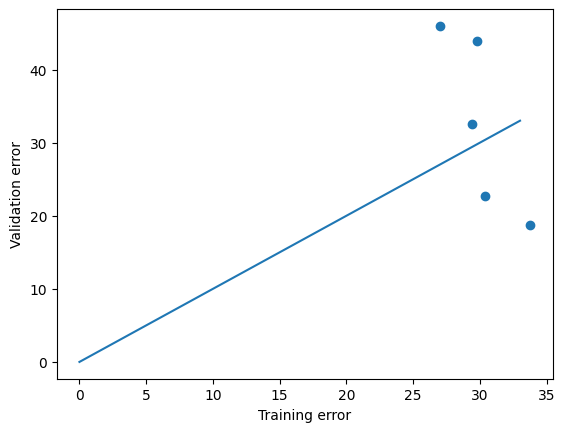
Validation error is 32.59
(array([27.01702641, 33.77336708, 29.77769409, 30.36829778, 29.43052913]),
 array([45.96660227, 18.74724423, 43.87388433, 22.67665118, 32.59370908]))

So what is happening? You can see that the overall fitting errors of both training and validation sets are somewhat larger. But the huge improvements are that: * there is generally less discrepancy between training and validation (the most important goal), * you can see this partly by the training and validation models all being more similar in the top row of figures, * in the bottom row of figures you can see that \(\theta_0\), which is simply the intercept, and \(\theta_2\), which represents the quadratic term, are larger than all other terms for all cross-validation tests, suggesting that perhaps a quadratic model has sufficient complexity to represent these data.

In an ideal world, though, wouldn’t it be great if our algorithm could find out exactly which features we can discard? In Ridge regularization all \(\theta_i\) are forced to be smaller than without regularization but all remain non-zero. If we could get a few \(\theta_i\) to become exactly zero, then we can certainly eliminate those features.

Lasso Regression

It turns out that even these high demands can be met, and almost just as easily. Instead of penalizing the fitting parameters with the summed squares of \(\theta_i\), we choose a different pentalty term which is just the sum of absolute values of \(\theta_i\). In other words, for a single measurement point, the fitting error/cost is now:

\(J = \sum_{i=0}^n [(\theta_i x_i - y)^2 + \lambda |\theta_i|\) ]

It turns out that this trivial change is enough to miraculously get rid of feautures completely and automatically. This process is called feature selection (of course we can also do more manual feature selection based on ridge detection [although not as easily as you might think], or just intuition of interdependencies between features etc.).

This particular choice of regularization is called Least Absolute Shrinkage and Selection Operator, or Lasso regularization/regression. It is also available directly in scikit-learn and included in my solve_theta function as solver=4.

Let’s try out this Lasso regularization with \(\lambda=1\):

Code
solver = 4
my_crossvalidate(x_poly,y,True,solver,1,1)
Performing cross-validation 1
Problem solved with fitting parameters:

Parameter      Value
      θ_0 100.228351
      θ_1   0.000000
      θ_2  90.560149
      θ_3   0.000000
      θ_4   0.000000
      θ_5   0.000000
      θ_6   0.000000
      θ_7   0.000000
      θ_8   0.000000
      θ_9   0.000000
     θ_10   0.000000
     θ_11   0.000000
     θ_12   0.000000
     θ_13   0.000000
     θ_14   0.000000
     θ_15   0.000000
Training error is 24.07
Validation error is 43.95
Performing cross-validation 2
Problem solved with fitting parameters:

Parameter      Value
      θ_0 100.739486
      θ_1   1.852837
      θ_2  91.513940
      θ_3   0.000000
      θ_4   0.000000
      θ_5   0.000000
      θ_6   0.000000
      θ_7   0.000000
      θ_8   0.000000
      θ_9   0.000000
     θ_10   0.000000
     θ_11   0.000000
     θ_12   0.000000
     θ_13   0.000000
     θ_14   0.000000
     θ_15   0.000000
Training error is 24.34
Validation error is 25.16
Performing cross-validation 3
Problem solved with fitting parameters:

Parameter      Value
      θ_0 100.138917
      θ_1   0.000000
      θ_2  94.761057
      θ_3   0.000000
      θ_4   0.000000
      θ_5   0.000000
      θ_6   0.000000
      θ_7   0.000000
      θ_8   0.000000
      θ_9   0.000000
     θ_10   0.000000
     θ_11   0.000000
     θ_12   0.000000
     θ_13   0.000000
     θ_14   0.000000
     θ_15   0.000000
Training error is 24.0
Validation error is 21.71
Performing cross-validation 4
Problem solved with fitting parameters:

Parameter      Value
      θ_0 100.801677
      θ_1   0.000000
      θ_2  91.912034
      θ_3   0.000000
      θ_4   0.000000
      θ_5   0.000000
      θ_6   0.000000
      θ_7   0.000000
      θ_8   0.000000
      θ_9   0.000000
     θ_10   0.000000
     θ_11   0.000000
     θ_12   0.000000
     θ_13   0.000000
     θ_14   0.000000
     θ_15   0.000000
Training error is 29.14
Validation error is 11.69
Performing cross-validation 5
Problem solved with fitting parameters:

Parameter      Value
      θ_0 100.025784
      θ_1   0.000000
      θ_2  90.929607
      θ_3   0.000000
      θ_4   0.000000
      θ_5   0.000000
      θ_6   0.000000
      θ_7   0.000000
      θ_8   0.000000
      θ_9   0.000000
     θ_10   0.000000
     θ_11   0.000000
     θ_12   0.000000
     θ_13   0.000000
     θ_14   0.000000
     θ_15   0.000000
Training error is 22.76
Validation error is 31.77
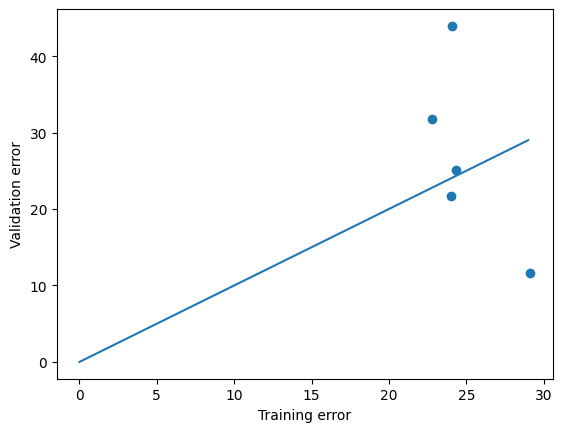
(array([24.06646898, 24.33825185, 24.00228551, 29.14198855, 22.75906699]),
 array([43.95201446, 25.15934277, 21.7056151 , 11.69270754, 31.77470019]))

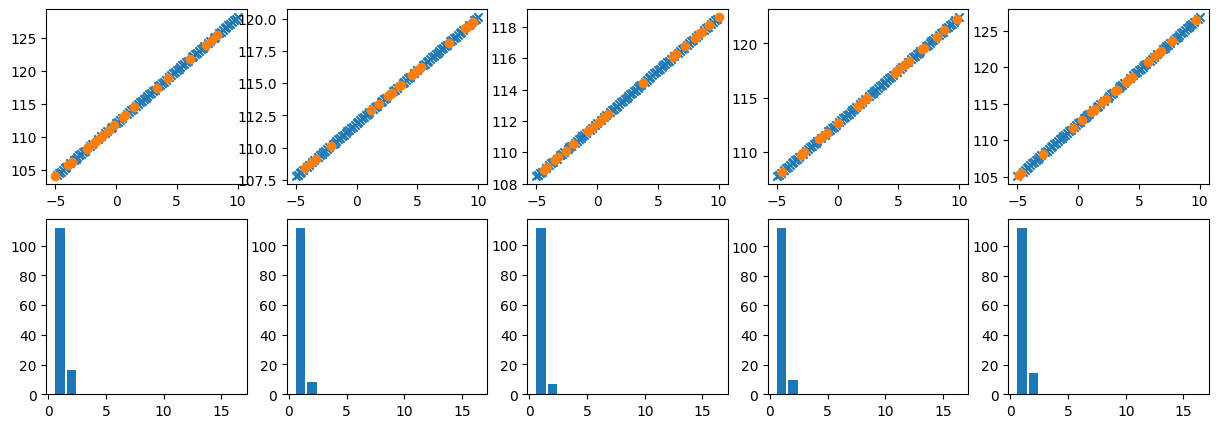
As you can see, Lasso magically gets rid of all the complexity (higher-order terms, but also the linear term) and only leaves us with the quadratic term that we used in generating these synthetic data.

The above is really the result we want. But for demonstration purposed, let’s see what happens when we do less or more regularization. First, here is the result with \(\lambda =0.1\) (the last parameter in my my_crossvalidate function).

Code
my_crossvalidate(x_poly,y,True,4,1,0.1)
Performing cross-validation 1
Problem solved with fitting parameters:

Parameter      Value
      θ_0  99.233398
      θ_1  -0.804461
      θ_2 101.662994
      θ_3   0.000000
      θ_4   0.000000
      θ_5   0.000000
      θ_6   0.000000
      θ_7   0.000000
      θ_8   0.000000
      θ_9  -0.000000
     θ_10  -0.000000
     θ_11  -0.000000
     θ_12  -0.000000
     θ_13  -0.000000
     θ_14  -0.000000
     θ_15  -0.000000
Training error is 22.21
Validation error is 15.31
Performing cross-validation 2
Problem solved with fitting parameters:

Parameter      Value
      θ_0  99.033095
      θ_1  -0.502862
      θ_2 102.340661
      θ_3   0.000000
      θ_4   0.000000
      θ_5   0.000000
      θ_6   0.000000
      θ_7   0.000000
      θ_8   0.000000
      θ_9   0.000000
     θ_10   0.000000
     θ_11   0.000000
     θ_12   0.000000
     θ_13   0.000000
     θ_14   0.000000
     θ_15   0.000000
Training error is 22.79
Validation error is 12.58
Performing cross-validation 3
Problem solved with fitting parameters:

Parameter      Value
      θ_0  99.383298
      θ_1  -0.000000
      θ_2 101.287125
      θ_3   0.000000
      θ_4   0.000000
      θ_5   0.000000
      θ_6   0.000000
      θ_7   0.000000
      θ_8   0.000000
      θ_9   0.000000
     θ_10   0.000000
     θ_11   0.000000
     θ_12   0.000000
     θ_13  -0.000000
     θ_14  -0.000000
     θ_15  -0.000000
Training error is 22.65
Validation error is 13.82
Performing cross-validation 4
Problem solved with fitting parameters:

Parameter     Value
      θ_0 98.662122
      θ_1  0.000000
      θ_2 99.364756
      θ_3  2.182084
      θ_4  0.000000
      θ_5  0.000000
      θ_6  0.000000
      θ_7  0.000000
      θ_8  0.000000
      θ_9  0.000000
     θ_10  0.000000
     θ_11  0.000000
     θ_12  0.000000
     θ_13  0.000000
     θ_14  0.000000
     θ_15  0.000000
Training error is 18.8
Validation error is 29.96
Performing cross-validation 5
Problem solved with fitting parameters:

Parameter      Value
      θ_0  98.885894
      θ_1  -0.920995
      θ_2 102.127091
      θ_3   0.000000
      θ_4   0.000000
      θ_5  -0.000000
      θ_6  -0.000000
      θ_7  -0.000000
      θ_8  -0.000000
      θ_9  -0.000000
     θ_10  -0.000000
     θ_11  -0.000000
     θ_12  -0.000000
     θ_13  -0.000000
     θ_14  -0.000000
     θ_15  -0.000000
Training error is 16.69
Validation error is 37.39
(array([22.20640788, 22.78669049, 22.64649952, 18.79996619, 16.69356643]),
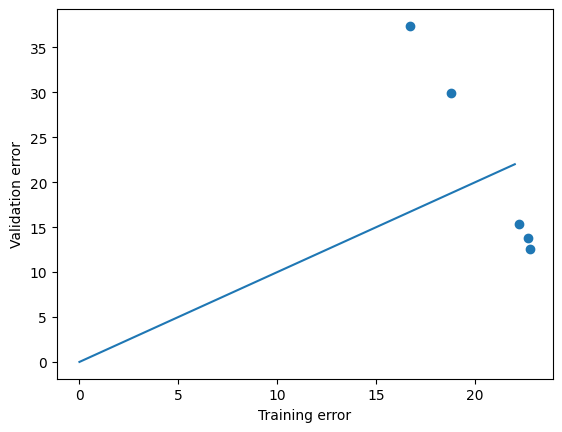
 array([15.30663844, 12.57574657, 13.81628806, 29.9587357 , 37.3920277 ]))

In this case, you see that some higher-order terms ‘survive’ and not always the same ones, i.e. depending on what split of training and validation data is chosen, sometimes the data are overfitted with a small 8th order contribution and another time with a small 11th order contribution, say.

How about when we use a lot more regularization. Let’s find out for \(\lambda = 10\):

Code
my_crossvalidate(x_poly,y,True,4,1,10)
Performing cross-validation 1
Problem solved with fitting parameters:

Parameter      Value
      θ_0 112.089877
      θ_1  16.071781
      θ_2   0.000000
      θ_3   0.000000
      θ_4   0.000000
      θ_5   0.000000
      θ_6   0.000000
      θ_7   0.000000
      θ_8   0.000000
      θ_9   0.000000
     θ_10   0.000000
     θ_11   0.000000
     θ_12   0.000000
     θ_13   0.000000
     θ_14   0.000000
     θ_15   0.000000
Training error is 376.99
Validation error is 176.26
Performing cross-validation 2
Problem solved with fitting parameters:

Parameter      Value
      θ_0 111.881243
      θ_1   8.217249
      θ_2   0.000000
      θ_3   0.000000
      θ_4   0.000000
      θ_5   0.000000
      θ_6   0.000000
      θ_7   0.000000
      θ_8   0.000000
      θ_9   0.000000
     θ_10   0.000000
     θ_11   0.000000
     θ_12   0.000000
     θ_13   0.000000
     θ_14   0.000000
     θ_15   0.000000
Training error is 380.18
Validation error is 558.16
Performing cross-validation 3
Problem solved with fitting parameters:

Parameter      Value
      θ_0 111.846148
      θ_1   6.667137
      θ_2   0.000000
      θ_3   0.000000
      θ_4   0.000000
      θ_5   0.000000
      θ_6   0.000000
      θ_7   0.000000
      θ_8   0.000000
      θ_9   0.000000
     θ_10   0.000000
     θ_11   0.000000
     θ_12   0.000000
     θ_13   0.000000
     θ_14   0.000000
     θ_15   0.000000
Training error is 393.3
Validation error is 587.25
Performing cross-validation 4
Problem solved with fitting parameters:

Parameter      Value
      θ_0 112.638089
      θ_1   9.764811
      θ_2   0.000000
      θ_3   0.000000
      θ_4   0.000000
      θ_5   0.000000
      θ_6   0.000000
      θ_7   0.000000
      θ_8   0.000000
      θ_9   0.000000
     θ_10   0.000000
     θ_11   0.000000
     θ_12   0.000000
     θ_13   0.000000
     θ_14   0.000000
     θ_15   0.000000
Training error is 387.77
Validation error is 406.83
Performing cross-validation 5
Problem solved with fitting parameters:

Parameter      Value
      θ_0 112.314382
      θ_1  14.541144
      θ_2   0.000000
      θ_3   0.000000
      θ_4   0.000000
      θ_5   0.000000
      θ_6   0.000000
      θ_7   0.000000
      θ_8   0.000000
      θ_9   0.000000
     θ_10   0.000000
     θ_11   0.000000
     θ_12   0.000000
     θ_13   0.000000
     θ_14   0.000000
     θ_15   0.000000
Training error is 367.9
Validation error is 270.9
(array([376.99067818, 380.18158467, 393.29848937, 387.76928744,
        367.90324592]),
 array([176.26287137, 558.1613232 , 587.24958073, 406.8272978 ,
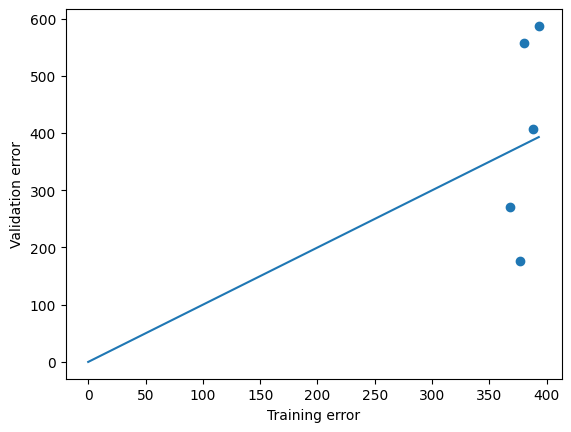
        270.90185628]))

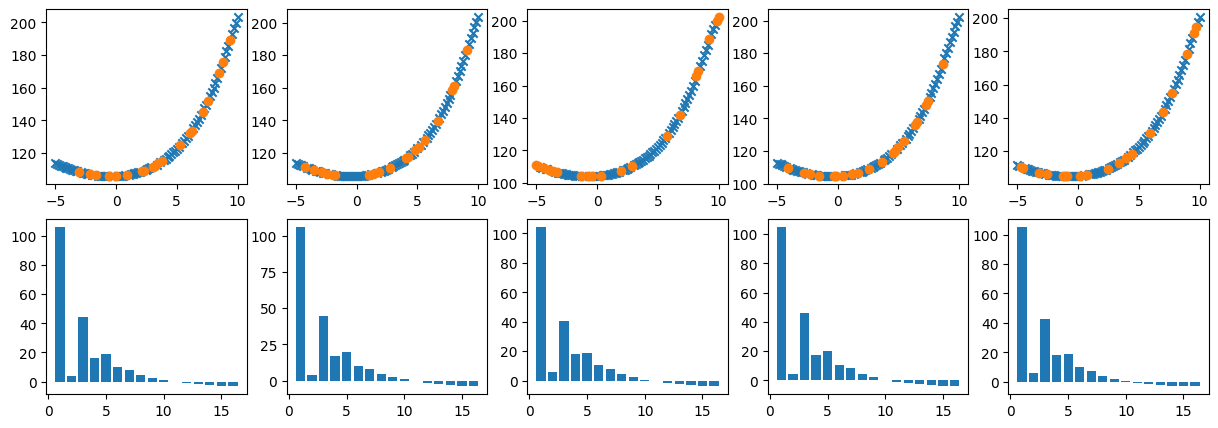
Clearly, now we are underfitting. In a few cases only the bias feature survived (predicting that \(y = \theta_0\), the constant bias/intercept) while a few other cases have only the linear fit \(y = \theta_0 + \theta_1 x\), which of course is also not a good fit to the quadratic data.

As pointed out earlier, the exact same Ridge and Lasso pentalty terms can also be added to the cost function (and cost function gradient) for logistical regression to avoid overfitting of classification schemes.

Gory details (for those interested)

Hard-Coded Ridge Regularized Numerical Regression

As pointed out above, the ‘black box’ built in scikit-learn functions work perfectly fine but may have some hidden ‘sauce’ that is not necessarily transparent to the user. Below, the Ridge Regularized Regression is coded from scratch, which really is just a minor modification from our trusty gradient descent. There are only 2 minor changes: the cost function has an additional term of the sum of squared \(\theta\) (line 5 below), which means that the cost-gradient function needs to have the derivative of that term w.r.t. each \(\theta\) (except \(\theta_0\), which is why the penalty is only added to grads[1:], meaning element 1 and everything above, line 11).

Then the gradient descent function is just copied and pasted from before, but calling the regularized cost and gradient functions. Note, though, that when you call any of these functions with \(\lambda =0\), you have the exact same cost, gradient, and gradient descent as before. In other words, there is no reason to have separate LinearRegression and Ridge functions, and I only provided the codes the way I did for educational purposes, i.e. introducing the cost, gradient, gradient descent without regularization first. To the prior point: if you use the scikit-learn Lasso or Ridge functions with \(\lambda =0\) (actually, alpha=0 if you call the functions directly), then you should get the same result from both, which should also be the same as the unregularized LinearRegression.

Code
def cost_ridge(theta, x, y, reglambda):
  # Usual mean squared error cost:
  cost = mean_squared_error(x.dot(theta),y) /2
  # Additional regularization/penalty to keep theta small:
  cost += reglambda*np.sum(theta[1:]**2)/(2*len(y))
  return cost

def gradient_ridge(theta, x, y,reglambda):
  grads = (x.dot(theta) - y).dot(x)/len(y)
  # Regularization of theta_1 and higher:
  grads[1:] += (reglambda/len(y)) * theta[1:]
  return grads

def gradient_descent_ridge(theta,x, y,alpha,tolerance,reglambda):
  nrsteps = 100000
  m = len(y)

  i=0
  converged = False
  diverged = False
  while i < nrsteps-1 and not converged and not diverged:
      costi = cost_ridge(theta,x,y,reglambda)
      theta = theta -  alpha * gradient_ridge(theta,x,y,reglambda)

      if i>0:
        improvement = np.abs(1- costi/cost_sv)
        if improvement < tolerance:
          converged = True
        elif improvement > 1:
          print(i, improvement, "Errors are diverging:", cost, ">", cost_sv)
          diverged = True
      i+=1
      cost_sv = costi

  if i==nrsteps-1:
    print(i-1, costi, "Did not converge in", nrsteps, "steps. Increase nr of steps and try again.")
  return theta

The above gradient descent solver with regularized cost and cost gradient was already added as option 7 in my solver ‘switchboard’ at the very top of this notebook (perhaps not good python practice), and can therefor also be called directly in my cross-validation function.

Code
solver=7
my_crossvalidate(x_poly,y,True,solver,1,1)
Performing cross-validation 1
Problem solved with fitting parameters:

Parameter      Value
      θ_0 105.822554
      θ_1   3.903082
      θ_2  44.311235
      θ_3  16.201362
      θ_4  19.012753
      θ_5   9.776528
      θ_6   8.004936
      θ_7   4.333554
      θ_8   2.668154
      θ_9   0.895497
     θ_10  -0.215204
     θ_11  -1.182175
     θ_12  -1.873749
     θ_13  -2.435269
     θ_14  -2.858650
     θ_15  -3.193534
Training error is 33.48
Validation error is 38.29
Performing cross-validation 2
Problem solved with fitting parameters:

Parameter      Value
      θ_0 105.764865
      θ_1   3.884396
      θ_2  44.737640
      θ_3  17.097288
      θ_4  19.566143
      θ_5  10.307365
      θ_6   8.329569
      θ_7   4.535569
      θ_8   2.723366
      θ_9   0.823310
     θ_10  -0.412509
     θ_11  -1.495204
     θ_12  -2.294656
     θ_13  -2.954779
     θ_14  -3.467269
     θ_15  -3.881567
Training error is 32.55
Validation error is 37.57
Performing cross-validation 3
Problem solved with fitting parameters:

Parameter      Value
      θ_0 104.233851
      θ_1   5.613006
      θ_2  40.633237
      θ_3  17.823225
      θ_4  18.553581
      θ_5  10.317990
      θ_6   7.960655
      θ_7   4.405967
      θ_8   2.516868
      θ_9   0.683222
     θ_10  -0.560919
     θ_11  -1.616749
     θ_12  -2.406737
     θ_13  -3.047617
     θ_14  -3.544048
     θ_15  -3.938636
Training error is 34.14
Validation error is 29.69
Performing cross-validation 4
Problem solved with fitting parameters:

Parameter      Value
      θ_0 104.647789
      θ_1   4.273518
      θ_2  46.369281
      θ_3  17.446136
      θ_4  20.013101
      θ_5  10.249211
      θ_6   8.201036
      θ_7   4.230287
      θ_8   2.376778
      θ_9   0.434569
     θ_10  -0.793538
     θ_11  -1.854636
     θ_12  -2.610801
     θ_13  -3.217338
     θ_14  -3.666750
     θ_15  -4.013155
Training error is 32.12
Validation error is 32.63
Performing cross-validation 5
Problem solved with fitting parameters:

Parameter      Value
      θ_0 105.006945
      θ_1   6.004223
      θ_2  42.840363
      θ_3  18.059941
      θ_4  18.522352
      θ_5   9.786405
      θ_6   7.357659
      θ_7   3.775258
      θ_8   1.998602
      θ_9   0.308486
     θ_10  -0.743012
     θ_11  -1.597447
     θ_12  -2.174672
     θ_13  -2.607496
     θ_14  -2.901293
     θ_15  -3.104979
Training error is 33.29
Validation error is 42.02
(array([33.47637746, 32.55056815, 34.13571643, 32.11972681, 33.29288479]),
 array([38.29482539, 37.56769984, 29.6862831 , 32.629277  , 42.01864248]))

You can see the same qualitative difference between the unregularized gradient descent (run the cell above with the last number \(\lambda = 0\)) and regularized Ridge regression from our hard coded routines as by using LinearRegression versus Ridge from scikit-learn (though the latter seem to do even more overfitting). As before, all coefficients \(\theta\) are shrunk to smaller values, but none vanish (no proper feature selection).

I do not provide a hard coded Lasso routine, because as easy as this method is formally, it has an unfortunate implementation challenge: the derivative/gradient of the absolute function/value \(|\theta|\), which we need for gradient descent, is not defined at $ $. This makes the implementation a bit messier. Basically, one has one proper derivative for $<-$ (with \(\epsilon\) some small number), another for $> $ and an approximation (often using ‘sub gradients’) of a derivative for \(-\epsilon < \theta< \epsilon\).

Why can Lasso Regression do Feature Selection but Ridge Cannot?

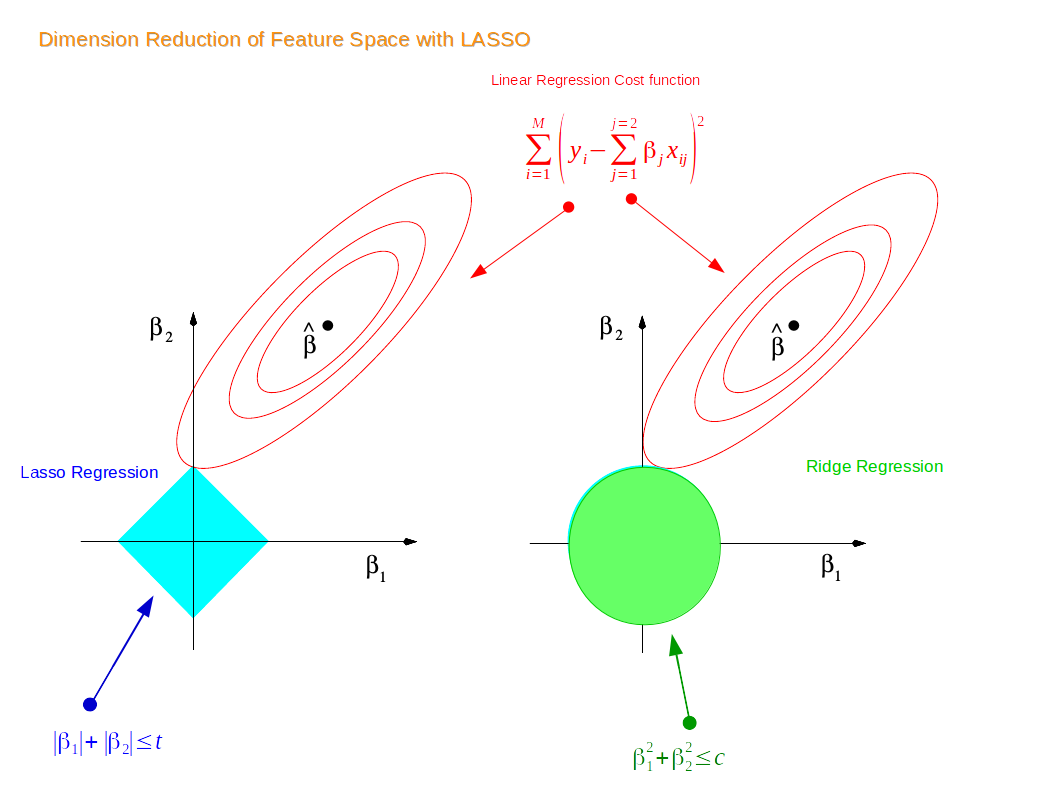
https://miro.medium.com/max/2116/1*Jd03Hyt2bpEv1r7UijLlpg.png from https://miro.medium.com/max/2116/1*Jd03Hyt2bpEv1r7UijLlpg.png A super-detailed discussion can also be found here: https://www.coursera.org/lecture/ml-regression/deriving-the-lasso-coordinate-descent-update-6OLyn , but it uses yet another alternative to gradient descent: coordinate descent. In coordinate descent, fitting is essentially done for one coordinate \(\theta_i\) (i.e. one fitting parameter for one feature) at a time.

The figure above illustrates why Lasso (left panel) can optimize to find best-fit \(\theta_1, \ldots, \theta_n\) where a number of those are exactly zero, whereas Ridge (right panel) can make all the \(\theta\) smaller but does not force any of them to zero. In the figure, the symbol \(\beta\) is used instead of our \(\theta\). So \(\beta_1\) and \(\beta_2\) are the fitting parameters of two features (in that notation, we might fit a second order polynomial \(y = \beta_1 x + \beta_2 x^2\), or some function of completely unrelated features \(x_1\) (say, temperature) and \(x_2\) (say, pressure) with \(y = \beta_1 x_1 + \beta_2 x_2\)).

If you remember from the very first module, the least-squared-fitting errors of this regression model are obviously quadratic in \(\beta_1\) and \(\beta_2\) and form a convex, bowl-like, surface \(\mathbf{J}(\beta_1,\beta_2)\) in a 3D surface plot, or elliptical contours in a 2D plot, just as shown in the first notebook in this series. Those contours are also shown in the figure above. In a contour plot, each line connects all the same values of a parameter, in this case the cost/error \(\mathbf{J}\). The lowest least-square-error is the minimum in the center of those ellipses, which is indicated as (vector) \(\hat{\beta}\) above. The first ellipse surrounding is for all the combinations of \(\beta_1\) and \(\beta_2\) that have an error of, say, 10 (in arbitrary non-normalized units), the next contour is least-square (LS, or mean-squared-error MSE, which is the notation we used before) error of 20, the next one 30, etc. So these would be the actual errors without regularization.

Regularization adds a penalty to the error to try and keep the coefficients small. The Lasso penalty for this 2-feature case is (apart from perhaps an overal factor 0.5) \(\mathbf{J}_\lambda^\mathrm{Lasso} = \lambda (|\beta_1| + |\beta_2|)\), while the Ridge penalty is \(\mathbf{J}_\lambda^\mathrm{Ridge} = \lambda (\beta_1^2 + \beta_2^2)\). For a range in fitting parameters \(\beta_1^\mathrm{min} \le \beta_1 \le\beta_1^\mathrm{max}\) and \(\beta_2^\mathrm{min} \le \beta_2 \le\beta_2^\mathrm{max}\), any combination of \(\beta_1\) and \(\beta_2\) within this range will fall in the diamonshape for $^ $ (with 4 the corners given by \((\lambda \beta_1^\mathrm{min},0)\), \((0,\lambda \beta_2^\mathrm{min})\), \((\lambda \beta_1^\mathrm{max},0)\), \((0,\lambda \beta_2^\mathrm{max})\)), while for the Ridge penalty $^ $ they fall within an ellipse with the same major and minor axes. The figure is perhaps cofusing because in general the diamond and ellipse overlap with the LS contours.

The total cost/error is the sum of the LS error, shown by the same contours for Lasso and Ridge, plus the regularization error. Consider one contour of the LS (least-squares) errors, say the outermost one. Again, every combination of \(\beta_1\) and \(\beta_2\) that falls on that contour will have the same LS fitting error (cost). Similarly, every point on the boundary of the Lasso (diamond) or Ridge (ellipsoids) costs have the same regularization penalty.

When you combine the two, you find that some point towards the upper-right of a LS contour may have the same LS error as on the bottom-left on the same contour, but the former has much larger values of \(\beta_1\) and \(\beta_2\) and will thus have a much higher regularization error. Conversely, fits with very small \(\beta_1\) and \(\beta_2\) (say close to zero) fall in a region with very large LS errors.

If you think about it, you’ll see that the optimum combination of unregularized LS errors together with the regularization penalty, is the point where a LS contour touches the boundary of the penalty term. Where exactly this happens depends on a user’s choice of regularization strength \(\lambda\) which defines the size of the diamond or Ridge ellipsoid. The key point, though, is that the ellipsoids of the LS errors can graze the diamond-shaped Lasso errors exactly on the \(\theta_1\) or \(\theta_2\) axes, whereas they touch the circular Ridge contours somewhere outside those axes. In other words, for Ridge one always finds an option \(|\theta_1|>0\) and \(|\theta_2|>0\), whereas for Lasso some of the \(\theta_i\) can be forced to be exactly zero.

In general terms, a non-regularized regression might find all \(|\theta_i|>0\), such as you saw above for our 15th order polynomial fit to a simple quadratic function. For both Lasso and Ridge, if \(\lambda\gg1\) is made very very large, the regularization penalty will make all \(\theta\approx 0\) (expect the bias/intercept, which is typically not regularized). However, the path from the unregularized to the more and more regularized fits is different for Ridge and Lasso. For the former, all the \(\theta\) get smaller and smaller at the same time until they (almost) vanish. In other words, a fairly direct path/line from the least-squared-error values to all zeros. But for Lasso, with more and more regularization, first one or more \(\theta_i\) will become zero, and then the other \(\theta_i\) become smaller and smaller.

Linear Regression, Lasso, and Ridge interpretation visualization code

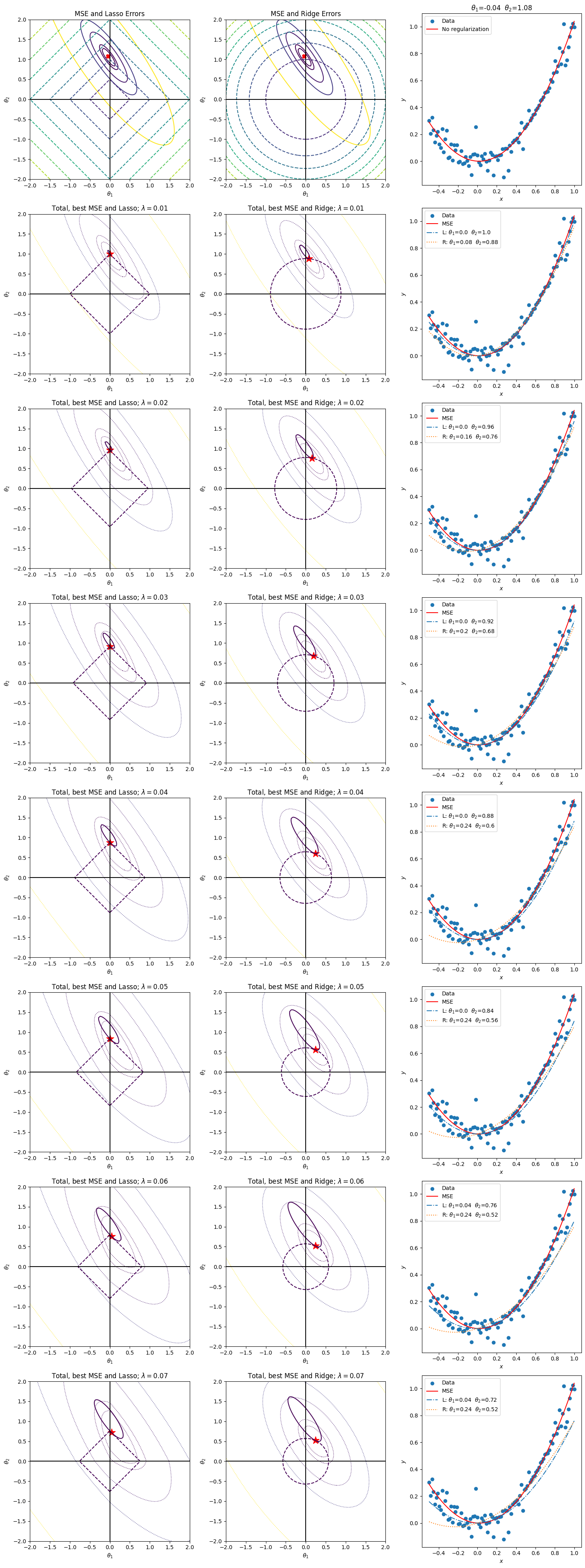
For those that really like to see the nitty-gritty (if not now, maybe in the future), I have coded up the concepts behind the web figure above in the big cell below. The code is not pretty, so just look at the figures it produces.

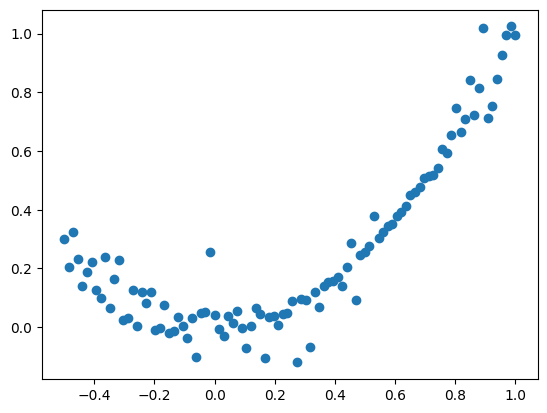
This is how it works: the synthetic data are again the same simple quadratic function as above with some noise, and we do a ‘polynomial’ regression with \(x_1=x\) and \(x_2=x^2\); in other words, we already assume the intercept is zero but try to fit the data with a linear plus a quadratic term.

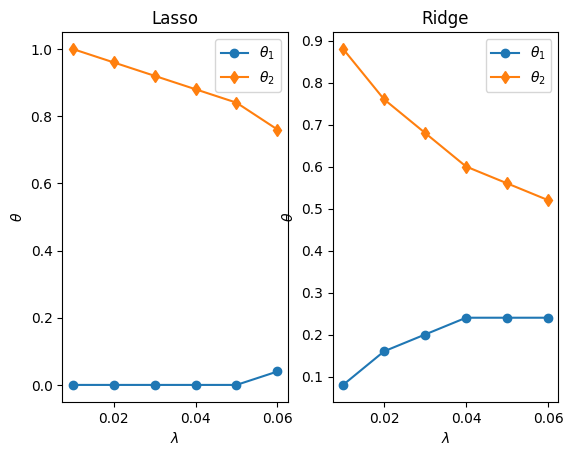
Below, we normalize the synthetic data and do a ‘brute force’ fit of all \(\theta_1\), \(\theta_2\) pairs (equivalent to the \(\beta\) in the web figure above) so that we can plot the error contours. The first row plots the unregularized least-squares fit that we’ve used in the past in solid contours, as well as the Lasso penalties in the left column and Ridge in the middle. The \(\times\) symbol in this first row shows the location of the minimum least-squares-error.

The following rows are for increasing levels of regularization. The solid contours show the total cost (least-squares plus regularization) while the dashed and dotted contours show the least-squares-error and penalty contours for the best-fit \(\theta_1\)-\(\theta_2\) pair. The \(\times\) symbol in those rows shows where the minimum error is located, and you can see that it is the intersect of the individual least-squares-error and penalty contours/contributions.

Code
x = x_save
x = x/(np.max(x))
y = (y_save-99 )/100
plt.scatter(x,y);

Code
# Illustrative plots:
fig = plt.figure(figsize=(15,40))

nr_fits = 101
m = np.shape(y)[0]

x1_range = x
x2_range = x**2

x_1 = x1_range
x_2 = x2_range

LSerror =  np.zeros([nr_fits,nr_fits])

# Try all combinations of theta_1 and theta_2 between -2 and 2 in 101 steps
thetas1_rng = np.linspace(-2,2,nr_fits)
thetas2_rng = np.linspace(-2,2,nr_fits)

theta1, theta2 = np.meshgrid(thetas1_rng,thetas2_rng)

LassoError =  np.zeros([nr_fits,nr_fits])
RidgeError =  np.zeros([nr_fits,nr_fits])

savelassos = np.zeros([8,3]) # 8 different regularization strenghts
saveridges = np.zeros([8,3])

for k in range(1,8):
    lambda_reg = k*0.01

    # Compute full grid of errors:
    for i in range(nr_fits):
        for j in range(nr_fits):

            y_pred = theta1[i,j] * x1_range + theta2[i,j] * x2_range

            LSerror[i,j] = mean_squared_error(y_pred,y)
            LassoError[i,j] = lambda_reg * ( np.abs(theta1[i,j]) + np.abs(theta2[i,j]))
            RidgeError[i,j] = lambda_reg * ( theta1[i,j]**2 + theta2[i,j]**2)

    # Minimum least-squares, Lasso, and Ridge errors and corresponding best fit theta:
    LSerrormin = np.min(LSerror)
    min_ind = np.where(LSerror==LSerrormin)
    besttheta1 = theta1[min_ind[0],min_ind[1]].item()
    besttheta2 = theta2[min_ind[0],min_ind[1]].item()
    print(k, min_ind, "lambda = ", lambda_reg,
          "Best least squared theta:", besttheta1,besttheta2,
          "with error:", LSerrormin )

    lasserror = LSerror+LassoError
    Lassoerrormin = np.min(lasserror)
    min_ind = np.where(lasserror==Lassoerrormin)
    besttheta1_lasso = theta1[min_ind[0],min_ind[1]].item()
    besttheta2_lasso = theta2[min_ind[0],min_ind[1]].item()
    savelassos[k-1,0] = lambda_reg
    savelassos[k-1,1] = besttheta1_lasso
    savelassos[k-1,2] = besttheta2_lasso
    print(k, min_ind,"lambda = ", lambda_reg,
          "Best Lasso theta:", besttheta1_lasso,besttheta2_lasso,
          "with error:", Lassoerrormin )

    ridgeerror = LSerror+RidgeError
    Ridgeerrormin = np.min(ridgeerror)
    min_ind = np.where(ridgeerror==Ridgeerrormin)
    besttheta1_ridge = theta1[min_ind[0],min_ind[1]].item()
    besttheta2_ridge = theta2[min_ind[0],min_ind[1]].item()
    saveridges[k-1,0] = lambda_reg
    saveridges[k-1,1] = besttheta1_ridge
    saveridges[k-1,2] = besttheta2_ridge
    print(k, min_ind,"lambda = ", lambda_reg,
          "Best Ridge theta:", besttheta1_ridge,besttheta2_ridge,
          "with error:", Ridgeerrormin )


    if(k==1):
        plt.subplot(8,3,1)
        toterr = LSerror
        plt.contour(theta1, theta2, toterr,
                    levels=[1.5*np.min(toterr),2*np.min(toterr),
                            5*np.min(toterr),10*np.min(toterr),
                            50*np.min(toterr)])

        plt.contour(theta1, theta2, LassoError, linestyles='dashed')

        plt.scatter(besttheta1,besttheta2,marker='x',color='red',linewidths=4)

        plt.xlabel(r'$\theta_1$')
        plt.ylabel(r'$\theta_2$')
        plt.title('MSE and Lasso Errors')
        plt.gca().set_aspect('equal', adjustable='box')

        plt.axhline(y=0, color='k')
        plt.axvline(x=0, color='k')

        plt.subplot(8,3,2)
        toterr = LSerror
        plt.contour(theta1, theta2, toterr,
                    levels=[1.5*np.min(toterr),2*np.min(toterr),
                            5*np.min(toterr),10*np.min(toterr),
                            50*np.min(toterr)])
        plt.contour(theta1, theta2, RidgeError,linestyles='dashed')
        plt.scatter(besttheta1,besttheta2,marker='x',color='red',linewidths=4)

        plt.xlabel(r'$\theta_1$')
        plt.ylabel(r'$\theta_2$')
        plt.title('MSE and Ridge Errors')
        plt.gca().set_aspect('equal', adjustable='box')

        plt.axhline(y=0, color='k')
        plt.axvline(x=0, color='k')

        plt.subplot(8,3,3)
        thetitle = r'$\theta_1$='+str(np.round(besttheta1,2))+'  '+r'$\theta_2$='+str(np.round(besttheta2,2))
        plt.scatter(x1_range,y)
        y_pred = besttheta1*x1_range + besttheta2* x2_range
        plt.plot(x1_range, y_pred,'r-')
        plt.legend(['Data', 'No regularization'])
        plt.xlabel(r'$x$')
        plt.ylabel(r'$y$')
        plt.title(thetitle)


    l = k*3 + 1

    plt.subplot(8,3,l)
    print("Plotting panels", l,  'for regularization param', k, lambda_reg)
    toterr = LSerror+LassoError
    plt.contour(theta1, theta2, toterr,
                levels=[1.5*np.min(toterr),2*np.min(toterr),
                        5*np.min(toterr),10*np.min(toterr),
                        50*np.min(toterr)],linestyles='dotted',linewidths=1)
    plt.scatter(besttheta1_lasso,besttheta2_lasso,marker='*',color='red',s=200)

    minlassoerr = lambda_reg*(np.abs(besttheta1_lasso) + np.abs(besttheta2_lasso))
    plt.contour(theta1, theta2, LassoError, levels=[minlassoerr],linestyles='dashed')

    minlLEerr = mean_squared_error(besttheta1_lasso * x_1 + besttheta2_lasso * x_2,y)
    plt.contour(theta1, theta2, LSerror, levels=[minlLEerr])

    plt.xlabel(r'$\theta_1$')
    plt.ylabel(r'$\theta_2$')
    plt.title('Total, best MSE and Lasso; '+r'$\lambda=$'+str(round(lambda_reg,2)))
    plt.gca().set_aspect('equal', adjustable='box')

    plt.axhline(y=0, color='k')
    plt.axvline(x=0, color='k')

    plt.subplot(8,3,l+1)
    print("Plotting panels", l+1,  'for regularization param', k, lambda_reg)

    toterr = LSerror+RidgeError

    plt.contour(theta1, theta2, toterr,
                levels=[1.5*np.min(toterr),2*np.min(toterr),
                        5*np.min(toterr),10*np.min(toterr),
                        50*np.min(toterr)],linestyles='dotted',linewidths=1)

    plt.scatter(besttheta1_ridge,besttheta2_ridge,marker='*',color='red',s=200)

    minridgeerr = lambda_reg *( besttheta1_ridge**2 + besttheta2_ridge**2)
    plt.contour(theta1, theta2, RidgeError, levels=[minridgeerr],linestyles='dashed')

    minlLEerr = mean_squared_error(besttheta1_ridge * x_1 + besttheta2_ridge * x_2,y)
    plt.contour(theta1, theta2, LSerror, levels=[minlLEerr])

    plt.axhline(y=0, color='k')
    plt.axvline(x=0, color='k')

    plt.xlabel(r'$\theta_1$')
    plt.ylabel(r'$\theta_2$')
    plt.title('Total, best MSE and Ridge; '+r'$\lambda=$'+str(round(lambda_reg,2)))
    plt.gca().set_aspect('equal', adjustable='box')

    plt.subplot(8,3,l+2)
    plt.scatter(x1_range,y)
    y_pred = besttheta1*x1_range + besttheta2* x2_range
    plt.plot(x1_range, y_pred,'r-')
    y_pred = besttheta1_lasso*x1_range + besttheta2_lasso* x2_range
    plt.plot(x1_range, y_pred,'-.')
    y_pred = besttheta1_ridge*x1_range + besttheta2_ridge* x2_range
    plt.plot(x1_range, y_pred,':')

    lasso_label = 'L: ' + r'$\theta_1$='+str(np.round(besttheta1_lasso,2))+'  '+r'$\theta_2$='+str(np.round(besttheta2_lasso,2))
    ridge_label = 'R: ' + r'$\theta_1$='+str(np.round(besttheta1_ridge,2))+'  '+r'$\theta_2$='+str(np.round(besttheta2_ridge,2))
    plt.legend([ "Data", 'MSE', lasso_label,ridge_label])
    plt.xlabel(r'$x$')
    plt.ylabel(r'$y$')

    fig.tight_layout()

plt.figure()
plt.subplot(1,2,1)
plt.plot(savelassos[:-2,0],savelassos[:-2,1],'-o')
plt.plot(savelassos[:-2,0],savelassos[:-2,2],'-d')
plt.xlabel(r'$\lambda$')
plt.ylabel(r'$\theta$')
plt.legend([r'$\theta_1$',r'$\theta_2$'])
plt.title('Lasso')

plt.subplot(1,2,2)
plt.plot(saveridges[:-2,0],saveridges[:-2,1],'-o')
plt.plot(saveridges[:-2,0],saveridges[:-2,2],'-d')
plt.xlabel(r'$\lambda$')
plt.ylabel(r'$\theta$')
plt.legend([r'$\theta_1$',r'$\theta_2$'])
plt.title('Ridge')

1 (array([77]), array([49])) lambda =  0.01 Best least squared theta: -0.040000000000000036 1.08 with error: 0.004131624599811297
1 (array([75]), array([50])) lambda =  0.01 Best Lasso theta: 0.0 1.0 with error: 0.014251291724828093
1 (array([72]), array([52])) lambda =  0.01 Best Ridge theta: 0.08000000000000007 0.8799999999999999 with error: 0.01320442531635827
Plotting panels 4 for regularization param 1 0.01
Plotting panels 5 for regularization param 1 0.01
2 (array([77]), array([49])) lambda =  0.02 Best least squared theta: -0.040000000000000036 1.08 with error: 0.004131624599811297
2 (array([74]), array([50])) lambda =  0.02 Best Lasso theta: 0.0 0.96 with error: 0.023965983242334756
2 (array([69]), array([54])) lambda =  0.02 Best Ridge theta: 0.16000000000000014 0.7600000000000002 with error: 0.0198199891608311
Plotting panels 7 for regularization param 2 0.02
Plotting panels 8 for regularization param 2 0.02
3 (array([77]), array([49])) lambda =  0.03 Best least squared theta: -0.040000000000000036 1.08 with error: 0.004131624599811297
3 (array([73]), array([50])) lambda =  0.03 Best Lasso theta: 0.0 0.9199999999999999 with error: 0.033333456572457947
3 (array([67]), array([55])) lambda =  0.03 Best Ridge theta: 0.20000000000000018 0.6800000000000002 with error: 0.025089134984681967
Plotting panels 10 for regularization param 3 0.03
Plotting panels 11 for regularization param 3 0.03
4 (array([77]), array([49])) lambda =  0.04 Best least squared theta: -0.040000000000000036 1.08 with error: 0.004131624599811297
4 (array([72]), array([50])) lambda =  0.04 Best Lasso theta: 0.0 0.8799999999999999 with error: 0.04235371171519766
4 (array([65]), array([56])) lambda =  0.04 Best Ridge theta: 0.2400000000000002 0.6000000000000001 with error: 0.029569165634756506
Plotting panels 13 for regularization param 4 0.04
Plotting panels 14 for regularization param 4 0.04
5 (array([77]), array([49])) lambda =  0.05 Best least squared theta: -0.040000000000000036 1.08 with error: 0.004131624599811297
5 (array([71]), array([50])) lambda =  0.05 Best Lasso theta: 0.0 0.8399999999999999 with error: 0.0510267486705539
5 (array([64]), array([56])) lambda =  0.05 Best Ridge theta: 0.2400000000000002 0.56 with error: 0.03341312982388294
Plotting panels 16 for regularization param 5 0.05
Plotting panels 17 for regularization param 5 0.05
6 (array([77]), array([49])) lambda =  0.06 Best least squared theta: -0.040000000000000036 1.08 with error: 0.004131624599811297
6 (array([69]), array([51])) lambda =  0.06 Best Lasso theta: 0.040000000000000036 0.7600000000000002 with error: 0.05931919148636291
6 (array([63]), array([56])) lambda =  0.06 Best Ridge theta: 0.2400000000000002 0.52 with error: 0.03697387582562591
Plotting panels 19 for regularization param 6 0.06
Plotting panels 20 for regularization param 6 0.06
7 (array([77]), array([49])) lambda =  0.07 Best least squared theta: -0.040000000000000036 1.08 with error: 0.004131624599811297
7 (array([68]), array([51])) lambda =  0.07 Best Lasso theta: 0.040000000000000036 0.7200000000000002 with error: 0.0672414829704778
7 (array([63]), array([56])) lambda =  0.07 Best Ridge theta: 0.2400000000000002 0.52 with error: 0.040253875825625916
Plotting panels 22 for regularization param 7 0.07
Plotting panels 23 for regularization param 7 0.07
Text(0.5, 1.0, 'Ridge')

Code
plt.figure()
plt.plot(savelassos[:-2,0],savelassos[:-2,1],'-o')
plt.plot(saveridges[:-2,0],saveridges[:-2,1],'-d')
plt.title('Optimal '+r'$\theta$'+' for increasing '+r'$\lambda$')
plt.legend(['Lasso','Ridge'])
plt.xlabel(r'$\theta_1$')
plt.ylabel(r'$\theta_2$');

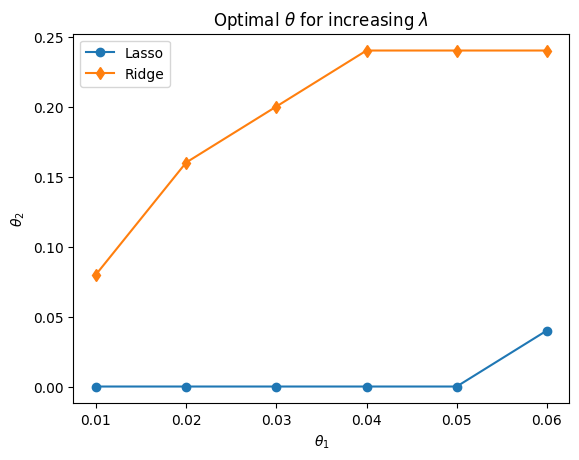
Ridge regularization actually always finds both \(\theta_1>0\) and \(\theta_2>0\). With Lasso regularization, \(\theta_1=0\) even with minimal regularization and then as \(\lambda\) increases, \(\theta_2\) also becomes smaller and smaller. For this very easy example, it seems that regression without regularization already works pretty well, but that is mostly because it is hard to overfit anything with only 2 features, and the reason only 2 features are included is purely for visualization purposes (i.e. 2D plots in terms of \(\theta_1\) and \(\theta_2\) for the 2 features, with the cost/error as a third dimension).

In more general applications, we have no idea what the ‘right’ level of complexity is, plus often there is a trade-off between accuracy and simplicity. For instance, in the house-prices example, one could prefer to use Lasso regression to find, say, the 4 most important properties (maybe square-footage, school district, nr bathrooms, age) to predict a house price with 85% accuracy, rather than having to do a regression on, say, 40 available house properties (features) for an accuracy of 92%.

Classification with Regularized Logistical Regression

In this last bonus section, I provide fully self-contained code (i.e. without using any pre-packaged scikit-learn or other machine learning libraries) to do multivariate nonlinear classification with regularization. While that might sound like an entirely different problem that will require significantly more work and understanding, it isn’t. In fact, there is zero difference in applying regularization to the logistical regression schemes that you learned last week versus the numerical regression schemes used as an example in this notebook.

Look at the cell below: we just add the same (Ridge) penalty to the cost function and its derivative to the cost-gradient function. The cost itself for logistical regression is slightly different, but the regularization is exactly the same. We can use any solver we want (which are just general-purpose minimization routines, not necessarily related to machine learning or regression) to minimize this cost function, such as Newton or Conjugate Gradient. We just need to give the regularized functions as input instead of the unregularized functions from before. In fact, we can use the regularized functions below with \(\lambda=0\) (reglambda=0) to still get the unregularized results.

Code
def cost_logistic(theta, x, y,reglambda):
  hypothesis = np.transpose(sigmoid(x.dot(theta)))
  cost = - ( np.log(hypothesis).dot(y) +  np.log(1-hypothesis).dot(1-y)) / len(y)  + reglambda*np.sum(theta[1:]**2)/(2*len(y))
  return cost

def grad_logistic(theta,x,y,reglambda):
  hypothesis = sigmoid(x.dot(theta))
  err = (hypothesis-y)
  grad = err.dot(x) / len(y)
  grad[1:] += (reglambda/len(y)) * theta[1:]
  return grad

The functions below are copy-pasted from the last module without modification.

Code
def sigmoid(z):
    return 1/(1 + np.exp(-z))                     # sigmoid

def d_sigmoid(z):
    sigmoid = 1/(1 + np.exp(-z))
    return sigmoid*(1-sigmoid)                        # sigmoid'

def predict(theta,x):
  hypothesis = sigmoid(x.dot(theta))
  pos = hypothesis >= 0.5
  neg = hypothesis < 0.5
  p = hypothesis
  p[pos]=1
  p[neg]=0
  return p

def generate_polynomials(X1,X2,degree):
  m = np.size(X1)
  out = np.ones([m,1])
  newfeature = np.ones([m,1])

  for i in range(1,degree+1):
      for j in range(i+1):
          newfeature[:,0] = (X1**(i-j))*(X2**j)
          out = np.append(out, newfeature, axis=1)
  return out

Example

We revisit the second example from last module, which is a binary classification scheme with 2 features and a non-trivial decision boundary. Last time, we fitted the decision boundary with a 6th order polynomial and agreed that this probably led to overfitting. To push this even further, here we’ll fit with a 12th order polynomial, and then use Ridge regularization to automatically reduce this overfitting.

First, we simple load the data again and generated the polynomials. We include all cross-terms, which results in a whopping 91 features.

Code
sheet_url = 'https://docs.google.com/spreadsheets/d/1eq-Awuub_ChZi5YIqlbq81_RWUUrFBIqRwVeMZerVUI/edit#gid=0'
csv_export_url = sheet_url.replace('/edit#gid=', '/export?format=csv&gid=')
data = pd.read_csv(csv_export_url)
X = data.iloc[:,:2].to_numpy()
Y = data.iloc[:,2].to_numpy()

[m,n] = np.shape(X)
y = Y

x = np.ones([m,n+1])
x[:,1:] = X

# Generate polynomials
X1 = x[:,1]
X2 = x[:,2]
degree = 12;

xpoly = generate_polynomials(X1,X2,degree)
print("The dimensions of our feature array are", np.shape(xpoly))
The dimensions of our feature array are (117, 91)

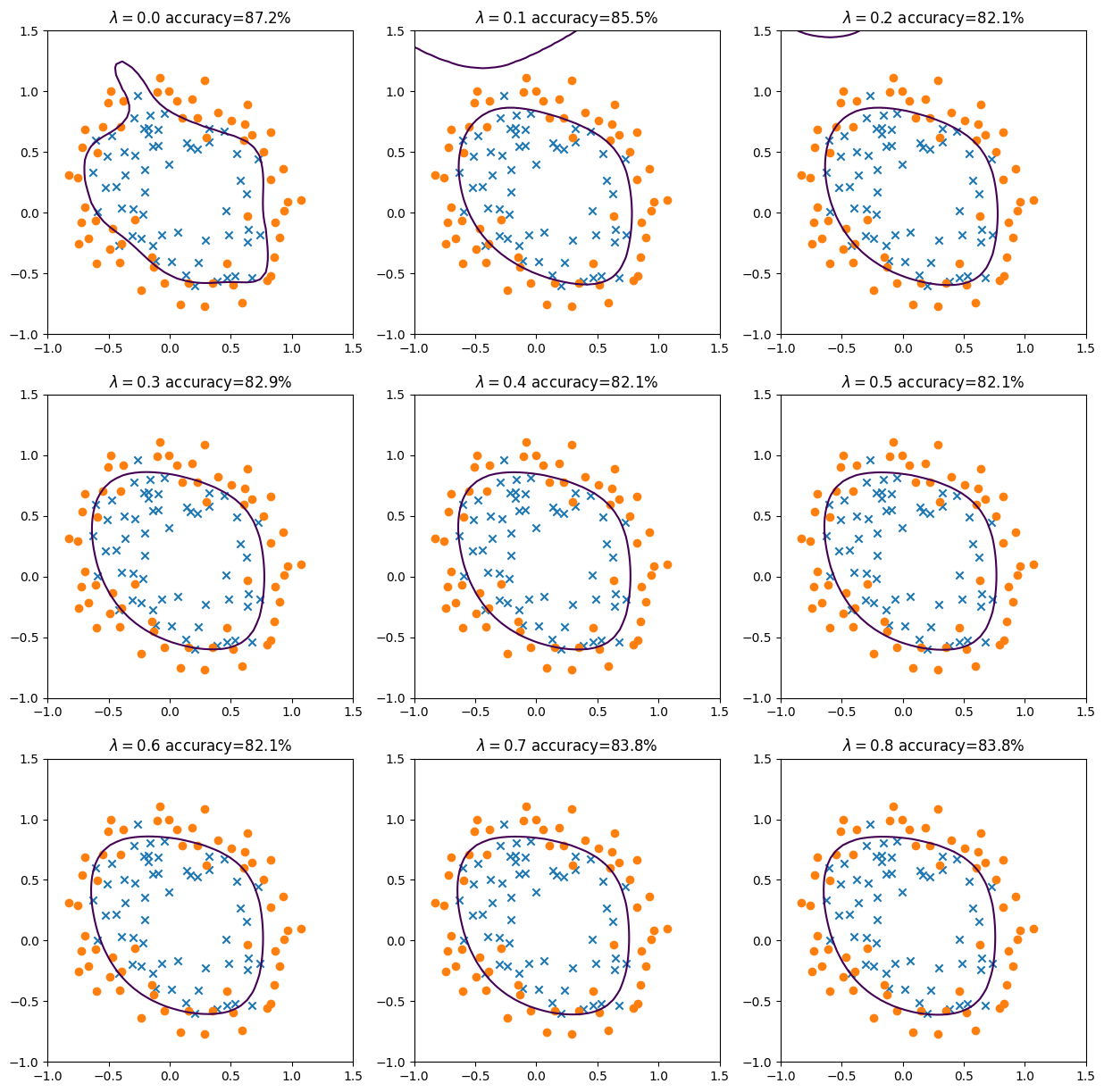
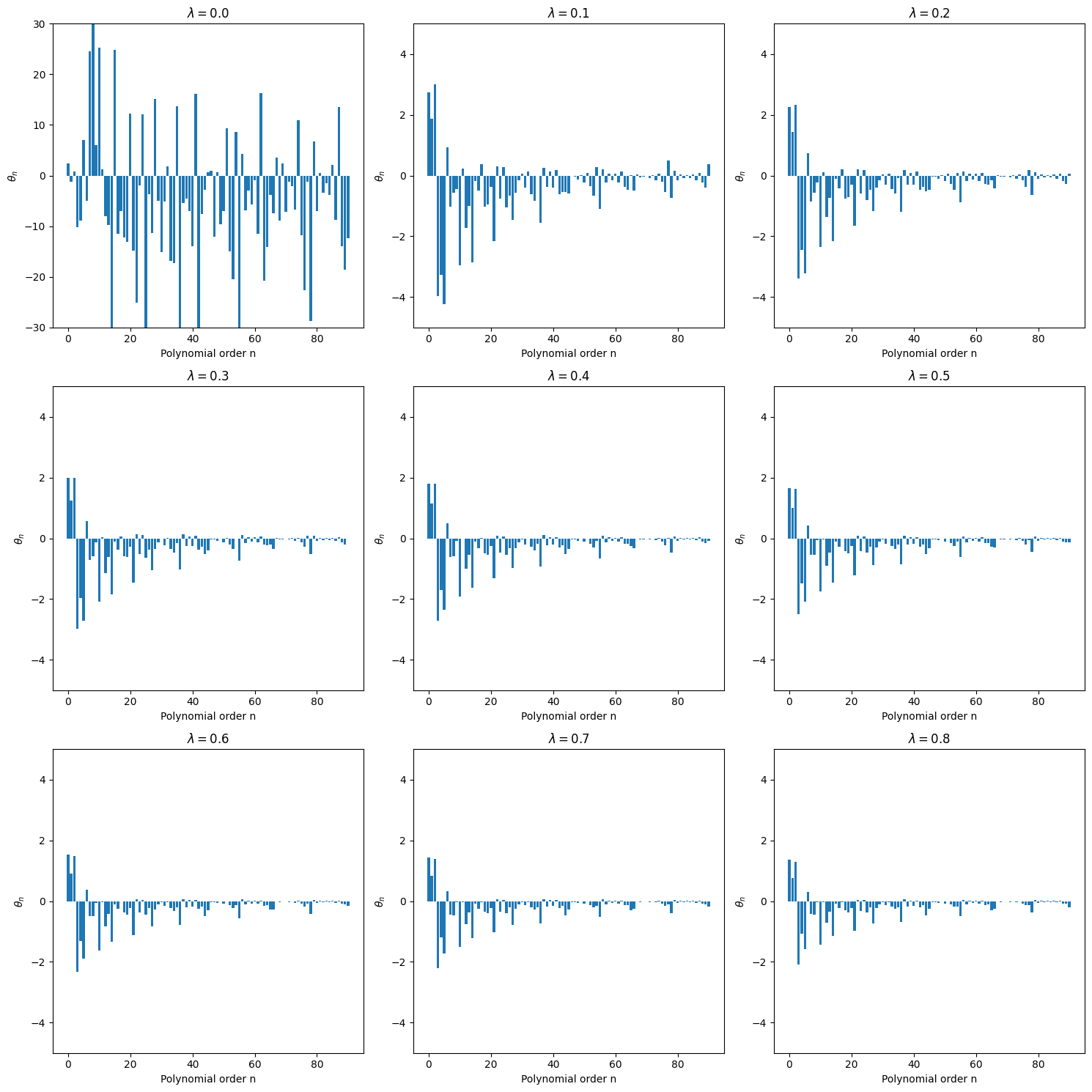
In the following code-block, I simply copy-paste the fitting routine from before using the accelerated Newton method, but add an outer loop that repeats the entire process for 9 different levels of regularization. A 3x3 panel figure shows the decision boundaries for all cases as well as corresponding classification accuracy.

Code
fig = plt.figure(figsize=(15,15))
[m,n] = np.shape(xpoly)

save_thesas = np.zeros([9,n])

for iplot in range(9):

  reglambda = 0.1*iplot

  initial_theta = np.zeros(n )

  result = optimize.minimize(cost_logistic, initial_theta, args=(xpoly,y,reglambda), method='TNC', jac=grad_logistic, \
                            options={'disp': True}, tol=0.001)

  if result.success:
      besttheta = result.x
      nriterations = result.nit
      # print("Converged after", result.nit, "iterations to best theta fits:", besttheta)
  else:
      print("Accelerated method did not work, maybe try gradient descent.")

  print(iplot+1, "Sum of squared fitting parameters for lambda=", round(reglambda,1), "is ", round(np.sum(besttheta[1:]**2)/(2*len(y)),3))
  y_pred = predict(besttheta,xpoly)

  # Visualize results:
  finaltheta =  besttheta
  save_thesas[iplot,:] = finaltheta
  # Here is the grid range
  npts = 50
  u = np.linspace(-1, 1.5, npts);
  v = np.linspace(-1, 1.5, npts);

  z = np.zeros([len(u), len(v)]);
  # Evaluate z = theta*x over the grid
  for i in range(npts):
      for j in range(npts):
        coeff = generate_polynomials(u[i],v[j],degree)
        z[j,i] = coeff.dot(finaltheta)

  [m,n] = np.shape(xpoly)
  plt.subplot(3,3,iplot+1)
  pos_ind = np.where(y==1)
  neg_ind = np.where(y==0)
  plt.scatter(x[pos_ind,1], x[pos_ind,2],marker='x')
  plt.scatter(x[neg_ind,1], x[neg_ind,2],marker='o')


  [uu,vv] = np.meshgrid(u,v)
  plt.contour(u,v,z,levels=[0])
  y_pred = predict(finaltheta,xpoly)
  accur = round(np.mean((y_pred == y) * 100),1)

  plt.title(r'$\lambda=$'+str(round(reglambda,2))+ ' accuracy='+str(accur)+'%')
1 Sum of squared fitting parameters for lambda= 0.0 is  77.487
/tmp/ipython-input-1087626788.py:38: DeprecationWarning: Conversion of an array with ndim > 0 to a scalar is deprecated, and will error in future. Ensure you extract a single element from your array before performing this operation. (Deprecated NumPy 1.25.)
  z[j,i] = coeff.dot(finaltheta)
2 Sum of squared fitting parameters for lambda= 0.1 is  0.436
3 Sum of squared fitting parameters for lambda= 0.2 is  0.265
4 Sum of squared fitting parameters for lambda= 0.3 is  0.194
5 Sum of squared fitting parameters for lambda= 0.4 is  0.155
6 Sum of squared fitting parameters for lambda= 0.5 is  0.126
7 Sum of squared fitting parameters for lambda= 0.6 is  0.106
8 Sum of squared fitting parameters for lambda= 0.7 is  0.092
9 Sum of squared fitting parameters for lambda= 0.8 is  0.08

Interestingly, you see that with relatively modest regularization, we already get a much more reasonable ‘looking’ decision boundary. Regularization, i.e. reducing overfitting, always results in lower fitting accuracy on the training data, but you can see that in this case the accuracy is still high. From the above figures, it seems that there is not much difference for the last 6 or so regularization factors.

Also look at the different visualization below, similar to what we used earlier. The bar plots show the magnitude of each of the 91 fitting parameters. Above, we also printed the squared sum of all fitting parameters (the final Ridge penalty). It seems that for this case, a regularization factor of \(\lambda = 0.3\) might be sufficient. To determine this more rigorously requires a different approach, though, which also involves cross-validation and testing. This will be discussed in the final recommendations section below.

Code
fig = plt.figure(figsize=(15,15))
for iplot in range(9):
  plt.subplot(3,3,iplot+1)
  plt.bar(range(n),save_thesas[iplot,:])
  plt.xlabel('Polynomial order n')
  plt.ylabel(r'$\theta_n$')
  reglambda = round(0.1*iplot,1)
  plt.title(r'$\lambda=$'+str(reglambda))
  if iplot<1:
    plt.ylim(-30, 30)
  else:
    plt.ylim(-5, 5)

plt.tight_layout()

Putting it all together

As you may have gathered from this long notebook, practical machine learning applications involve more than a single algorithm (such as linear regression). There is always essentially a flow chart of necessary steps, which together form the pipeline of a machine learning application. scikit-learn and other libraries have specific tools to construct such pipelines. One can also just construct them in regular functions, which typically call other functions, such as the my_crossvalidate function above.

In general, a machine learning pipeline involves at least the following steps, some of which were discussed in detail, some that probably won’t be discussed here, and some important additional remarks that are given below:

Preprocessing:

  • Collect data. Even this step may involve a little work in pulling data of some online repository, for instance, and loading it succesfully into a pandas dataframe and/or directly into a numpy array; both of which you have seen in the examples.
  • Clean up data. More often than not, data are messy and may have text in some cells that should only have numbers, mix up different units, have unclear row or column labels etc. Sometimes you may also want to eliminate outliers in your data, but in science you have to make sure to follow best-practices and not manipulate your data improperly.
  • Missing data Most ML algorithms do not allow for missing values. For example, in predicting house prices, the square footage is likely a very important feature, but lets say that those are not known for 10% of the houses in your data base. You could exclude those houses altogether from your modeling, but 1) those are still valid data points in terms of other features, and 2) another 10% of houses may not have values for another feature, etc, so before you know it you significantly reduce your dataset. Another option would be to just set the feature to zero when not known, but that of course would be interpreted as zero square-footage and would severely deteriorate your fitting. Using the average of all other houses sizes is a better all-purpose solution, but you can probably see that that is also not ideal. There is no easy solution here, b.t.w., and one has to just think about what the most reasonable option is for a given problem. The filling in of missing values is referred to as imputing. scikit-learn again has many options, such as the SimpleImputer to fill in missing values.
  • Non-numeric data. ML algorithms also only work for numerical data. If your data came from some quiz and one feature would be the answer to some question where the options were the typical: strongly disagree, disagree, neither agree nor disagree, agree, strongly agree, then an obvious option is to replace those words/strings with numerical values 1, 2,3 4, 5. In that case, one could run a simple linear regression to see how one can predict some outcome \(y\) from the answers in this 1..5 range. This can be done automatically by, e.g., scikit-learn LabelEncoder which will take any column of word labels and replace them with numerical values. This approach only makes sense, though, when there is some ordering or scale to the labels (like, bad, neutral, good). If the same quiz has a question with answers apple, car, orange, pencil, tomato, then numbering from 1 to 5 and doing, say, a linear regression does not make much sense. In that case, one could use, for instance, a binary classification algorithm that fits whether the answer is yes/no to apple, yes/no to car, yes/no to tomato. In other words, make one column (feature) for each label that only has yes or no for each answer, labeled as 0 or 1. This approach is called one-hot encoding, and this is done automatically by the scikit-learn OneHotEncoder.
  • Feature engineering. Now we can add our polynomial expansion features for non-linear regressions, but we can also simply delete features that don’t seem important, or combine certain other features based on intuition or actual knowledge (for instance, to predict the pressure of an ideal gas, one could combine density and temperature accurding to the ideal gas law).
  • Feature scaling. Scale and center (or not) all features for better performance of fitting algorithms, by hand or using special functions. Make sure to 1) only use training data in scaling, and 2) rescale the fitting parameters (\(\theta\)) if you want to use them direcly with your original features.

Numerical / Logistical Regression and Regularization

Once you have all your data cleaned up, scaled, and collated in one large feature area, say for \(n+1\) features (including the bias feature), you solve the regression problem. This just means finding the \(n+1\) values of fitting parameters \(\theta_0, \theta_1, \ldots, \theta_n\) that minimize the cost function (fitting error). To solve this problem, i.e. minimize the cost function, there are dozens of options, many of which you have now seen: batch gradient descent, mini-batch gradient descent, stochastic gradient descent, coordinate descent, accelerated versions with Newton or Conjugate Gradient methods, etc. etc. Which minimization method to choose mostly has to do with memory and/or CPU (computational cost) efficiency and is not specifically related to machine learning.

The are a few important steps, though, that are specific to machine learning, some of which were discussed in this notebook, and some that will be emphasized further here: * If you fit all your data at once, you are almost guaranteed to overfit your data and do very poorly in predicting new data collected later on. In practice, you therefore split off a subset of training data, perhaps something like 70%-80% of your measurements/data points (in a spreadsheet, this means 70%-80% of the rows, with one set of features \(x^{(i)}_\mathrm{train}\) and one target \(y^{(i)}_\mathrm{train}\) per row). Ideally, you select those points at random so there is no impact from the ordering of your data. This should actually be done before some of the pre-processing steps above: feature scaling should only consider the magnitude and average of the training data, imputing (filling in missing values) should only use, for instance, the mean/average of training data, etc. You fit your training data and obtain a set of best fitting parameters \(\theta\). You may want to re-scale those \(\theta\) to work directly with new data without having to scale those. * Next, you test how well your current model performs in predicting new data, by using a subset of your original data that your regression algorithm has not seen yet: your validation data. You predict \(\tilde{y}_\mathrm{val} = \vec{\theta} \cdot x_\mathrm{val}\) where $ $ is always obtained from only the training data, and compute the error/accuracy between predicted \(\tilde{y}_\mathrm{val}\) and the actual/measured \(y_\mathrm{val}\) in the rows of your validation data. Even better is to cross-validate for multiple splits of training and validation data, as was demonstrated in nauseating detail earlier in this notebook.
* At this stage, you may realize that the accuracy of your model is great for your training data but performs much worse on your validation data. That is a sure sign that your model is overfitting the data (too much variance). To ‘fix’ this, you can use the more sophisticated regressions with Lasso or Ridge regularization (or a combination of the two, which is called Elastic Net). You can then optimize which value of the regularization parameter \(\lambda\) gives you similar and acceptable accuracy for both your training and (cross-)validation data. * At this point you may think you are done, and indeed this is as far as has been discussed above, but there is one more important subtlety that is often overlooked. In doing the regularization step, you have ‘poluted’ your validation data. The regularization parameter (degree of regularization) \(\lambda\) is only used in fitting the training data, but which value of \(\lambda\) gave the best performance was determined by how well it could predict the validation data. That means that \(\lambda\) is not independent of the validation data. A proper machine learning algorithm therefore splits a dataset into three subsets: training, validation, and test data. * For instance this could be a split of 70% training, 15% validation, and 15% test data. The last split is not used to develop your model itself (which includes the selection of hyperparameters like the learning rate and regularization strenght), but is what should be used in evaluating and reporting how well your final algorithm works. For example: once you have completely optimized your entire algoritm and you do a rigorous cross-validation test with, say, 20 different subsets of validation data, you may find that your algorithm now has a predictive power of 91%. But if the regularization parameter (or learning rate) was deterimed by the cross-validation, then that’s ‘cheating’. So once you picked your \(\lambda\) by optimizing the cross-validation, you can now perform a 100% independent test of the predictive power by the test set of data that has not yet been involved in any step. Likely you will see a slightly worse predictive power of, say, 87%. That is the actual accuracy that you should expect, though, when you go out in the real world and collect more data and want to predict some outcome.

Visualization

Visualization plays a critical role in understanding these often complex and higher dimensional problems. I have tried to come up with illustative visualizations/plots for the key concepts discussed so far, but there are many more. In fact, python has beautiful visualization packages (e.g. https://seaborn.pydata.org) that can elucidate dependencies/correlations between features even before doing any complex ML computations. I have not discussed this in sufficient detail, perhaps, but a powerful way to measure the degree of under/over-fitting, for instance, is to plot two curves for 1) the fitting error for training data and 2) the prediction error for validation data, both as a function of the number of data points.

All of the above applies equally to any other machine learning algorith (support vector machines, decision trees, deep/shallow neural networks, etc.).

Conclusion

A summary of this week’s material, and last week’s, was already provided in the last section on ‘Putting it all together’. The main Conclusion is that after what you’ve learned this week, you should have a pretty good conceptual, as well as technical, understanding of the full process of how machine learning is used in big data analytics problems, from data acquisition and encoding, to model development, optimization, and validation.

In the next few weeks, we will build on all these concepts to understand the Queen of all ML algorithms: Deep Neural Networks.


✏️ Next up: Practice: CV & Regularization

📖 Next module: Module 7: Neural Networks